Logo
MINECRAFTBIBLE
Items
Items

All game items

Blocks
Blocks

Building blocks

Mobs
Mobs

Creatures & monsters

Biomes
Biomes

World biomes

Structures
Structures

Generated structures

Recipes
Recipes

Crafting guides

Advancements
Advancements

Achievements

Loot Tables
Loot Tables

Drop rates

Tags
Tags

Item groupings

All Versions
View all data →
Capes
Cape ArchiveNEW

Browse rare Minecon capes, OptiFine capes, and custom capes from players worldwide

Browse

Player Database
Player DatabasePopular

Search any player

Skin Browser
Skin Browser

Browse & download skins

Cape Gallery
Cape GalleryNEW

Minecon & OptiFine capes

Seed Vault
Seed Vault

Curated seeds

Learn

Guides
GuidesNew

Tutorials & tips

Blog
Blog

News & updates

Community

Community Hub
Community HubHub

Posts, discussions & more

All Versions
View community →
Seed Analyzer
Seed Analyzer

World seed analysis

Loot Explorer
Loot Explorer

Drop rates

Crafting Calculator
Crafting Calculator

Material planning

Enchant Calculator
Enchant Calculator

Probability math

Redstone Lab
Redstone Lab

Signal timing

Trading Profit
Trading Profit

Villager ROI

All Versions
View all tools →
Mods
Mods

Browse all mods

Plugins
Plugins

Server plugins

Resource Packs
Resource Packs

Textures & sounds

Shaders
Shaders

Visual enhancements

Datapacks
Datapacks

World logic

Scanner
Mod Intelligence

Scan & analyze any mod

All Versions
View all mods →
Loading...
IntroductionIntroductionVersion HistoryVersion HistoryGuidesGuidesBlog & NewsBlog & News
ItemsItemsBlocksBlocksMobsMobsRecipesRecipesBiomesBiomesStructuresStructuresAdvancementsAdvancementsLoot TablesLoot TablesTagsTags
ModsModsPluginsPluginsResource PacksResource PacksShadersShadersDatapacksDatapacks

MinecraftBible

The Ultimate Wiki

Logo
MINECRAFTBIBLE

The ultimate Minecraft reference. Every item, block, mob, and recipe documented with precision.

Community

  • Skin Browser
  • Cape Gallery
  • Seed Vault
  • Blog
  • Guides

Database

  • Items
  • Blocks
  • Mobs
  • Recipes
  • Biomes
  • Structures

Tools

  • Seed Analyzer
  • Mod Intelligence
  • Crafting Calculator
  • Enchant Calculator

Mods & Packs

  • Mods
  • Plugins
  • Resource Packs
  • Shaders
  • Datapacks

Site & Legal

  • About
  • Authors
  • Editorial Policy
  • Corrections
  • Contact
  • Privacy Policy
  • Terms of Service
  • DMCA
  • Sitemap

© 2026 MinecraftBible. Not affiliated with Mojang or Microsoft.

PrivacyTermsContact
ZyPass
PluginMIT

ZyPass

A password plugin that uses player UUIDs and IP addresses to remember trusted users. Players can bypass login on the same IP, but must re-authenticate if they join from a new one.

36
Downloads
1
Followers
2 months ago
Updated
📦
3
Versions
managementtechnologyutilitypaper
Download Latestv2.0.0View on Modrinth

📖About ZyPass

Unlike typical password plugins, this system goes a step further by tracking both a player’s unique ID and their IP address.

When a player joins and successfully enters the password, their ID and IP are stored as a trusted combination. On future joins from the same IP, they won’t need to re-enter the password, making the experience seamless for regular players. All trusted players are saved to the config file, so you can manually remove an IP and user ID if needed to force a password re-entry- just remember to restart the server after making any manual changes.

However, if that same account logs in from a different IP- whether it’s the player on a new network or someone attempting unauthorized access- the plugin will require the password again. Since the IP doesn’t match the trusted record, bypass is not allowed.

This approach improves security while still keeping things convenient for trusted users. No repeated logins for regulars, but strong protection against potential intruders.

Setup Instructions:

  1. Download the plugin and place it in your server’s plugins folder.
  2. Restart your server.
  3. Open the generated ZyPass folder and edit the config file:
    Keep the quotation marks.
    Enter your password in the first set of quotes.
    Enter your hint in the second set of quotes.
    Do not modify anything else- the plugin will automatically manage additional data as players authenticate.
    Players only need to type the password itself (not the quotation marks).
  4. Save your changes and restart the server again.
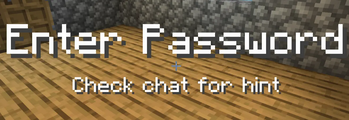
  5. Join the server, wait for the on-screen instructions (displayed above the hotbar), and enter your password in chat.

Additional Notes:

Password messages are not fully sent in chat, so other players cannot see what you entered.
Your password remains private unless you choose to share it.

👥 Team & Contributors

Zytrynx
ZytrynxOwner

⚙️ Compatibility

Environment
🖥️ Server-side
Loaders
paper
Minecraft Versions
26.1.2

🔗 Links

Modrinth Page