Logo
MINECRAFTBIBLE
Items
Items

All game items

Blocks
Blocks

Building blocks

Mobs
Mobs

Creatures & monsters

Biomes
Biomes

World biomes

Structures
Structures

Generated structures

Recipes
Recipes

Crafting guides

Advancements
Advancements

Achievements

Loot Tables
Loot Tables

Drop rates

Tags
Tags

Item groupings

All Versions
View all data →
Capes
Cape ArchiveNEW

Browse rare Minecon capes, OptiFine capes, and custom capes from players worldwide

Browse

Player Database
Player DatabasePopular

Search any player

Skin Browser
Skin Browser

Browse & download skins

Cape Gallery
Cape GalleryNEW

Minecon & OptiFine capes

Seed Vault
Seed Vault

Curated seeds

Learn

Guides
GuidesNew

Tutorials & tips

Blog
Blog

News & updates

Community

Community Hub
Community HubHub

Posts, discussions & more

All Versions
View community →
Seed Analyzer
Seed Analyzer

World seed analysis

Loot Explorer
Loot Explorer

Drop rates

Crafting Calculator
Crafting Calculator

Material planning

Enchant Calculator
Enchant Calculator

Probability math

Redstone Lab
Redstone Lab

Signal timing

Trading Profit
Trading Profit

Villager ROI

All Versions
View all tools →
Mods
Mods

Browse all mods

Plugins
Plugins

Server plugins

Resource Packs
Resource Packs

Textures & sounds

Shaders
Shaders

Visual enhancements

Datapacks
Datapacks

World logic

Scanner
Mod Intelligence

Scan & analyze any mod

All Versions
View all mods →
Loading...
IntroductionIntroductionVersion HistoryVersion HistoryGuidesGuidesBlog & NewsBlog & News
ItemsItemsBlocksBlocksMobsMobsRecipesRecipesBiomesBiomesStructuresStructuresAdvancementsAdvancementsLoot TablesLoot TablesTagsTags
ModsModsPluginsPluginsResource PacksResource PacksShadersShadersDatapacksDatapacks

MinecraftBible

The Ultimate Wiki

Logo
MINECRAFTBIBLE

The ultimate Minecraft reference. Every item, block, mob, and recipe documented with precision.

Community

  • Skin Browser
  • Cape Gallery
  • Seed Vault
  • Blog
  • Guides

Database

  • Items
  • Blocks
  • Mobs
  • Recipes
  • Biomes
  • Structures

Tools

  • Seed Analyzer
  • Mod Intelligence
  • Crafting Calculator
  • Enchant Calculator

Mods & Packs

  • Mods
  • Plugins
  • Resource Packs
  • Shaders
  • Datapacks

Site & Legal

  • About
  • Authors
  • Editorial Policy
  • Corrections
  • Contact
  • Privacy Policy
  • Terms of Service
  • DMCA
  • Sitemap

© 2026 MinecraftBible. Not affiliated with Mojang or Microsoft.

PrivacyTermsContact
ZSTD Compresser
PluginAGPL-3.0-only

ZSTD Compresser

Provides a high-compression Zstd data stream for Minecraft multiplayer, replacing the vanilla Zlib compression pipeline to significantly reduce bandwidth usage.

829
Downloads
4
Followers
1 months ago
Updated
📦
10
Versions
optimizationutilityfabricforgeneoforgevelocity
Download Latestv0.2.0-BetaView on Modrinth

📖About ZSTD Compresser

English

Provides a high-compression Zstd data stream for Minecraft multiplayer, replacing the vanilla Zlib compression pipeline to significantly reduce bandwidth usage. Supports cooperative operation between a client-side Mod and a Velocity server plugin.

How It Works

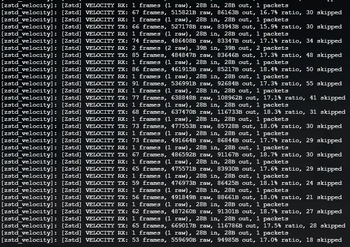
All game packets exchanged between the client and server are batched together before encryption and compressed using the Zstd algorithm. Compared to vanilla Zlib, Zstd can reduce data size by 50%–80% at the same compression speed. Automatic dictionary training is also supported to further improve compression ratios.

Supported Versions

  • Fabric: 1.21.1, 1.20.1
  • Forge: 1.20.1
  • Neoforge: 1.21.1
  • Velocity: 3.4.0+

Compatibility

Known compatible with:

  • ViaVersion
  • limboauth

Features

  • Transparent Replacement: Seamlessly takes over the vanilla compression pipeline without requiring server configuration changes
  • Batch Compression: Aggregates small packets within a 10ms time window to reduce TCP fragmentation overhead, with a 32MB sliding window
  • Adaptive Bypass: Automatically sends raw batched data if compression does not reduce packet size
  • Real-Time Statistics HUD: Displays TX/RX byte counts and compression ratio in the top-left corner (toggle with F8)
  • Highly Configurable: YAML configuration file with support for compression level, window size, statistics interval, and more

Usage

  1. Velocity: Place the plugin into the plugins/ directory and restart the proxy
  2. Client: Install the corresponding Fabric / Forge mod for your Minecraft version
  3. Press F8 to toggle the HUD display

Notes

  • Both the client and server must install compatible versions to enable Zstd compression
  • If no Zstd-compatible client is detected, Velocity automatically falls back to vanilla transmission
  • If no Zstd-compatible server is detected, the client automatically falls back to vanilla transmission

简体中文

为 Minecraft 多人游戏提供 Zstd 高压缩率数据流,替代原版 Zlib 压缩,显著降低带宽占用。支持客户端 Mod + Velocity 服务端插件协同工作。

原理

客户端与服务端之间的所有游戏数据包在加密前被批量合并,使用 Zstd 算法压缩。相比原版 Zlib,Zstd 在同等压缩速度下可降低 50%-80% 数据量。支持自动训练字典进一步提升压缩比。

版本支持

  • Fabric: 1.21.1、1.20.1
  • Forge: 1.20.1
  • Neoforge: 1.21.1
  • Velocity: 3.4.0+

兼容性

已知兼容

  • Viaversion
  • limboauth

特性

  • 透明替换:无缝接管原版压缩管线,无需修改服务端配置
  • 批量压缩:10ms 时间窗口内聚合小包,减少 TCP 分段开销,32MB 滑动窗口
  • 自适应跳过:若压缩后体积未减小,自动发送原始批量数据
  • 实时统计 HUD:左上角显示 TX/RX 字节数与压缩率(F8 开关)
  • 可配置:YAML 配置文件,支持压缩等级、窗口大小、统计间隔等

使用方法

  1. Velocity:放入 plugins/,重启代理端
  2. 客户端:安装对应 MC 版本的 Fabric / Forge Mod
  3. 按 F8 切换 HUD 显示

注意事项

  • 客户端与服务端均须安装对应版本才能启用 Zstd 压缩
  • 未检测到 Zstd 客户端时,Velocity 自动回退为原版传输
  • 未检测到 Zstd 服务端时,客户端自动回退为原版传输

👥 Team & Contributors

furryaxw
furryaxwOwner

⚙️ Compatibility

Environment
💻 Client-side
Loaders
fabricforgeneoforgevelocity
Minecraft Versions
1.21.1

🔗 Links

Modrinth Page