
MINECRAFTBIBLE
Loading...


Xwarp is a Minecraft plugin that allows players to set and teleport to custom warp points with countdown timers, movement cancellation, and customizable warp icons for a seamless and immersive teleportation experience.
Xwarp is a feature-rich teleportation plugin for Minecraft that allows players to easily set and teleport to custom warp points within their world. Whether you're managing a large server with multiple locations or just want to teleport between your favorite spots, Xwarp offers a seamless and immersive experience.
Custom Warp Points: Set warp points anywhere in the world with ease using the /setwarp [warpname] command. These warp points can be accessed by any player with the appropriate permissions.
Teleport Countdown: When a player selects a warp, a 5-second countdown begins, with a clear message displayed in the center of the screen: "Teleporting in 5 seconds, don't move!" (colored in yellow). If the player walks or moves during this time, the teleportation is canceled, adding an element of realism and control to the teleportation process.
Movement Cancellation: Prevent players from teleporting if they move while waiting. This encourages players to remain stationary for teleportation to complete successfully, preventing accidental teleports during gameplay.
GUI-Based Warp Selection:
One of Xwarp's standout features is its Graphical User Interface (GUI) for selecting warps. Instead of relying solely on commands, players can access a sleek warp selection screen where they can visually choose their desired warp point. Here's what makes the GUI special:
Icon Customization: Each warp point can be represented by a different icon (block/item) in the GUI. Administrators can change the warp icon using the /seticonwarp [warpname] [itemname] command, allowing full customization of the look and feel of the warp menu.
Visual Warp Selection: Players simply open the warp menu and click on the desired warp icon to begin teleporting. The GUI provides an intuitive and engaging way to access teleport points, especially for large servers with multiple destinations.
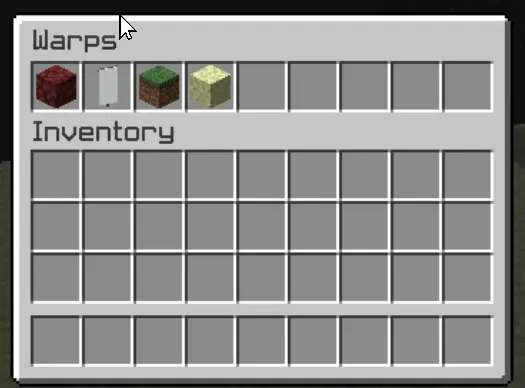
Warp Management: Server administrators can easily add, delete, and manage warp points, and even assign custom icons to each warp point for better organization and clarity.
Permissions Integration: Fine-grained permissions allow you to control which players can set, access, or delete warps. This ensures that only authorized users can manage or use certain warp points.
Setting a Warp: Use /setwarp [warpname] to create a new warp at your current location. The warp is saved along with a default icon.
Selecting a Warp: Players can open the warp GUI and click on the icon for their desired destination. A 5-second countdown will start, and if they don't move, they are teleported to the selected warp.
Customizing Warps: Use /seticonwarp [warpname] [itemname] to change the icon representing a warp in the GUI, making it easy for players to distinguish between different warp points.
Xwarp is designed for flexibility, ease of use, and visual appeal. It’s perfect for large servers that need efficient teleportation management or for small groups of players who want a fast and intuitive way to travel across their world. With its GUI-based approach, teleportation becomes not just a command-line task, but a visually engaging experience that fits right into Minecraft’s world.
Take your server to the next level with Xwarp—your all-in-one teleportation solution!
/warp - xwarp.warp
/setwarp - xwarp.setwarp
/delwarp - xwarp.delwarp
/seticonwarp - xwarp.seticonwarp