
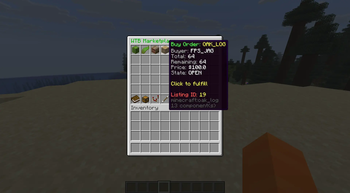

WTB Plugin
WTB is a modern player-driven buy-order marketplace plugin for Minecraft that lets players create buy requests, manage listings, claim fulfilled items, and run a clean server economy.
📖About WTB Plugin
WTB Plugin – Want‑To‑Buy Marketplace System
A clean, modern, GUI‑driven buy‑order marketplace plugin for Minecraft servers.
Players create buy requests, sellers fulfill them, and the economy becomes player‑driven and dynamic.
Built for Spigot/Paper 1.20+ with full Vault economy support.
📘 Overview
The WTB Plugin introduces a buyer‑driven trading system to Minecraft.
Instead of auctions or chest shops, players post buy orders for items they want, and other players fulfill them.
This creates:
- A healthier server economy
- More player interaction
- A reason to gather resources
- A clean, intuitive trading experience
Perfect for Survival, Economy, and SMP servers.
✨ Features
🎯 Player Features
- Create buy orders:
/wtb buy <material> <quantity> <price> - Browse all listings through a GUI
- Manage personal orders via My Listings
- Claim fulfilled items through the Claim Box (infinite pagination)
- View transaction history in the Transactions GUI
- Cooldown system to prevent spam
- Blocked‑material enforcement
- Safe claim handling with no item loss
🛠 Admin Features
/wtb admin list— view all active listings/wtb admin cancel <id>— force‑cancel any listing- Admin‑only listing IDs in GUIs
- Admin‑only tab completion
- UUID → player name resolution for readable output
🧩 Technical Details
- Platform: Spigot/Paper 1.20+
- Economy: Vault
- Database: SQLite or MySQL
- Architecture:
ListingService— business logicListingDAO— database operations- GUI system built with Bukkit Inventory API
- Permissions:
wtb.admin— admin commands & listing visibility
📦 Installation
- Download the latest release from the Releases page.
- Place the JAR into your server’s
plugins/folder. - Start the server to generate configuration files.
- Edit
config.ymlandsettings.ymlas needed. - Reload or restart the server.
📝 Commands
Player Commands
/wtb buy <material> <qty> <price>
/wtb
Admin Commands
/wtb admin list
/wtb admin cancel <id>
📄 Configuration Files
config.yml— database, cooldowns, and general settingssettings.yml— GUI settings and blocked materialsplugin.yml— plugin metadata
🛡 Stability & Safety
- Safe claim handling
- Pagination for large datasets
- Validation for invalid or expired listings
- Async database operations
🚀 Roadmap (Future Ideas)
- Listing expiration system
- Sorting & filtering in GUIs
- Seller‑side GUI for fulfilling orders
- Analytics dashboard for admins
- Multi‑currency support
📬 Support
Found a bug? Have a feature request?
Open an Issue on GitHub — contributions and suggestions are welcome.
📜 License
This project is licensed under the MIT License.