Logo
MINECRAFTBIBLE
Items
Items

All game items

Blocks
Blocks

Building blocks

Mobs
Mobs

Creatures & monsters

Biomes
Biomes

World biomes

Structures
Structures

Generated structures

Recipes
Recipes

Crafting guides

Advancements
Advancements

Achievements

Loot Tables
Loot Tables

Drop rates

Tags
Tags

Item groupings

All Versions
View all data →
Capes
Cape ArchiveNEW

Browse rare Minecon capes, OptiFine capes, and custom capes from players worldwide

Browse

Player Database
Player DatabasePopular

Search any player

Skin Browser
Skin Browser

Browse & download skins

Cape Gallery
Cape GalleryNEW

Minecon & OptiFine capes

Seed Vault
Seed Vault

Curated seeds

Learn

Guides
GuidesNew

Tutorials & tips

Blog
Blog

News & updates

Community

Community Hub
Community HubHub

Posts, discussions & more

All Versions
View community →
Seed Analyzer
Seed Analyzer

World seed analysis

Loot Explorer
Loot Explorer

Drop rates

Crafting Calculator
Crafting Calculator

Material planning

Enchant Calculator
Enchant Calculator

Probability math

Redstone Lab
Redstone Lab

Signal timing

Trading Profit
Trading Profit

Villager ROI

All Versions
View all tools →
Mods
Mods

Browse all mods

Plugins
Plugins

Server plugins

Resource Packs
Resource Packs

Textures & sounds

Shaders
Shaders

Visual enhancements

Datapacks
Datapacks

World logic

Scanner
Mod Intelligence

Scan & analyze any mod

All Versions
View all mods →
Loading...
IntroductionIntroductionVersion HistoryVersion HistoryGuidesGuidesBlog & NewsBlog & News
ItemsItemsBlocksBlocksMobsMobsRecipesRecipesBiomesBiomesStructuresStructuresAdvancementsAdvancementsLoot TablesLoot TablesTagsTags
ModsModsPluginsPluginsResource PacksResource PacksShadersShadersDatapacksDatapacks

MinecraftBible

The Ultimate Wiki

Logo
MINECRAFTBIBLE

The ultimate Minecraft reference. Every item, block, mob, and recipe documented with precision.

Community

  • Skin Browser
  • Cape Gallery
  • Seed Vault
  • Blog
  • Guides

Database

  • Items
  • Blocks
  • Mobs
  • Recipes
  • Biomes
  • Structures

Tools

  • Seed Analyzer
  • Mod Intelligence
  • Crafting Calculator
  • Enchant Calculator

Mods & Packs

  • Mods
  • Plugins
  • Resource Packs
  • Shaders
  • Datapacks

Site & Legal

  • About
  • Authors
  • Editorial Policy
  • Corrections
  • Contact
  • Privacy Policy
  • Terms of Service
  • DMCA
  • Sitemap

© 2026 MinecraftBible. Not affiliated with Mojang or Microsoft.

PrivacyTermsContact
Wireless Redstone Plugin
PluginLicenseRef-All-Rights-Reserved

Wireless Redstone Plugin

Adds wireless redstone to cross long distances easily

213
Downloads
2
Followers
2 months ago
Updated
📦
2
Versions
adventuregame-mechanicstechnologybukkitpaperpurpurspigot
Download Latestvv1.0.1View on Modrinth

📖About Wireless Redstone Plugin

Releasing general improvement update soon. Found some weird bugs and missing features

⚡ Wireless Redstone: Lightning Rods

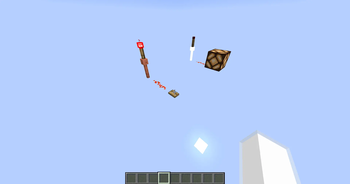
Tired of messy redstone trails across your base? This plugin lets you use Lightning Rods as long-range, wireless transmitters and receivers. It’s lightweight, survival-friendly, and integrates perfectly with the vanilla look of Minecraft.

🕹️ How to Use

Releasing video tutorial soon

1. The Setup

Place a Lightning Rod.

Place a Redstone Torch directly on top of it.

2. Tuning the Frequency

Take a Book and Quill and rename it to either Sender or Receiver using an Anvil.

Open the book and type your desired Frequency (e.g., 100, Base_Alpha, or Gate) on the first page.

Right-click the Lightning Rod with the book to register the device.

3. Transmitting Power

When a Sender receives power, the torch on top will light up.

All Receivers on the same frequency will instantly activate, triggering a visual "strike" > effect on the rod.

🌟 Key Features

  • Full Variant Support: Works with all Lightning Rod stages (Normal, Exposed, Weathered, Oxidized) and even Waxed versions.

  • Survival Integrated: No commands needed. Everything is done through blocks and items.

  • Auto-Cleanup: If you break a rod or the torch above it, the location is automatically removed from the config—no "ghost" data left behind.

🛠️ Installation

  • Drop the .jar into your plugins folder.

  • Restart your server.

  • Start linking your machines!

Note: The Redstone Torch acts as the antenna tip and signal indicator. Use observers or adjacent redstone dust to pull the signal from your receivers.

👥 Team & Contributors

Pitchi
PitchiOwner

⚙️ Compatibility

Environment
🖥️ Server-side
Loaders
bukkitpaperpurpurspigot
Minecraft Versions
1.211.21.11.21.21.21.31.21.41.21.51.21.61.21.7+7 more

🔗 Links

Modrinth Page