

webplugin
This plugin allows you to publish your website. Simply enter the port number and server IP address in the configuration file to publish your website. If you encounter any problems, please report them on Discord. We will fix them immediately. The included m
📖About webplugin
WebConsolePlugin
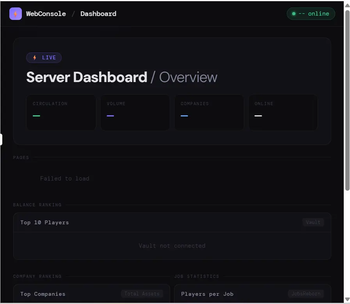
A web-based dashboard plugin for Paper servers.
Access a public status page and a password-protected admin panel from any browser — no client-side mods required.
📦 What's Included
🌐 Main Menu
A homepage automatically served at your server's IP and port.
Displays server status and links to any subpages you add to the public_html/ folder.
Adding a new folder creates a new card on the homepage automatically — no restart needed.
🔐 Admin Panel
Player Management- Ban, kick, unban players
- Give, take, or set player balance (requires Vault)
- View all online players with coordinates, HP, ping, and game mode in real time
- Execute server commands directly from the browser
- Command history saved for quick re-use
- Toggle whitelist on/off
- Add and remove players
- View
logs/latest.logwith keyword filtering - Auto-refresh mode (updates every 3 seconds)
- Every admin action is recorded with timestamp and operator
- Persisted to disk — survives server restarts
- Individual entries can be selected and deleted (owner role only)
- Records every successful login with username and timestamp (up to 500 entries)
- Records failed login attempts with IP address
- Set up recurring broadcast messages at custom intervals
- Kick all online players at once with a custom message
👑 Role System
Two roles are available: admin and owner.
| Feature | admin | owner |
|---|---|---|
| All management features | ✅ | ✅ |
| Delete action log entries | ❌ | ✅ |
| Clear login history | ❌ | ✅ |
Setting Up Accounts and Roles
Edit plugins/WebConsole/config.yml:
admin:
  session-expire-minutes: 60
  accounts:
    - username: "alice"
      password: "yourpassword"
      role: "admin"          # Regular administrator
    - username: "bob"
      password: "ownerpassword"
      role: "owner"          # Full privileges
Run
/wc reloadto apply changes — no restart required.
You can add as many accounts as you need.
⚙️ Setup
1. Drop the .jar into plugins/ and start the server.
2. Set your port in plugins/WebConsole/config.yml:
port: 8080 # Change to a port that is open on your server
⚠️ Make sure the port is open in your firewall or hosting panel.
3. Set up admin accounts (see Role System above).
4. Open in your browser:
- Main menu:
http://your-server-ip:PORT/ - Admin panel:
http://your-server-ip:PORT/admin/
⌨️ Commands
| Command | Description |
|---|---|
/wc reload |
Reload config.yml |
/wc bridges |
List active plugin bridges |
/wc modules |
List registered admin modules |
Permission: webconsole.admin (default: OP)
🔌 Optional Dependencies
All are soft dependencies — the plugin works without them.
- Vault — Balance display and management
- JobsReborn — Job statistics
- CompanyPlugin — Company rankings
- MarketPlugin — Item market prices
WebConsolePlugin(日本語)
Paper サーバー向けの Web ダッシュボードプラグインです。
公開ステータスページとパスワード保護された管理者パネルをブラウザからアクセスできます。クライアント側の Mod は不要です。
📦 同封されるもの
🌐 メインメニュー
サーバーの IP とポートにアクセスすると表示されるトップページです。
サーバーの稼働状況と、public_html/ フォルダに追加したサブページへのリンクを表示します。
フォルダを追加するだけで自動的にカードが生成されます — 再起動不要。
🔐 管理者パネル
プレイヤー管理- BAN・キック・BAN解除
- 残高の付与・徴収・セット (Vault 必須)
- 全オンラインプレイヤーの座標・HP・Ping・ゲームモードをリアルタイム表示
- ブラウザからサーバーコマンドを実行
- コマンド履歴を保存して素早く再実行
- ホワイトリストの ON/OFF 切り替え
- プレイヤーの追加・削除
logs/latest.logをキーワードで絞り込んで閲覧- 3秒ごとの自動更新モードあり
- すべての管理操作を日時・操作者とともに記録
- ディスクに永続保存(サーバー再起動後も保持)
- エントリを選択して個別削除可能 (owner ロールのみ)
- ログイン成功のたびにユーザー名と日時を記録 (最大500件・永続化)
- ログイン失敗時のIPアドレスを記録
- 指定した間隔でサーバー全体に自動ブロードキャスト
- 全オンラインプレイヤーを任意のメッセージと一括キック
👑 ロール管理
admin(通常管理者)と owner(オーナー)の2段階です。
| 機能 | admin | owner |
|---|---|---|
| すべての管理機能 | ✅ | ✅ |
| 操作ログの個別削除 | ❌ | ✅ |
| ログイン履歴の削除 | ❌ | ✅ |
アカウントとロールの設定方法
plugins/WebConsole/config.yml を編集します:
admin:
  session-expire-minutes: 60
  accounts:
    - username: "alice"
      password: "パスワード"
      role: "admin"          # 通常管理者
    - username: "bob"
      password: "パスワード2"
      role: "owner"          # 特権操作が可能
/wc reloadを実行するだけで反映されます — 再起動不要。
アカウントは何件でも追加できます。
⚙️ セットアップ手順
1. .jar を plugins/ に入れてサーバーを起動します。
2. plugins/WebConsole/config.yml でポートを設定します:
port: 8080 # 自分のサーバーで開放しているポートに変更してください
⚠️ ファイアウォールやホスティングパネルでそのポートを開放してください。
3. 管理者アカウントを設定します (上の「ロール管理」参照)。
4. ブラウザでアクセスします:
- メインメニュー:
http://サーバーIP:ポート番号/ - 管理者パネル:
http://サーバーIP:ポート番号/admin/
⌨️ コマンド
| コマンド | 説明 |
|---|---|
/wc reload |
config.yml を再読み込み |
/wc bridges |
有効なプラグインブリッジ一覧 |
/wc modules |
登録済み管理モジュール一覧 |
権限: webconsole.admin (デフォルト: OP)
🔌 オプション依存プラグイン
すべてソフト依存です。なくても動作しますが、関連機能は非表示になります。
- Vault — 残高の表示・操作
- JobsReborn — ジョブ統計
- CompanyPlugin — 企業ランキング
- MarketPlugin — アイテム価格