
Webmarket
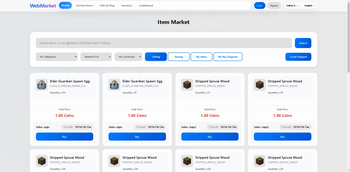
Powerful web-based global market plugin, supporting in-game GUI operations, mobile-friendly, offline functionality, cross-server compatibility, auction / sell / buy / official market.
📖About Webmarket
WebMarket Free
Supports Paper / Folia / Spigot / Bukkit / Purpur on 1.20+. The web UI works on both desktop and mobile browsers.
The free edition focuses on the core web player market, inventory viewing, pending claims, trade logs, account flows, and economy features.
Included Features
Core player market
Players can list, buy, and delist items. The free edition is hard-limited to100concurrent player-market listings at runtime.Offline operations
Players can still view inventory / ender chest data and handle pending claims through the web UI while offline.Full item detail rendering
Durability, enchants, lore, custom names, potion effects, shulker-box contents, bundle contents, and other NBT data are preserved and displayed.Trade logs
Supports player trade log queries and material-based trade log queries.Account system
Supports web registration, in-game registration, account binding, password change, and API-key-based login.Built-in economy and Vault economy
Supports money trading, transfers, balance lookup, wealth leaderboard, and transaction history.Icon and asset fallback
Supports vanilla assets, partial custom-item resources, and generated web icon caching.
Not Included in Free
- In-game GUI
- Buy request system
- Auction house
- Official shop sell / buyback
- Buff shop
- Special item / perk area
- Cross-server features
- Remote inventory operations
- Points currency trading
- Per-player permission-group overrides
Installation
- Put the free-edition jar into the server
pluginsdirectory. - Start the server once to generate the config files.
- Edit
config.ymlorconfig.en_us.ymlas needed. - Restart the server.
Main Commands
All commands support the /wm prefix. Some also have short aliases.
| Command | Description |
|---|---|
/wm help |
Show available help |
/wm bind <code> |
Bind the web account to the Minecraft account |
/wm register <email> <password> [username] |
Register a web account in game |
/wm claim |
Claim pending items |
/wm sj <amount> <unit_price> |
Quick-list the held item to the player market |
/wm marketlogs me |
Query your own trade logs |
/wm marketlogs <player> [page] [filters] |
Admin query for a player's trade logs |
/wm marketlogs-material <material> [page] [filters] |
Query logs for a material |
/wm restrict |
Manage basic player-market listing restrictions |
/wm blockitem |
Manage blocked NBT items |
/wm money |
Check balance |
/wm money pay <player> <amount> [reason] |
Transfer money |
/wm money top [page] |
Wealth leaderboard |
/wm money history [player] [page] |
Query transaction history |
/wm economy [process] |
View or process economy status |
/wm resetpassword <email> |
Admin reset for web password |
Permission Nodes
| Node | Purpose |
|---|---|
webmarket.use |
Base command access |
webmarket.resetpassword |
Reset web password |
webmarket.economy.view |
View economy status |
webmarket.economy.process |
Process offline economy records |
webmarket.restrict |
Manage market restrictions |
webmarket.marketlogs |
Query player/material trade logs |
webmarket.marketlogs.self |
Query your own trade logs |
webmarket.iconcache |
Manage web icon cache |
webmarket.blockitem |
Manage blocked listing items |
webmarket.money.balance |
View own balance |
webmarket.money.others |
View other players' balances |
webmarket.money.pay |
Transfer money |
webmarket.money.top |
View wealth leaderboard |
webmarket.money.history |
View own transaction history |
webmarket.money.history.others |
View other players' transaction history |
webmarket.money.admin |
Admin economy commands |
bStats