Logo
MINECRAFTBIBLE
Items
Items

All game items

Blocks
Blocks

Building blocks

Mobs
Mobs

Creatures & monsters

Biomes
Biomes

World biomes

Structures
Structures

Generated structures

Recipes
Recipes

Crafting guides

Advancements
Advancements

Achievements

Loot Tables
Loot Tables

Drop rates

Tags
Tags

Item groupings

All Versions
View all data →
Capes
Cape ArchiveNEW

Browse rare Minecon capes, OptiFine capes, and custom capes from players worldwide

Browse

Player Database
Player DatabasePopular

Search any player

Skin Browser
Skin Browser

Browse & download skins

Cape Gallery
Cape GalleryNEW

Minecon & OptiFine capes

Seed Vault
Seed Vault

Curated seeds

Learn

Guides
GuidesNew

Tutorials & tips

Blog
Blog

News & updates

Community

Community Hub
Community HubHub

Posts, discussions & more

All Versions
View community →
Seed Analyzer
Seed Analyzer

World seed analysis

Loot Explorer
Loot Explorer

Drop rates

Crafting Calculator
Crafting Calculator

Material planning

Enchant Calculator
Enchant Calculator

Probability math

Redstone Lab
Redstone Lab

Signal timing

Trading Profit
Trading Profit

Villager ROI

All Versions
View all tools →
Mods
Mods

Browse all mods

Plugins
Plugins

Server plugins

Resource Packs
Resource Packs

Textures & sounds

Shaders
Shaders

Visual enhancements

Datapacks
Datapacks

World logic

Scanner
Mod Intelligence

Scan & analyze any mod

All Versions
View all mods →
Loading...
IntroductionIntroductionVersion HistoryVersion HistoryGuidesGuidesBlog & NewsBlog & News
ItemsItemsBlocksBlocksMobsMobsRecipesRecipesBiomesBiomesStructuresStructuresAdvancementsAdvancementsLoot TablesLoot TablesTagsTags
ModsModsPluginsPluginsResource PacksResource PacksShadersShadersDatapacksDatapacks

MinecraftBible

The Ultimate Wiki

Logo
MINECRAFTBIBLE

The ultimate Minecraft reference. Every item, block, mob, and recipe documented with precision.

Community

  • Player Database
  • Skin Browser
  • Cape Gallery
  • Community Hub
  • Seed Vault

Database

  • Items
  • Blocks
  • Mobs
  • Recipes
  • Biomes
  • Structures

Tools

  • Seed Analyzer
  • Mod Intelligence
  • Crafting Calculator
  • Enchant Calculator

Mods & Packs

  • Mods
  • Plugins
  • Resource Packs
  • Shaders
  • Datapacks

© 2026 MinecraftBible. Not affiliated with Mojang or Microsoft.

PrivacyTermsContact
Waystone Warps
PluginMIT

Waystone Warps

An enhanced teleportation experience for PaperMC servers that does away with bog standard /warp commands.
3.3K
Downloads
36
Followers
3 months ago
Updated
📦
10
Versions
adventuregame-mechanicstransportationbukkitpaperpurpurspigot
Download Latestv1.0.0View on Modrinth

📖About Waystone Warps

🧭 Waystone Warps

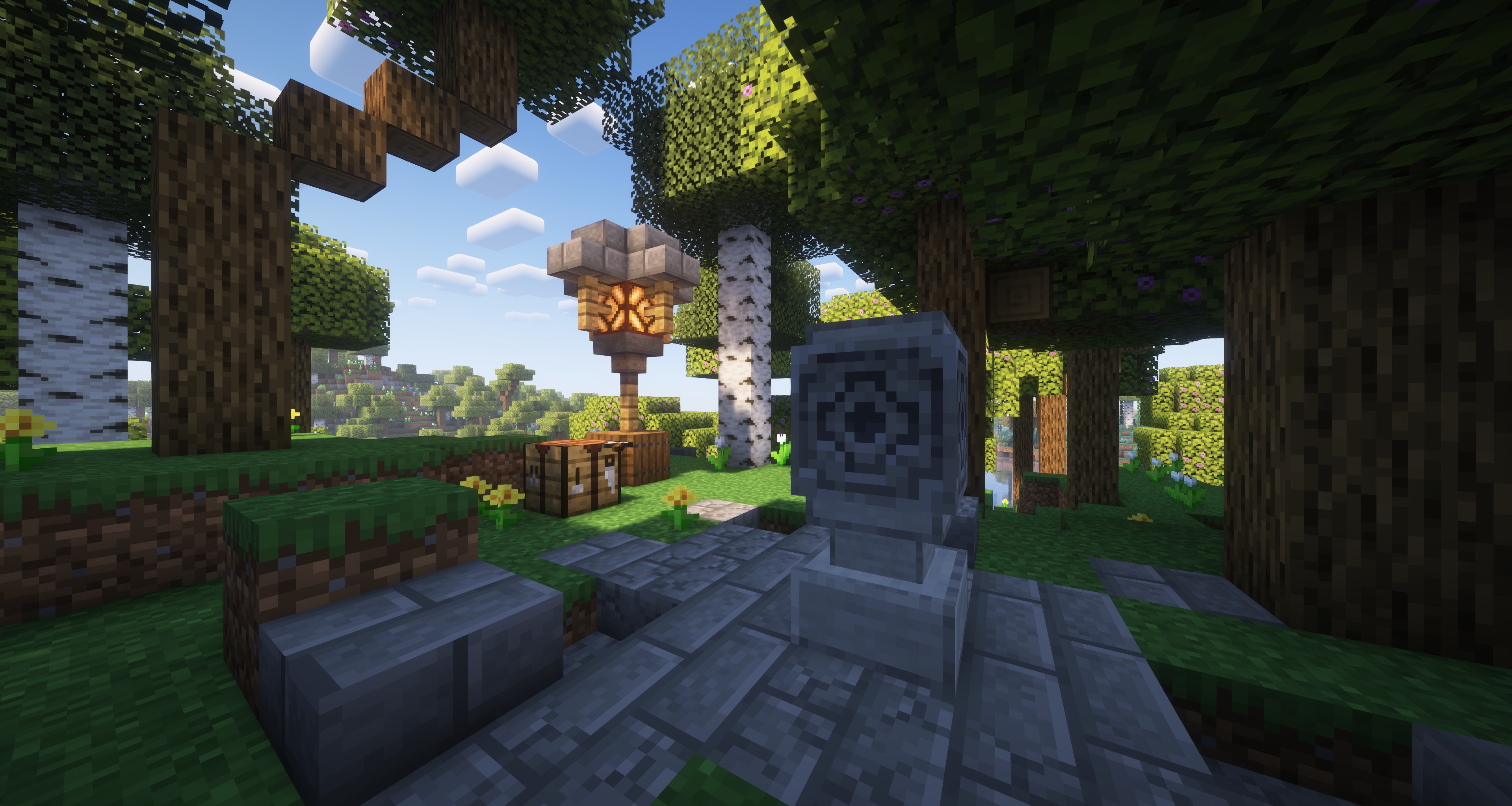
A waystone placed in the world

Transform your travels with the Waystone Warps plugin! Craft and place waystones to set up teleportation points throughout your world. Discover new waystones placed by others as you explore and easily teleport between them. Streamline your journey across the world knowing you can always teleport back home in a snap, or simply visit your friends in an instant.

Here are some of the cool features you can expect:

  • Physically Grounded - Warps are bound via a physical waystone structure in the world, making the experience much more immersive.
  • Intuitive GUI Menus - Your entire waystone can be managed using click menus. Never need to type a command ever again.
  • Manage Access Easily - Limit your waystones to only you, open it up to your friends, or leave it out there for the public to find.
  • Teleportation Fees - Let your players work for it! Change teleportation costs between xp, items, or even a provided economy plugin.

Installation

Download the latest release (.jar file) from the releases tab and place it in your server's plugins folder.

For additional functionality such as per player/rank permissions and warp limits, you must install
Vault as well as a compatible permission and chat
metadata provider. LuckPerms is a recommended plugin for handling both.

Getting Started

To establish a waystone warp, place down a lodestone on top of a smooth stone block, then right click the lodestone. This opens up a creation menu where you are able to
name your warp. Once the waystone warp is established, you will be presented with various options to do with warp management.

To discover waystones made by other players, right click a waystone and watch the particles change colours.

To teleport to waystones, right click with a compass in hand. This will bring up a menu listing all your discovered waystons. Click on the waystone of choice to teleport to it.

Permissions

  • waystonewarps.command.warpmenu - Allows the use of the warpmenu command to open up the menu that allows players to teleport to warps.
  • waystonewarps.bypass.open_menu - Allows access to open the management menu.
  • waystonewarps.bypass.access_control - Allows access to change the access control.
  • waystonewarps.bypass.manage_players - Allows access to manage players.
  • waystonewarps.bypass.rename - Allows access to rename the waystone.
  • waystonewarps.bypass.icon - Allows access to change the waystone icon.
  • waystonewarps.bypass.relocate - Allows access to relocate the waystone.
  • waystonewarps.admin.invalids.list - Allows usage of the list command.
  • waystonewarps.admin.invalids.remove - Allows usage of remove command.
  • waystonewarps.admin.invalids.removeall - Allows usage of removeall command.
  • waystonewarps.teleport - Allows teleportation
  • waystonewarps.teleport.interworld - Allows teleportation to undiscovered warps
  • waystonewarps.teleport.cooldown_bypass - Allows bypassing the cooldown timer
  • waystonewarps.create - Allow the creation of warps
  • waystonewarps.discover - Allow the discovery of warps

Per Player Limits

Ensure that you have a Vault provider installed to set limits as described out in the installation section. Each Vault
provider plugin has its own way of implementing this feature. As LuckPerms is the recommended provider, instructions
will make use of it as such.

To set a metadata for a player, use command:

/lp group <group_name> meta set <limit_name> <desired_number>

For groups:

/lp user <user_name> meta set <limit_name> <desired_number>

Here are the different limits you can set:

  • waystonewarps.warp_limit - Defines how many waystone warps a player can create.
  • waystonewarps.teleport_cost - Defines how much it costs to teleport.
  • waystonewarps.teleport_timer - Defines how long it takes to teleport.

Building from Source

Requirements

  • Java JDK 21 or newer
  • Git

Compiling

git clone https://gitlab.com/Mizarc/waystonewarps.git
cd waystone-warps/
./gradlew shadowJar

Built .jar binary can be found in the build/libs folder.

Support

If you encounter any bugs, crashes, or unexpected behaviour, please open an issue in this repository.

License

Waystone Warps is licensed under the permissive MIT license. Please view LICENSE for more info.

👥 Team & Contributors

Mizarc
MizarcOwner

⚙️ Compatibility

Environment
🖥️ Server-side
Loaders
bukkitpaperpurpurspigot
Minecraft Versions
1.211.21.11.21.21.21.31.21.41.21.51.21.61.21.7+4 more

🔗 Links

Modrinth Page