

Warez Protect
Safeguard your server like never before with simple plugin for Bukkit, Spigot, and Paper! Instantly detect alts and find/block players trying to join as someone else - stop unfair kills and theft! All that without anoying passwords and logins!
📖About Warez Protect




WarezProtect
Anti‑alt and anti-impersonation plugin by zahadneokurkycz
Introduction
Protect your server with this lightweight security plugin! Its job is to detect and potentially prevent people from using ALT accounts and logging as another user (via modified clients) aka impersonation. All of this, without forcing players to use /login or similar security measures, which are usually pretty annoying for players. It's designed mainly for smaller servers that could benefit from automatic user validation for all players while keeping its security.
How it works
WarezProtect uses IP addresses and login order to detect suspicious behavior:
- Alt detection
If the IP, which the player joined for the first time (registered with on the server) is used as a first IP (used for registration) on another account, the second one is flagged as an ALT account
- Impersonation detection
If accounts were registered with different IPs, but one later joins using the ip that someone else used for registration, or used as primary login IP address, this login attempt is flagged as a possible impersonation attempt.
Example:
- Player A registered from IP 192.168.0.128
- Player B registered from IP 192.168.0.067
- If Player B later joins using IP 192.168.0.128, the plugin assumes Player A may be impersonating Player B
Commands
Base nested command
/wp <flag | inspect | ip> [player]
This is just an alias for all other commands (see their use cases below)
Aliases: /warezprotect
Permission: warezprotect.base
Permissions for its subcommands:
warezprotect.ipwarezprotect.inspectwarezprotect.flag
Flag (builds cache / starts detection)
/wpf
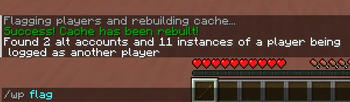
This command starts manual detection. Detection runs automatically on schedule, but this is an option to start it manually. Detection results are saved to cache.
Aliases: /wpflag, /flagalts, /wp flag, /flagplayers
Permission: warezprotect.flag
Inspect (show detection results)
/wpi [player]
This command allows you to read through the detection results in game.
This also allows you to look up specific players.
Aliases: /altsinspect, /wpinspect, /wp inspect
Permission: warezprotect.inspect
Show your IP
/ip
Self explanatory. Mainly just a remnant from debugging
Aliases: /wp ip, /whatsmyip
Permission: warezprotect.ip
Permissions
warezprotect.base
This is just a permission to even see the base nested command
Commands:
/wp/warezprotect
Default value: Allowed for everyone
warezprotect.flag
This allows players to starts manual detection in-game
Commands:
/wpflag/flagalts/wp flag/flagplayers
Default value: OP only
warezprotect.inspect
This allows players to look through the detection results in-game
Commands:
/altsinspect/wpinspect/wp inspect
Default value: OP only
warezprotect.ip
This allows players to see their own ip
Commands:
/wp ip/ip/whatsmyip
Default value: Allowed for everyone
warezprotect.debug
Permission for debug commands (those may be in betas, or they could be accidentally left in releases)
Commands: currently nothing
Default value: OP only
Config
Show default config# If and what do you want to show as soon as someone joins the server
# {} is representing the player name
useWelcomeMessage: true
welcomeMessage: Hello, {} welcome to the server!
# Controls how often data should be saved
# There are three options:
# IMMEDIATE - Saves data immediately after they are created/modified
# - Highest resource usage - can impact performance especially with higher player count
# - No risk of data loss
# - Recommended for servers with very low player count
# SCHEDULER - Saves data every 10 minutes and when the server is stopped
# - Minimal resource usage - very low performance impact
# - Low risk of data loss - in case of a server crash, at most only the last 10 minutes may be lost
# - RECOMMENDED for most servers
# ONSTOP - Saves data only when the server is stopped
# - No resource usage - Data saving process does not consume any resources
# - High risk of data loss - in case of a server crash, all data since the start of the server are lost
# - NOT recommended
savingMethod: SCHEDULER
# ########################
#
# USER FLAGGING
#
##########################
# Controls how often should we search for impersonation, alt accounts and rebuild cache
# There are four options:
# ONJOIN - Searches for alts/impersonation immediately after any player joins
# - Highest resource usage - can have significant impact on performance especially when players join frequently
# - Immediate detection
# - Recommended for servers where immediate detection is a priority - otherwise NOT recommended
# SCHEDULER - Searches for alts/impersonation every 20 minutes and when the server is stopped
# - Minimal resource usage - low performance impact
# - Fast detection and frequent updates - in case of high volume of unique players or low server performance may lead to some moderate lag (~50+ ms lag every 20 mins)
# - RECOMMENDED for most servers
# ONSTOP - Searches for alts/impersonation only when the server is stopped
# - No resource usage - may slow down server shut down (although slightly)
# - List of flagged players does not update as frequently
# - RECOMMENDED for servers with somewhat frequent restarts (restart every ~1-2 days)
# MANUALLY - Searches for alts/impersonation only when administrator invokes /flagplayers command
# - No resource usage
# - List of flagged players does not update automatically
# - NOT recommended
flaggingFrequency: SCHEDULER
# If you want to skip flagging individual alt accounts.
# For example, in this case player "p1" can have an alt account "p2" (or the other way around) and it won't get flagged as
# an alt account. You can add an indefinite number of account pairs
# If you don't want to use this feature, you can DISABLE it by setting pairsToSkip: []
pairsToSkip:
- p1: p2
Who is it for?
- servers who don't want to use login systems
- servers who want simple ALT detector
- can be used as an addition to plugins like Authme and others
NOTICE
You may not redistribute this software or its respective source code in unchanged form.
If you wish to share or redistribute this project, make sure to include meaningful changes and proper attribution to the original project.
Thank you for respecting the work that went into this.