

PluginLicenseRef-All-Rights-Reserved
VortexGens
High-performance generator plugin for modern Minecraft servers. Players place, upgrade, and stack custom generators to build efficient resource farms, with rank-based limits, GUI upgrades, holograms, and a full developer API.
23
Downloads
1
Followers
2 months ago
Updated
📦
1
Versions
📖About VortexGens

VortexGens
VortexGens is a fully customizable generator plugin designed for modern Minecraft servers. It allows server administrators to create custom blocks that produce resources, items, entities, or run console commands. Players can place, upgrade, and stack these generators to build optimized resource production setups for their bases.
Why Choose VortexGens?
Managing generator-based economies (such as in Skyblock, Factions, or Prison servers) often comes with significant drawbacks:
- Performance Concerns: Traditional plugins that spawn separate entities or execute excessive checks for every single generator can cause severe server lag. VortexGens solves this by offering a native block-based stacking system that allows players to stack identical generators on a single block.
- Gameplay Flexibility: Instead of forcing your server into a single style of play, VortexGens supports both Manual Mode (where players mine blocks that regenerate after a cooldown) and Auto Mode (where resources are passively dropped or generated into the world).
- Deep Customization: You can define unique progression paths with custom upgrade costs (using Vault money or EXP), visual holographic displays, and seamless integrations with custom item and block plugins like Oraxen, Nexo, and MMOItems.
Key Features
- Dual Generator Modes:
- Manual Mode: Classic Prison-style regenerating blocks. Once mined, the block turns into a placeholder material (like Bedrock) and reverts back when the cooldown finishes. Supports Fortune and Silk Touch.
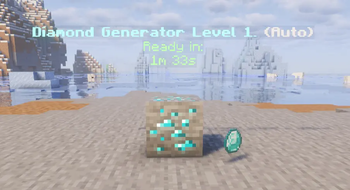
- Auto Mode: Passive resource generation. Generators automatically drop rewards, spawn mobs, or run commands at set intervals.
- Smart Generator Stacking: Players can stack multiple generators of the same level and type on a single block, saving base space and significantly improving server performance by reducing individual block ticking.
- Interactive Upgrade GUI: A clean, built-in menu allows players to inspect their generator (owner, stack size, cooldowns), upgrade its level, or retrieve individual or entire stacks of generators.
- Native 3D Holograms: Displays real-time status updates directly above each generator (such as owner name, level, stack size, and remaining cooldown seconds) using native armor stands without needing external hologram plugins.
- LuckPerms Integration: Define custom placement limits per rank/group (e.g., Default players can place up to 10 generators, VIPs can place 25, etc.).
- Custom Item/Block Support: Out-of-the-box support for custom blocks and rewards from Oraxen, Nexo, and MMOItems.
- Flexible Databases: Supports H2 (local file-based storage) and MySQL/MariaDB for larger multi-server networks.
How It Works
For Players
- Placement: Place a generator block on the ground to activate it (subject to your group limit).
- Management: Right-click the placed generator block to open the GUI. Here, you can pay to upgrade the generator's level or pick it up back into your inventory.
- Stacking: Right-click an existing generator block while holding an identical one to stack them.
For Administrators
- Creation: Define your generators in the
generators/configuration folder. You can configure the item, ready/regenerating blocks, levels, upgrade costs, cooldowns, and reward lists. - Commands: Use
/vortexgens give <player> <generator> [amount] [level]to hand out generators, and/vortexgens reloadto apply configuration changes instantly.
System Requirements & Dependencies
Compatibility
- Platforms: Spigot, Paper, or compatible forks.
- Minecraft Versions: 1.18.2 and above.
Dependencies
- Vault & any Vault-compatible economy plugin (Optional - required for money-based upgrades).
- LuckPerms (Optional - required for rank-based placement limits).
- Oraxen, Nexo, or MMOItems (Optional - required to use custom items/blocks).
- Jet315 Minions (Optional - Add proper hook for minion block breaks).