


VelocityNavigator
A production-grade Velocity proxy plugin that introduces absolute traffic control over your network through intelligent load balancing, circuit breaker resilience, Bedrock/Geyser support, and a highly context-aware /lobby system.
📖About VelocityNavigator
[!IMPORTANT]
Velocity-Only Proxy Plugin: VelocityNavigator runs exclusively on your Velocity proxy server (3.x). It will not load or function if installed on Bukkit, Spigot, Paper, Purpur, or Folia backend servers. Install the JAR on your Velocity proxy's plugins folder, not your backend servers.
VelocityNavigator v4.2 is a production-grade Velocity proxy plugin that introduces absolute traffic control over your network through intelligent load balancing, circuit breaker resilience, Bedrock/Geyser support, and a highly context-aware /lobby system.
No more funneling all new players into a single hub. No more sending players to offline servers. No more guessing which lobby they ended up on.
Detailed algorithm charts and visualizations can be found in the wiki/Routing-Algorithms.
What's New in v4.2
- Hardened Security & Menu Selections — Stale or forged lobby menu selections cannot bypass drain mode, capacity checks, or circuit breakers anymore.
- Prometheus Boot Integration — Exporter starts immediately during initial proxy boot when enabled.
- Circuit Breaker Accuracy — Restored true consecutive-failure tracking behavior for the breaker.
- Redesigned Configuration (v6) — The
navigator.tomlfile has been completely redesigned with clean section banners and grouped documentation. - Unified Notifications — Aligned admin join notifications with the global
[update_checker].notify_adminsconfiguration and preserved during config writes. - Improved Validation & Normalization — Support for
latencyrouting mode and mixed-case contextual group name matching.
v4.1 Features Included
Bedrock/Geyser Form GUI Support — Seamless routing with Floodgate UUID mapping and format stripping. Bedrock players can use a native, interactive Form GUI (popup menu) to select their lobby. This GUI is highly configurable (supports custom titles, body text, and button formats) and can be toggled on/off using the
use_gui_for_lobbysetting.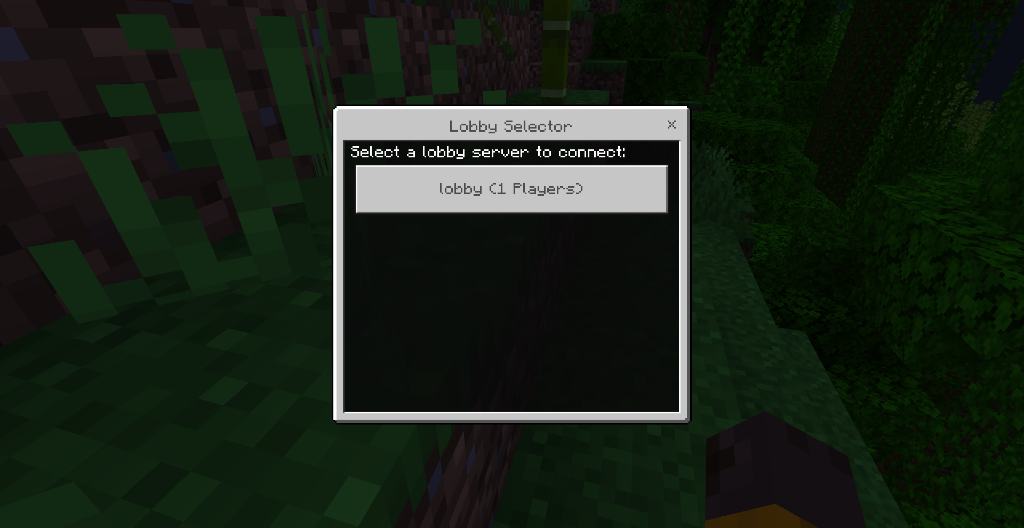
/vn serversDashboard — Paginated diagnostics with CB, drain, and capacity status per lobby.Legacy Color Code Converter — Auto-detects and converts legacy color codes to MiniMessage syntax.
Levenshtein Config Validation — Distance-based typo suggestions for TOML settings.
Self-Documenting Config — Automatically populates TOML comments with direct wiki links.
First-Run Welcome & Upgrades — Custom welcome message on fresh install and changelog summary on upgrades.
v4.0 Features Included
- 7 Selection Algorithms —
least_players,random,round_robin,power_of_two(recommended),weighted_round_robin,least_connections,consistent_hash - Circuit Breaker — Automatic failure detection with CLOSED → OPEN → HALF_OPEN state machine
- Player Affinity — Sticky sessions so players return to their previous lobby
- Server Drain Mode — Gracefully empty servers for maintenance with
/vn drain - Connection Retry & Fallback Chain — Configurable retry with priority-based fallback
- Admin Update Notifications — Automatic check on proxy start + admin join alerts
- Per-Group Mode Override — Different routing algorithms per contextual group
Why VelocityNavigator?
For Players
/lobbyjust works — fast, reliable, with clear feedback messages.- Always routes to a healthy, reachable server.
- Automatically places them into the best lobby immediately upon joining the network before they even finish authentication.
- Sticky sessions mean players rejoin the lobby they were last on.
For Admins
- Initial Join Balancing — Bypasses Velocity's default static fallback engine to perfectly split initial proxy connection waves.
- 7 routing algorithms — From simple
randomto advancedpower_of_twowith 3-5x better tail latency. - Circuit Breaker — Automatically stops routing to failing servers before players notice.
- Server Drain Mode — Safely empty lobbies for maintenance without kicking players.
- Contextual lobby groups — Different game servers can point to different lobby pools with automatic fallback loops.
- Real-time health checks — Async pings with configurable timeout, TTL caching, and ping coalescing to prevent backend storms.
- Connection retry — Automatically retries on connection failure with configurable fallback chain.
- Anti-spam protection — Pre-execution cooldown locks block macro abuse before the routing engine even fires.
- Update notifications — Checks for updates on startup and notifies admins when they join.
How Routing Works
Player runs /lobby
    ↓
Player affinity check (return to previous lobby if sticky)
    ↓
Contextual group resolution (if enabled)
    ↓
Fallback to default lobbies (if contextual group is empty/offline)
    ↓
Cycle pruning (remove current server if alternatives exist)
    ↓
Drain filter (skip servers in drain mode)
    ↓
Circuit breaker check (skip OPEN/circuit-tripped servers)
    ↓
Async health checks (with TTL cache + ping coalescing)
    ↓
Selection strategy (7 algorithms available)
    ↓
Connection attempt with retry + fallback chain
    ↓
Player is connected to the best available lobby
All server name matching is case-insensitive — Lobby-1 and lobby-1 are treated identically.
Commands & Diagnostics
| Command | Permission | Description |
|---|---|---|
/lobby |
velocitynavigator.use |
Send to best available lobby |
/vn reload |
velocitynavigator.admin |
Reload config live |
/vn status |
velocitynavigator.admin |
Runtime status dashboard |
/vn debug player <name> |
velocitynavigator.admin |
Preview routing for a player |
/vn debug server <name> |
velocitynavigator.admin |
Inspect server health snapshot |
/vn drain <server> |
velocitynavigator.admin |
Drain a server for maintenance |
/vn undrain <server> |
velocitynavigator.admin |
Remove drain mode from a server |
/vn drain status |
velocitynavigator.admin |
View all drained servers |
/vn updatecheck |
velocitynavigator.admin |
Check for plugin updates |
/vn servers |
velocitynavigator.admin |
Show paginated lobby server status dashboard |
/vn version |
velocitynavigator.admin |
Display installed version |
Quick Installation
- Install Velocity 3.x on your proxy server.
- Place the VelocityNavigator JAR into your proxy's
plugins/directory. - Start the proxy once to auto-generate a highly-commented configuration file (
navigator.toml). - Edit
plugins/velocitynavigator/navigator.tomlto define your lobby servers and preferred routing strategies. - Run
/vn reloador restart your proxy to apply the configuration.
Permissions
| Permission | Default | Description |
|---|---|---|
velocitynavigator.use |
none* |
Allows players to use the primary /lobby command (and aliases like /hub). Default changed to "none" in v4.1.0. |
velocitynavigator.admin |
false |
Access to all administrative diagnostic and maintenance commands (/vn). |
velocitynavigator.bypass.cooldown |
false |
Bypasses the configured lobby command anti-spam cooldown timer. |
velocitynavigator.bypasscooldown |
false |
Legacy alias for bypassing the lobby command cooldown timer. |
Quick Config Example
# VelocityNavigator v4.2.0 Configuration

notify_on_startup = true
notify_admins_on_join = true

[commands]
primary = "lobby"
aliases = ["hub", "spawn"]
permission = "none"
admin_aliases = ["velocitynavigator", "vn"]
cooldown_seconds = 3
reconnect_if_same_server = false

[routing]
selection_mode = "power_of_two"
cycle_when_possible = true
balance_initial_join = true
max_retries = 2

default_lobbies = [
  { server = "lobby-1", max_players = 100, weight = 3 },
  { server = "lobby-2", max_players = 100, weight = 2 },
  { server = "lobby-3", max_players = 50, weight = 1 },
]

[routing.affinity]
enabled = true
stickiness = 0.7

[circuit_breaker]
enabled = true
failure_threshold = 3
cooldown_seconds = 30
half_open_max_tests = 1

[health_checks]
enabled = true
timeout_ms = 2500
cache_seconds = 60

[update_checker]
channel = "release"

[bedrock]
enabled = false
auto_detect = true
strip_advanced_formatting = true
affinity_use_java_uuid = true

[lobby]
no_server_strategy = "disconnect"
no_server_message = "<red>No lobby servers are currently available. Please try again later.</red>"
fallback_server = ""
Compatibility
- Platform: Velocity only
- Velocity:
3.x - Java:
17+
⚡ Sponsored by Nexeu Hosting

Looking for high-performance, reliable, and affordable hosting for your Minecraft server proxy? Check out Nexeu Hosting! Premium hardware, instant setup, and 24/7 support.
👉 Get Premium Hosting at nexeu.zip
Documentation & Links
- GitHub Repository: View Source
- Quick Start Guide: Read Here
- Configuration Guide: Read Here
- Routing Algorithms: Read Here
- Algorithm Visualizations: Read Here
- Contextual Routing Guide: Read Here
- Circuit Breaker: Read Here
- Initial Join Balancing: Read Here
- Operations Runbook: Read Here
- Troubleshooting Guide: Read Here
- FAQ: Read Here
- Migration Guide (v3 to v4): Read Here
Telemetry
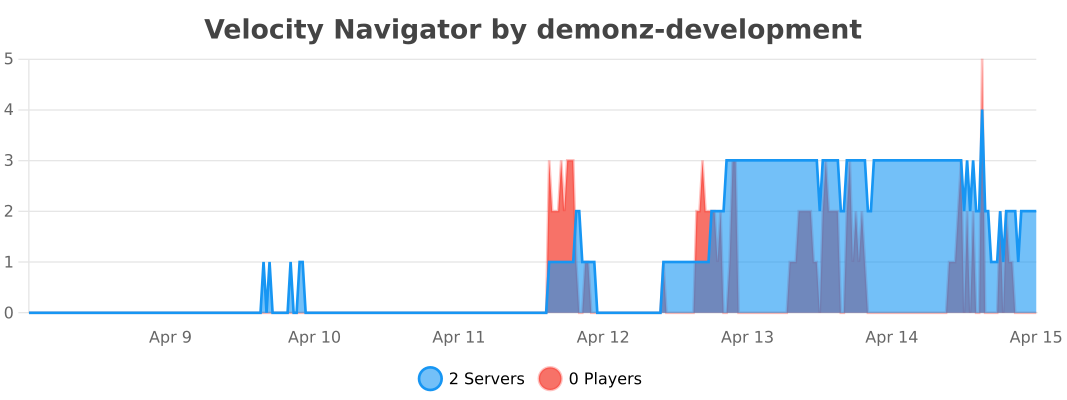

Built with care by DemonZ Development
Premium Minecraft infrastructure, engineered for scale.