

Velocity Commands
Velocity Commands is a configurable command system for the Velocity proxy. It lets you define custom commands in commands.yml and hot-reload them without needing to restart your server.
📖About Velocity Commands
Velocity Commands
Velocity Commands is a powerful and fully customizable command system for the Velocity proxy.
It allows server owners to create their own commands using a simple configuration file — no coding required.
Create custom chat commands, automate actions, broadcast messages, run console commands, and much more across your entire network.
Documentation: https://velocitycommands.dannb.online/
Discord: https://discord.gg/v5hU7kBp2S
✨ Features
Fully Custom Commands
Create your own commands using a simple commands.yml configuration file.
Multiple Command Types
Velocity Commands supports several command behaviours:
message_self— send a message to the player executing the commandmessage_other_player— send a message to another playerbroadcast— broadcast a message to the entire proxyconsole_command— execute a command from the console
Find information on command types here: https://velocitycommands.dannb.online/command-types/message-self
🔄 Hot Reloading
Add, remove, or modify commands without restarting your server.
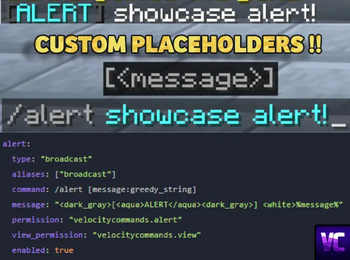
🎯 Custom Command Parameters
Create dynamic commands with parameters such as:
/msg <player> <message>
/punch <player>
Supported parameter types include:
playerstringwordgreedy_string
Find more information on custom parameters here: https://velocitycommands.dannb.online/getting-started/command-syntax-and-parameters
🎨 Chat Formatting
Velocity Commands supports:
- MiniMessage formatting
- Legacy colour codes (
&6,&a, etc)
🔗 Automatic Link Detection
Links in messages are automatically converted into clickable chat links.
🔊 Command Sounds
Play sounds when commands are executed to provide feedback to players.
⚡ Run Commands Anywhere
Commands can execute:
- as the player
- as the server console
- on the Velocity proxy
- on backend servers (Spigot, Paper, Purpur, etc)
🔐 Permission Support
Restrict commands with permissions so only certain players can use them.
You can also define view permissions so only certain players receive broadcasted messages.
📦 Built-in Placeholders
Velocity Commands includes several built-in placeholders, such as:
%player_name%%player_ping%%server_online_players%- and more!
These allow you to create dynamic and interactive commands.
Find all available base placeholders here: https://velocitycommands.dannb.online/getting-started/placeholders
📖 Documentation
Full documentation can be found here:
https://velocitycommands.dannb.online/
💬 Support
If you need help, have suggestions, or want to report a bug, join the Discord:
🚀 Example
Example command configuration:
punch:
  type: "broadcast"
  aliases: ["broadcast"]
  command: /punch [otherPlayerName:player] [reason:greedy_string]
  message: "<dark_gray>[<aqua>PUNCHED</aqua><dark_gray>] <white>%player_name% <gray>has punched <white>%otherPlayerName% <gray>for the reason of <white>%reason%"
  permission: "velocitycommands.punch"
  view_permission: "velocitycommands.view"
  enabled: true
This would allow players to run:
/punch <player> <reason>
❤️ Why Velocity Commands?
Velocity Commands makes it easy to build powerful commands for your network without writing any code.
Perfect for:
- network utilities
- moderation tools
- roleplay commands
- announcements
- automation
- server quality-of-life improvements