


PluginMIT
Velocity Web API
A plugin to expose web API endpoints for Velocity proxy servers. Display player and server information easily.
39
Downloads
2
Followers
8 months ago
Updated
📦
1
Versions
📖About Velocity Web API
Velocity Web API


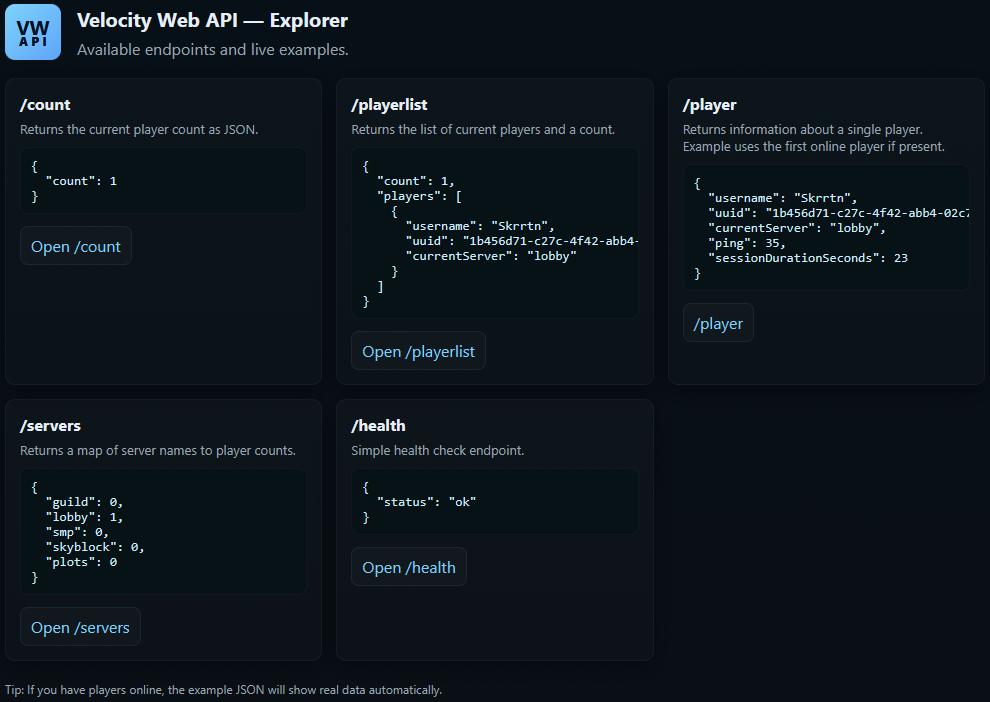
Lightweight HTTP API for Velocity proxies. Expose player lists, per-server counts, per-player details, etc. Ideal for websites, bots or other monitoring applications. I built it for my own uses, but it might help someone else out too.
Quick Install
- Drop the compiled plugin JAR into your Velocity
plugins/folder. - Start (or restart) your proxy; the plugin will create its data folder and a
config.cfg(if missing) in the plugin data directory.
Configuration
- The plugin creates a
config.cfgin its data folder on first run. Available keys:port: port the HTTP server listens on (default25576).bindAddress: interface/address to bind the HTTP server (default0.0.0.0to listen on all IPv4 interfaces; set to127.0.0.1for local-only access).checkUpdates: enable automatic Hangar update checks (defaulttrue).snapshotUpdates: include snapshot/unstable updates in checks (defaultfalse).debugEnabled: show debug messages (logger.debug) in the proxy console whentrue(defaultfalse).allowedOrigins: CORS allowed origins for HTTP API access (comma-separated, or * for all) (default*).
Tested With
- Velocity 3.x (expects
velocity-apion the runtime classpath)
Endpoints
All JSON endpoints return Content-Type: application/json; charset=utf-8 unless otherwise noted.
/- Serves the embedded
index.html(browser-friendly). - Example URL:
http://localhost:25576/
- Serves the embedded
/playerlist- Purpose: list connected players with basic metadata and a total count.
- Example URL:
http://localhost:25576/playerlist - Sample response:
{ "count": 2, "players": [ {"username":"Alice","uuid":"...","currentServer":"lobby"}, {"username":"Bob","uuid":"...","currentServer":"minigames"} ] }/count- Purpose: return the total number of connected players.
- Example URL:
http://localhost:25576/count - Sample response:
{ "count": 42 }/player/<username>or/player?username=<name>- Purpose: fetch detailed info for a connected player (exact-case lookup).
- Example URLs:
http://localhost:25576/player/Notchhttp://localhost:25576/player?username=Notch
- Notes: returns
400if username is missing;404if the player is not connected. - Sample response:
{ "username":"Notch", "uuid":"...", "currentServer":"lobby", "ping":42, "sessionDurationSeconds":360 }/servers- Purpose: returns a mapping of server names to player counts.
- Example URL:
http://localhost:25576/servers - Sample response:
{ "lobby": 5, "minigames": 12 }/health- Purpose: lightweight health check for monitoring.
- Example URL:
http://localhost:25576/health - Sample response:
{
    "status": "ok"
}
Commands
/vwapi reload: reloads theconfig.cfgfrom the plugin data directory and restarts the HTTP server if theportorbindAddresshave changed./vwapi version: prints the plugin version (from the plugin metadata)./vwapi debug [on|off]: toggle or explicitly set debug logging at runtime. When enabled, the plugin prints detailed debug messages and HTTP access lines to the console./vwapi status: shows the current HTTP server status (running/not running), the bound host and port, and an example URL you can visit (falls back tolocalhostwhen bound to all interfaces)./vwapi help: prints a short help listing the available/vwapisubcommands and usage examples.
Permissions
vwapi.admin: required to use the/vwapicommands.
Notes & Behavior
- Player lookup is exact-case and only returns connected players.
- The HTTP server binds to
bindAddress; by default this is0.0.0.0(all interfaces). Change to127.0.0.1for local-only access or a specific IP if desired. - When you change
bindAddressorportand run/vwapi reload, the plugin will restart the HTTP server automatically to apply the new bind/port (a full proxy restart is no longer required for those changes).
Troubleshooting
- If the HTTP server does not start, check the proxy logs for errors about port binding or resource issues.
- Ensure
velocity-apiis available at runtime and that the plugin is placed in the correctplugins/folder.
License & Support
- Licensed under the MIT License.
- If you need any help or support, please contact me on our Discord.