

PluginMIT
V AFKZone
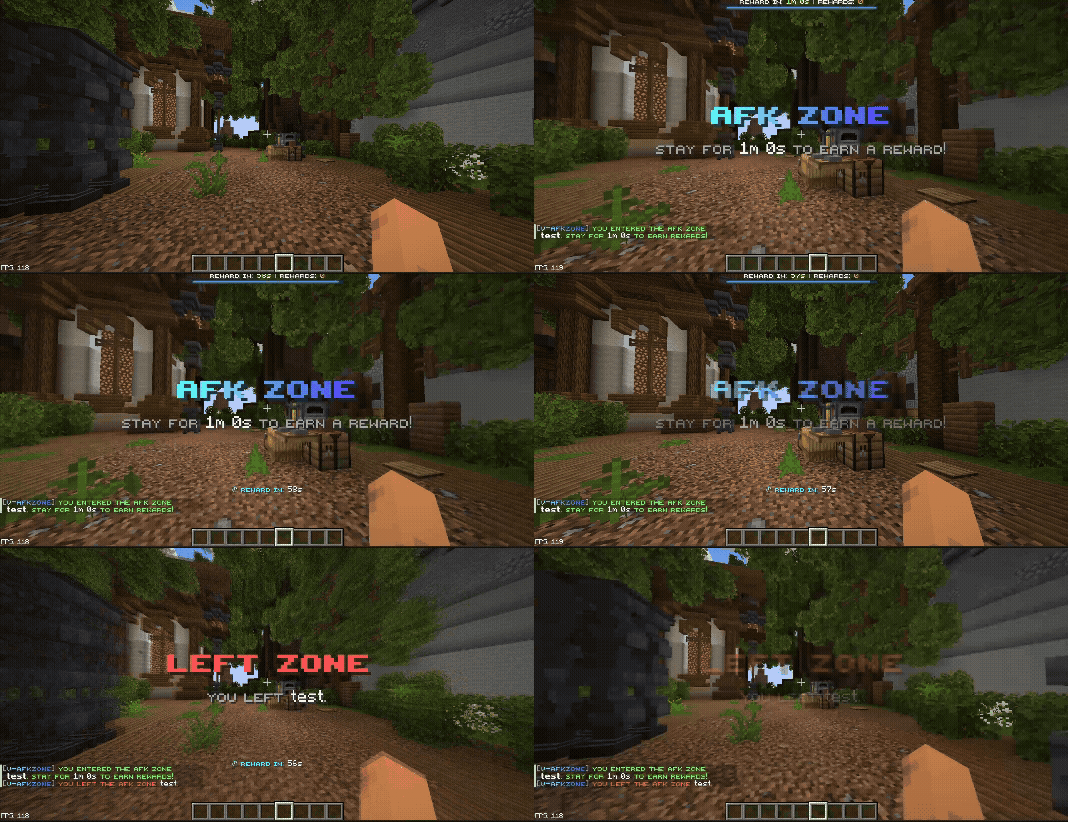
V-AfkZone - AFK Zone tracker with WorldGuard integration and configurable rewards.
60
Downloads
0
Followers
3 months ago
Updated
📦
1
Versions
📖About V AFKZone
🏗️ V-AfkZone
Timed AFK Rewards for Paper Servers
Simple vertical transportation for Paper 1.21.1+ servers


✨ Features
- 🎯 WorldGuard Integration — Create AFK zones using existing WorldGuard regions
- 🌍 AFK Everywhere — Permission-based rewards outside designated zones
- ⏱️ Flexible Timers — Configure reward intervals per zone or profile
- 📊 Visual Feedback — Boss bars, action bars, titles, and chat messages
- 🖱️ Admin GUI — In-game management with
/afkzone - 🔌 PlaceholderAPI — Full expansion with 13+ placeholders
- 🔔 Custom Events — Developer API with cancellable events
- 🔄 Auto Migration — Seamless upgrades from legacy configs
- ⚡ Zero Lag — Optimized scheduler with configurable intervals
- 🔒 Protected Zones — Prevent double-rewarding with zone priority system
🚀 Installation
- Download the latest
V-AfkZone-1.0.0.jar - Place the jar in your server's
plugins/folder - Ensure WorldGuard and WorldEdit are installed
- Start the server to generate default configs
- Configure zones in
plugins/V-AfkZone/area/ - Reload with
/afkzone reloador restart
🎮 Quick Start
Creating Your First AFK Zone
# 1. Create a WorldGuard region first
/region define spawn_afk

# 2. Create the zone config
/afkzone create zone spawn_afk

# 3. Edit plugins/V-AfkZone/area/spawn_afk.yml
Enabling AFK Everywhere
# 1. Create the profile
/afkzone create everywhere afk

# 2. Grant permission to players
/lp user <player> permission set vafkzone.everywhere.use true

# 3. Reload the plugin
/afkzone reload
⌨️ Commands
| Command | Permission | Description |
|---|---|---|
/afkzone |
vafkzone.admin |
Opens admin GUI |
/afkzone menu |
vafkzone.admin |
Opens main GUI |
/afkzone reload |
vafkzone.admin |
Reloads all configs |
/afkzone info |
vafkzone.info |
Shows your active sessions |
/afkzone sessions |
vafkzone.admin |
Shows all active sessions |
/afkzone sessions <player> |
vafkzone.admin |
Shows player's sessions |
/afkzone create zone <name> |
vafkzone.admin |
Creates zone config |
/afkzone create everywhere <name> |
vafkzone.admin |
Creates everywhere profile |
/afkzone edit <name> |
vafkzone.admin |
Opens editor (auto-detects) |
/afkzone edit zone <name> |
vafkzone.admin |
Opens zone editor |
/afkzone edit everywhere <name> |
vafkzone.admin |
Opens profile editor |
/afkzone delete <name> |
vafkzone.admin |
Deletes zone/profile |
/afkzone delete zone <name> |
vafkzone.admin |
Deletes zone |
/afkzone delete everywhere <name> |
vafkzone.admin |
Deletes profile |
/afkzone setup <name> |
vafkzone.admin |
Shortcut for zone create |
/afkzone everywhere <name> |
vafkzone.admin |
Shortcut for everywhere create |
🔐 Permissions
| Permission | Default | Description |
|---|---|---|
vafkzone.admin |
op |
Full admin access |
vafkzone.info |
true |
View own AFK info |
vafkzone.use |
true |
Use AFK zones |
vafkzone.everywhere.use |
false |
Use default everywhere profile |
💡 Tip: Custom everywhere profiles can use any permission node (e.g.,
vafkzone.everywhere.vip)
⚙️ Configuration
Zone Config (area/spawn_afk.yml)
### Zone identification
zoneName: spawn_afk
worldGuardRegion: spawn_afk
worldName: world

### Reward settings
requiredSeconds: 60
enabled: true

### Visual feedback
show-bossbar: true
show-actionbar: true
show-reward-received-message: true

### Sound effects
sound: false
sound-type: level_up

### Protection - blocks AFK Everywhere in this zone
disable-afk-everywhere: false

### Commands run as console when reward fires
rewardCommands:
  - give %player% diamond 1
  - broadcast %player% earned a reward from AFK zone spawn_afk!
Everywhere Profile (everywhere/afk.yml)
enabled: true
permission: vafkzone.everywhere.use
priority: 0

### Movement detection
walking: true
idle-threshold-seconds: 60

### Reward settings
requiredSeconds: 60

### Visual feedback
show-bossbar: true
show-actionbar: true
show-reward-received-message: true

### Sound effects
sound: false
sound-type: level_up

### Commands
rewardCommands:
  - give %player% diamond 1
  - broadcast %player% earned a reward from AFK Everywhere!
Global Config (config.yml)
settings:
  check-interval-seconds: 1  # Scheduler tick rate
  show-bossbar: true         # Master boss bar switch
  notify-admin-on-reward: false  # Log to online admins
  debug: false              # Extra console logging

messages:
  ### MiniMessage format supported
  prefix: "<gradient:#3b82f6:#8b5cf6>[V-AfkZone]</gradient> "
🔌 PlaceholderAPI
When PlaceholderAPI is installed, the vafkzone expansion is auto-registered:
| Placeholder | Description |
|---|---|
%vafkzone_in_zone% |
true/false if in any zone |
%vafkzone_zone_name% |
Current zone name |
%vafkzone_zone_names% |
All active zone names |
%vafkzone_next_reward% |
Seconds until next reward |
%vafkzone_rewards_total% |
Total rewards earned |
%vafkzone_time_in_zone% |
Seconds in current zone |
%vafkzone_required_seconds% |
Required seconds for zone |
%vafkzone_in_everywhere% |
true/false if in everywhere mode |
%vafkzone_everywhere_name% |
Active everywhere profile |
%vafkzone_everywhere_next_reward% |
Seconds until everywhere reward |
%vafkzone_everywhere_rewards_total% |
Total everywhere rewards |
%vafkzone_any_active% |
true/false any AFK active |
%vafkzone_active_count% |
Number of active sessions |