Logo
MINECRAFTBIBLE
Items
Items

All game items

Blocks
Blocks

Building blocks

Mobs
Mobs

Creatures & monsters

Biomes
Biomes

World biomes

Structures
Structures

Generated structures

Recipes
Recipes

Crafting guides

Advancements
Advancements

Achievements

Loot Tables
Loot Tables

Drop rates

Tags
Tags

Item groupings

All Versions
View all data →
Capes
Cape ArchiveNEW

Browse rare Minecon capes, OptiFine capes, and custom capes from players worldwide

Browse

Player Database
Player DatabasePopular

Search any player

Skin Browser
Skin Browser

Browse & download skins

Cape Gallery
Cape GalleryNEW

Minecon & OptiFine capes

Seed Vault
Seed Vault

Curated seeds

Learn

Guides
GuidesNew

Tutorials & tips

Blog
Blog

News & updates

Community

Community Hub
Community HubHub

Posts, discussions & more

All Versions
View community →
Seed Analyzer
Seed Analyzer

World seed analysis

Loot Explorer
Loot Explorer

Drop rates

Crafting Calculator
Crafting Calculator

Material planning

Enchant Calculator
Enchant Calculator

Probability math

Redstone Lab
Redstone Lab

Signal timing

Trading Profit
Trading Profit

Villager ROI

All Versions
View all tools →
Mods
Mods

Browse all mods

Plugins
Plugins

Server plugins

Resource Packs
Resource Packs

Textures & sounds

Shaders
Shaders

Visual enhancements

Datapacks
Datapacks

World logic

Scanner
Mod Intelligence

Scan & analyze any mod

All Versions
View all mods →
Loading...
IntroductionIntroductionVersion HistoryVersion HistoryGuidesGuidesBlog & NewsBlog & News
ItemsItemsBlocksBlocksMobsMobsRecipesRecipesBiomesBiomesStructuresStructuresAdvancementsAdvancementsLoot TablesLoot TablesTagsTags
ModsModsPluginsPluginsResource PacksResource PacksShadersShadersDatapacksDatapacks

MinecraftBible

The Ultimate Wiki

Logo
MINECRAFTBIBLE

The ultimate Minecraft reference. Every item, block, mob, and recipe documented with precision.

Community

  • Skin Browser
  • Cape Gallery
  • Seed Vault
  • Blog
  • Guides

Database

  • Items
  • Blocks
  • Mobs
  • Recipes
  • Biomes
  • Structures

Tools

  • Seed Analyzer
  • Mod Intelligence
  • Crafting Calculator
  • Enchant Calculator

Mods & Packs

  • Mods
  • Plugins
  • Resource Packs
  • Shaders
  • Datapacks

Site & Legal

  • About
  • Authors
  • Editorial Policy
  • Corrections
  • Contact
  • Privacy Policy
  • Terms of Service
  • DMCA
  • Sitemap

© 2026 MinecraftBible. Not affiliated with Mojang or Microsoft.

PrivacyTermsContact
UpgradeFurnaces
PluginLicenseRef-All-Rights-Reserved

UpgradeFurnaces

UpgradeFurnace lets players spend in-game currency to upgrade their furnaces through four powerful tiers, increasing smelting speed at the cost of burning through fuel faster. Link a chest, barrel, or shulker box to automate fuel input and output

32
Downloads
0
Followers
3 months ago
Updated
📦
1
Versions
economygame-mechanicsutilitypaper
Download Latestv1.0.0View on Modrinth

📖About UpgradeFurnaces

THIS PLUGIN IS AI/VIBE CODED.

UpgradeFurnace gives your players a reason to grind — upgrade their furnaces and blast furnaces through four tiers of smelting power, each faster than the last but at the cost of burning through fuel quicker.

⚙️ Features

Four upgrade tiers — Basic, Elite, Advanced, and Ultimate, each with configurable speed multipliers, fuel multipliers, and prices
Vault economy integration — upgrades cost in-game currency, fully compatible with any Vault-supported economy plugin
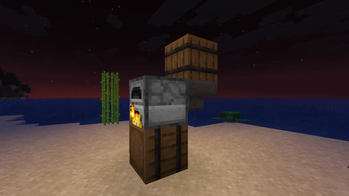
Inventory linking — link a Chest, Double Chest, Barrel, or Shulker Box to a furnace to automatically feed fuel and raw materials in, and pull finished output back out
Upgrade persistence — upgrades are stored via PDC and survive server restarts; breaking and replacing a furnace restores its previous tier
Blast Furnace support — optionally allow blast furnaces to be upgraded alongside regular furnaces, toggleable in config
Tier display — the furnace GUI title updates to reflect the current tier (e.g. Furnace [Ultimate])
Clean MiniMessage formatting — all messages use Kyori Adventure MiniMessage, fully customisable in config

🖱️ How to Use

Shift + Right-click a furnace or blast furnace to open the upgrade menu
Shift + Left-click a furnace then a chest, barrel, or shulker box to link an inventory
Shift + Left-click an already-linked furnace to unlink it

📋 Requirements

Paper 1.21.1 or later
Vault + a compatible economy plugin (e.g. EssentialsX, CMI)

🔧 Configuration
Everything is configurable in config.yml — tier prices, speed multipliers, fuel multipliers, blast furnace toggle, automation interval, and all plugin messages.

Built for server owners who want to give economy meaning and automation a purpose.

permissions:
  upgradefurnace.info:
    description: Allows using /upgradefurnace info
    default: true
  upgradefurnace.reload:
    description: Allows using /upgradefurnace reload
    default: op
  upgradefurnace.link.limit.1:
    description: Allows linking up to 1 furnace
    default: true
  upgradefurnace.link.limit.3:
    description: Allows linking up to 3 furnaces
    default: false
  upgradefurnace.link.limit.5:
    description: Allows linking up to 5 furnaces
    default: false
  upgradefurnace.link.limit.bypass:
    description: Bypass furnace link cap (unlimited)
    default: op

👥 Team & Contributors

O
OptimusPrimeRDCOwner

⚙️ Compatibility

Environment
🖥️ Server-side
Loaders
paper
Minecraft Versions
1.211.21.11.21.21.21.31.21.41.21.51.21.61.21.7+4 more

🔗 Links

Modrinth Page