Logo
MINECRAFTBIBLE
Items
Items

All game items

Blocks
Blocks

Building blocks

Mobs
Mobs

Creatures & monsters

Biomes
Biomes

World biomes

Structures
Structures

Generated structures

Recipes
Recipes

Crafting guides

Advancements
Advancements

Achievements

Loot Tables
Loot Tables

Drop rates

Tags
Tags

Item groupings

All Versions
View all data →
Capes
Cape ArchiveNEW

Browse rare Minecon capes, OptiFine capes, and custom capes from players worldwide

Browse

Player Database
Player DatabasePopular

Search any player

Skin Browser
Skin Browser

Browse & download skins

Cape Gallery
Cape GalleryNEW

Minecon & OptiFine capes

Seed Vault
Seed Vault

Curated seeds

Learn

Guides
GuidesNew

Tutorials & tips

Blog
Blog

News & updates

Community

Community Hub
Community HubHub

Posts, discussions & more

All Versions
View community →
Seed Analyzer
Seed Analyzer

World seed analysis

Loot Explorer
Loot Explorer

Drop rates

Crafting Calculator
Crafting Calculator

Material planning

Enchant Calculator
Enchant Calculator

Probability math

Redstone Lab
Redstone Lab

Signal timing

Trading Profit
Trading Profit

Villager ROI

All Versions
View all tools →
Mods
Mods

Browse all mods

Plugins
Plugins

Server plugins

Resource Packs
Resource Packs

Textures & sounds

Shaders
Shaders

Visual enhancements

Datapacks
Datapacks

World logic

Scanner
Mod Intelligence

Scan & analyze any mod

All Versions
View all mods →
Loading...
IntroductionIntroductionVersion HistoryVersion HistoryGuidesGuidesBlog & NewsBlog & News
ItemsItemsBlocksBlocksMobsMobsRecipesRecipesBiomesBiomesStructuresStructuresAdvancementsAdvancementsLoot TablesLoot TablesTagsTags
ModsModsPluginsPluginsResource PacksResource PacksShadersShadersDatapacksDatapacks

MinecraftBible

The Ultimate Wiki

Logo
MINECRAFTBIBLE

The ultimate Minecraft reference. Every item, block, mob, and recipe documented with precision.

Community

  • Skin Browser
  • Cape Gallery
  • Seed Vault
  • Blog
  • Guides

Database

  • Items
  • Blocks
  • Mobs
  • Recipes
  • Biomes
  • Structures

Tools

  • Seed Analyzer
  • Mod Intelligence
  • Crafting Calculator
  • Enchant Calculator

Mods & Packs

  • Mods
  • Plugins
  • Resource Packs
  • Shaders
  • Datapacks

Site & Legal

  • About
  • Authors
  • Editorial Policy
  • Corrections
  • Contact
  • Privacy Policy
  • Terms of Service
  • DMCA
  • Sitemap

© 2026 MinecraftBible. Not affiliated with Mojang or Microsoft.

PrivacyTermsContact
UnlockedEnchants
PluginMIT

UnlockedEnchants

Unlocked Enchants was designed to bypass standard Minecraft enchantment restrictions, allowing those with permission to apply, remove, and manage enchantments at levels far exceeding vanilla limits.
75
Downloads
1
Followers
1 months ago
Updated
📦
1
Versions
equipmentmanagementutilitypaper
Download Latestv1.0.0View on Modrinth

📖About UnlockedEnchants

SplashImage
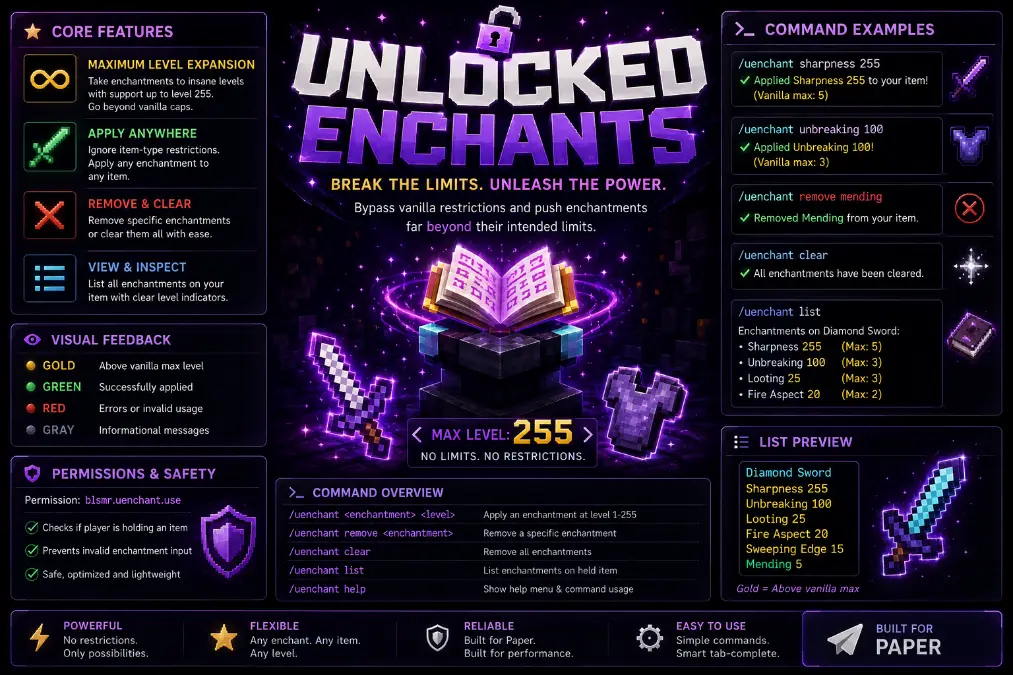
UnlockedEnchants is a Paper plugin designed to bypass standard Minecraft enchantment restrictions, allowing players to apply, remove, and manage enchantments at levels far exceeding vanilla limits.

The plugin enables "unsafe" enchanting, which means it ignores standard level caps (e.g., Sharpness V) and item-type restrictions. Its primary features include:

Maximum Level Expansion: Allows enchantments to reach up to level 255.

Command-Based Application: Users can apply specific enchantments directly to the item in their main hand via commands.

Enchantment Removal: Provides functionality to strip specific enchantments or completely clear all enchantments from an item.

Information Display: Includes a list command to view current enchantments on a held item, often highlighting which levels exceed vanilla maximums.

Command Structure

The plugin operates through the base command /uenchant with several subcommands:

/uenchant <enchantment> <level>: Applies the specified enchantment at the chosen level (1–255) to the held item.

/uenchant remove <enchantment>: Removes a specific enchantment from the item.

/uenchant clear: Completely strips all enchantments from the held item.

/uenchant list: Displays all enchantments currently on the held item.

/uenchant help: Shows the command menu and usage instructions.

Technical Details

Permissions: Access is controlled via the blsmr.uenchant.use permission node.

Tab Completion: The plugin features intelligent tab-completion for enchantment names and subcommands to improve ease of use.

Visual Feedback: It uses color-coded messages (e.g., gold for levels above vanilla max, green for successful applications) to provide clear feedback to the user.

Safety Checks: The plugin verifies that a player is holding an item before attempting to apply or modify enchantments.

As always I was thinking about making a server...and I have one up as a testing grounds....I have been converting and upgrading plugins I was making for the server instead for modrinth. I have a nice sort of unique shops plugin...but I need to work out some final kinks before public release of beta.

👥 Team & Contributors

Partakithware
PartakithwareOwner

⚙️ Compatibility

Environment
🖥️ Server-side
Loaders
paper
Minecraft Versions
1.211.21.11.21.21.21.31.21.41.21.51.21.61.21.7+7 more

🔗 Links

Modrinth Page