MINECRAFTBIBLE
Loading...


UnitySleep is a Minecraft plugin that allows the night to be skipped when only one player or a minimum percentage of players are sleeping.
UnitySleep is an advanced plugin that improves the sleep system on Minecraft multiplayer servers. It allows configuring how many players need to sleep to skip the night, with flexible options and an intuitive graphical interface.
🔢 Percentage Mode: Configure exact % of players that must sleep
👤 One Player Mode: Any player can skip the night
⏱️ Configurable Delay: Wait time before dawn (1-60 seconds)
👑 OP Exclusion: Administrators don't interfere with calculations
🌍 Multi-World: Enable/disable specific worlds
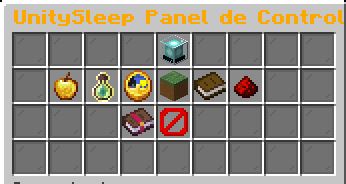
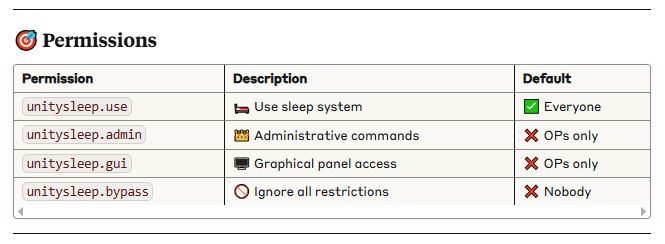
🎨 Administrative GUI: Complete graphical control panel
🌐 Multi-Language: Automatic Spanish and English
🛡️ Anti-Interference: Disables Minecraft vanilla system
🎯 For Paper Servers
Download latest Paper 1.21.3+
Place UnitySleep-1.1.0.jar in /plugins/ folder
Start server and configure
Use (/unitysleep gui) for easy setup
Sleep in a bed during the night
Watch chat messages indicating progress
Wait for the configured delay if conditions are met
Enjoy the automatic sunrise! 🌅

📱 GUI Access: /unitysleep gui
🔢 Mode: Left click = Percentage | Right click = One player
📊 Percentage: Left click = +5% | Right click = -5%
⏱️ Delay: Left click = +1s | Right click = -1s
🌍 Worlds: Manage enabled worlds
📈 Statistics: View server status
🌐 Language: Switch between Spanish and English
🔄 Reload: Apply configuration changes
/unitysleep setpercent 50 # 50% of players
/unitysleep setdelay 10 # 10 seconds delay
/unitysleep setpercent 75 # 75% of players
/unitysleep setdelay 3 # 3 seconds delay
/unitysleep setmode one # One player mode
/unitysleep setdelay 5 # 5 seconds delay
📋 With normal players: OPs don't count for calculation
🔧 Only OPs online: OPs do count (prevents "empty" server)
✅ OPs can always sleep and activate the system
/unitysleep fixgamerule # Fix vanilla configuration
/unitysleep debugsleep # Check status
/unitysleep testscenarios # Simulate scenarios
/unitysleep debugsleep # Detailed information
/unitysleep reload # Reload configuration
/unitysleep debug # Check values
Use /unitysleep debug to get information
Check server logs
Verify configuration with /unitysleep testscenarios
Check this manual, Use debug commands, Verify permissions
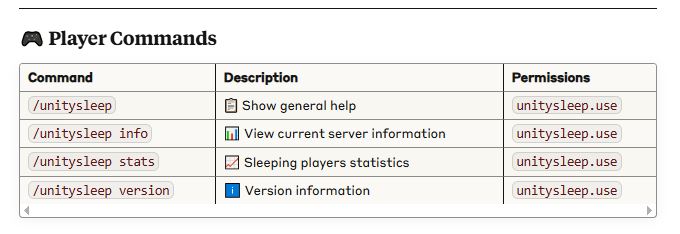
/unitysleep gui # 🖥️ Open admin panel
/unitysleep setpercent 50 # 📊 Set 50% requirement
/unitysleep setmode one # 👤 One player mode
/unitysleep setdelay 5 # ⏱️ 5 second delay
/unitysleep world add world # 🌍 Enable world
/unitysleep debugsleep # 🔍 Check status
🏢 Large Server: 50% percentage, 10s delay
🏠 Small Server: 75% percentage, 3s delay
⚡ Casual Server: One player mode, 5s delay
🔧 Admin Testing: Use debug commands frequently
👑 OPs are automatically excluded when other players are online
🛡️ Vanilla system is disabled automatically in percentage mode
🌐 Language changes apply immediately
🔄 Configuration reloads without restart
📊 Test scenarios before implementing changes
Minecraft Version: 1.21.5 ( Test Paper 1.21.5 )
API Version: 1.21
Author: DeLaRosaPlay
Plugin Version: 1.1.0
✅ Fully Compatible Servers
UnitySleep is built using standard Bukkit/Spigot APIs, making it compatible with most modern Minecraft server software:
📋 Primary Support
🟢 Paper - Primary target, best performance
🟢 Spigot - Full compatibility, stable
🟢 Bukkit/CraftBukkit - Basic compatibility
🟢 Purpur - Enhanced Paper fork with extra features
🟢 Airplane - Performance-focused Paper fork
🟢 Pufferfish - Optimized Paper distribution
🟢 Tuinity - Now merged into Paper (legacy support)
🟡 Fabric - Not compatible (different API)
🟡 Forge - Not compatible (different API)
🔴 Vanilla - Not compatible (no plugin support)
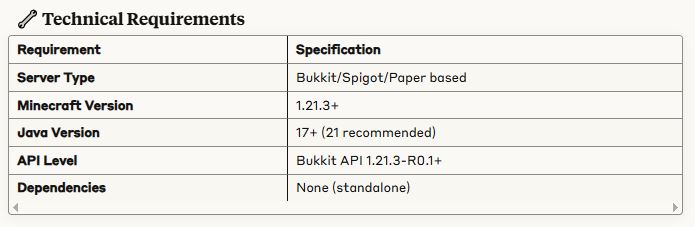
Server: Paper 1.21.3+
Java: 17 or 21
RAM: 2GB minimum
Plugins: UnitySleep + essential plugins only
⚡ Optimal Configuration
Paper: Latest stable version
Java: OpenJDK 17+ (Java 21 recommended)
Minecraft: 1.21.3 (current target version)