Logo
MINECRAFTBIBLE
Items
Items

All game items

Blocks
Blocks

Building blocks

Mobs
Mobs

Creatures & monsters

Biomes
Biomes

World biomes

Structures
Structures

Generated structures

Recipes
Recipes

Crafting guides

Advancements
Advancements

Achievements

Loot Tables
Loot Tables

Drop rates

Tags
Tags

Item groupings

All Versions
View all data →
Capes
Cape ArchiveNEW

Browse rare Minecon capes, OptiFine capes, and custom capes from players worldwide

Browse

Player Database
Player DatabasePopular

Search any player

Skin Browser
Skin Browser

Browse & download skins

Cape Gallery
Cape GalleryNEW

Minecon & OptiFine capes

Seed Vault
Seed Vault

Curated seeds

Learn

Guides
GuidesNew

Tutorials & tips

Blog
Blog

News & updates

Community

Community Hub
Community HubHub

Posts, discussions & more

All Versions
View community →
Seed Analyzer
Seed Analyzer

World seed analysis

Loot Explorer
Loot Explorer

Drop rates

Crafting Calculator
Crafting Calculator

Material planning

Enchant Calculator
Enchant Calculator

Probability math

Redstone Lab
Redstone Lab

Signal timing

Trading Profit
Trading Profit

Villager ROI

All Versions
View all tools →
Mods
Mods

Browse all mods

Plugins
Plugins

Server plugins

Resource Packs
Resource Packs

Textures & sounds

Shaders
Shaders

Visual enhancements

Datapacks
Datapacks

World logic

Scanner
Mod Intelligence

Scan & analyze any mod

All Versions
View all mods →
Loading...
IntroductionIntroductionVersion HistoryVersion HistoryGuidesGuidesBlog & NewsBlog & News
ItemsItemsBlocksBlocksMobsMobsRecipesRecipesBiomesBiomesStructuresStructuresAdvancementsAdvancementsLoot TablesLoot TablesTagsTags
ModsModsPluginsPluginsResource PacksResource PacksShadersShadersDatapacksDatapacks

MinecraftBible

The Ultimate Wiki

Logo
MINECRAFTBIBLE

The ultimate Minecraft reference. Every item, block, mob, and recipe documented with precision.

Community

  • Skin Browser
  • Cape Gallery
  • Seed Vault
  • Blog
  • Guides

Database

  • Items
  • Blocks
  • Mobs
  • Recipes
  • Biomes
  • Structures

Tools

  • Seed Analyzer
  • Mod Intelligence
  • Crafting Calculator
  • Enchant Calculator

Mods & Packs

  • Mods
  • Plugins
  • Resource Packs
  • Shaders
  • Datapacks

Site & Legal

  • About
  • Authors
  • Editorial Policy
  • Corrections
  • Contact
  • Privacy Policy
  • Terms of Service
  • DMCA
  • Sitemap

© 2026 MinecraftBible. Not affiliated with Mojang or Microsoft.

PrivacyTermsContact
Ultimate SetHome
PluginMIT

Ultimate SetHome

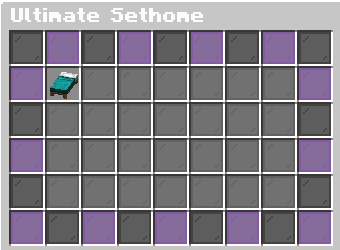
A professional sethome system with a custom GUI, movement detection, and multiple countdown modes (BossBar, Title, Chat).

206
Downloads
2
Followers
2 months ago
Updated
📦
4
Versions
adventuretransportationutilitybukkitpaperpurpurspigot
Download Latestv1.2.1View on Modrinth

📖About Ultimate SetHome


A professional, high-performance teleportation system for your Minecraft server.

Ultimate Sethome is designed to provide players with a seamless way to manage their home locations through a beautiful, intuitive Graphical User Interface (GUI). With built-in anti-cheat measures and customizable countdowns, it's the perfect addition to any Survival, Skyblock, or SMP server.


✨ Key Features

📦 Advanced GUI Menu: Manage all your homes in a 54-slot chest interface with custom glass borders (Ender/Void Style).

🛡️ Anti-Steal Protection: Hardened GUI logic prevents players from taking items out of the menu – 100% secure.

⏳ Flexible Countdown Modes: Choose how players see their teleport timer:

TITLE: Big, bold text in the center of the screen.

BOSSBAR: A sleek progress bar at the top of the screen.

CHAT: Classic, clean messages in the chat box.

🚫 Movement Detection: Teleportation cancels instantly if the player moves, preventing easy escapes from combat.

💎 Rank-Based Limits: Set different home limits for different players (e.g., Default: 3, VIP: 10, Admin: 999).

🎨 Fully Customizable: Everything from messages, sounds, and particle types to the HEX colors in the console banner can be changed in config.yml.


Command Description Permission
/sethome Create a new home ultimatesethome.use
/home Open the Home Manager ultimatesethome.use
/adminhome reload Refresh the config ultimatesethome.admin

🛠️ Installation:

1.Download Ultimate sethome

2.Drop it into your plugins folder.

3.Restart your server.

4.Configure everything in config.yml

Created by GraSter1234

👥 Team & Contributors

xFeneq
xFeneq
Member
GraSter1234
GraSter1234
Member

⚙️ Compatibility

Environment
🖥️ Server-side
Loaders
bukkitpaperpurpurspigot
Minecraft Versions
1.19.41.201.20.11.20.21.20.31.20.41.20.51.20.6+15 more

🔗 Links

Modrinth Page