Logo
MINECRAFTBIBLE
Items
Items

All game items

Blocks
Blocks

Building blocks

Mobs
Mobs

Creatures & monsters

Biomes
Biomes

World biomes

Structures
Structures

Generated structures

Recipes
Recipes

Crafting guides

Advancements
Advancements

Achievements

Loot Tables
Loot Tables

Drop rates

Tags
Tags

Item groupings

All Versions
View all data →
Capes
Cape ArchiveNEW

Browse rare Minecon capes, OptiFine capes, and custom capes from players worldwide

Browse

Player Database
Player DatabasePopular

Search any player

Skin Browser
Skin Browser

Browse & download skins

Cape Gallery
Cape GalleryNEW

Minecon & OptiFine capes

Seed Vault
Seed Vault

Curated seeds

Learn

Guides
GuidesNew

Tutorials & tips

Blog
Blog

News & updates

Community

Community Hub
Community HubHub

Posts, discussions & more

All Versions
View community →
Seed Analyzer
Seed Analyzer

World seed analysis

Loot Explorer
Loot Explorer

Drop rates

Crafting Calculator
Crafting Calculator

Material planning

Enchant Calculator
Enchant Calculator

Probability math

Redstone Lab
Redstone Lab

Signal timing

Trading Profit
Trading Profit

Villager ROI

All Versions
View all tools →
Mods
Mods

Browse all mods

Plugins
Plugins

Server plugins

Resource Packs
Resource Packs

Textures & sounds

Shaders
Shaders

Visual enhancements

Datapacks
Datapacks

World logic

Scanner
Mod Intelligence

Scan & analyze any mod

All Versions
View all mods →
Loading...
IntroductionIntroductionVersion HistoryVersion HistoryGuidesGuidesBlog & NewsBlog & News
ItemsItemsBlocksBlocksMobsMobsRecipesRecipesBiomesBiomesStructuresStructuresAdvancementsAdvancementsLoot TablesLoot TablesTagsTags
ModsModsPluginsPluginsResource PacksResource PacksShadersShadersDatapacksDatapacks

MinecraftBible

The Ultimate Wiki

Logo
MINECRAFTBIBLE

The ultimate Minecraft reference. Every item, block, mob, and recipe documented with precision.

Community

  • Skin Browser
  • Cape Gallery
  • Seed Vault
  • Blog
  • Guides

Database

  • Items
  • Blocks
  • Mobs
  • Recipes
  • Biomes
  • Structures

Tools

  • Seed Analyzer
  • Mod Intelligence
  • Crafting Calculator
  • Enchant Calculator

Mods & Packs

  • Mods
  • Plugins
  • Resource Packs
  • Shaders
  • Datapacks

Site & Legal

  • About
  • Authors
  • Editorial Policy
  • Corrections
  • Contact
  • Privacy Policy
  • Terms of Service
  • DMCA
  • Sitemap

© 2026 MinecraftBible. Not affiliated with Mojang or Microsoft.

PrivacyTermsContact
TypingInChat Plugin
PluginLicenseRef-GPL-3.0

TypingInChat Plugin

Bukkit plugin, that allows server to show when players are writing in chat.

217
Downloads
4
Followers
11 months ago
Updated
📦
3
Versions
socialutilitybukkitpaperpurpurspigot
Download Latestv1.2.1View on Modrinth

📖About TypingInChat Plugin

Plugin logo

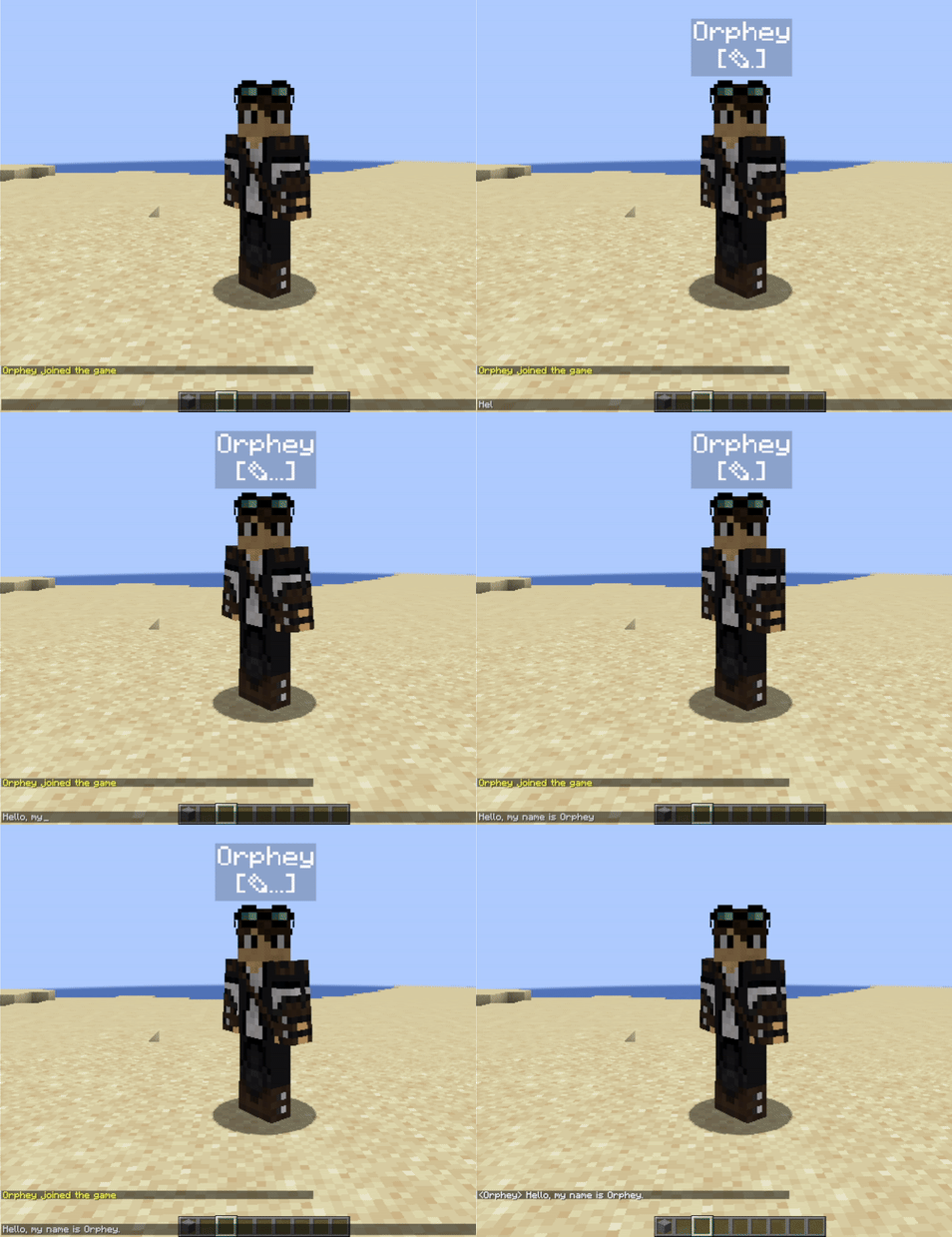
Basic chat typing animation

Enable your server players to see when someone actively writing in chat.
Server admins should install this plugin on their server. Then everyone who install TypingInChat client side mod will have visual indication while they are mashing keys in chat interface.
Players who do not have client-side mod will only see other player's indicators and will not have their own.

Features

  • Animated and highly customizable. Looks defined by server admins.
  • Permissions support to show or hide indication for specific users or groups.
  • Visible for players that don't have clientside mod.
  • Based on packets and text-display entities.
  • Text-displays are attached to players.

Customization Examples

Colored indicator, indentation enabled, text-shadow disabled: GIF

Colored everything, no indentation, text-shadow enabled: GIF

Default colors, player name hidden: GIF

Installation

You need to put typinginchat-spigot.jar into server plugins folder. Also, you need to have packetevents 2.6.0 and HologramAPI 1.6.0 or newer installed.

Configuration

You may change TIC indicators appearance with config.yml.

config.yml

#Show player display names
show-names: true
#Indentation style of typing icon
icon-indentation: true
#Hologram visibility radius
view-range: 16
#Hologram visibility through blocks
visible-through-blocks: false
#UNICODE character or text for typing animation
typing-char: "✎"

#Color customization
names-color: "#ffffff"
typing-icon-color: "#ffffff"
background-color: "#000000"
#From 0 to 255
background-transparency: 50
#Shadow outline of text font
text-shadow: false

#use /tic reload command to apply changes

Permissions

tic.display - allows player to have tic indication. True by default, but you can remove it from players or groups.

tic.admin - required for /typinginchat reload command usage.

Related

Link for client-side mode
(required only for players who want to show when they typing in chat):
TypingInChat-Mod

👥 Team & Contributors

Orphey98
Orphey98Owner

⚙️ Compatibility

Environment
🖥️ Server-side
Loaders
bukkitpaperpurpurspigot
Minecraft Versions
1.191.19.11.19.21.19.31.19.4

🔗 Links

Modrinth Page