Logo
MINECRAFTBIBLE
Items
Items

All game items

Blocks
Blocks

Building blocks

Mobs
Mobs

Creatures & monsters

Biomes
Biomes

World biomes

Structures
Structures

Generated structures

Recipes
Recipes

Crafting guides

Advancements
Advancements

Achievements

Loot Tables
Loot Tables

Drop rates

Tags
Tags

Item groupings

All Versions
View all data →
Capes
Cape ArchiveNEW

Browse rare Minecon capes, OptiFine capes, and custom capes from players worldwide

Browse

Player Database
Player DatabasePopular

Search any player

Skin Browser
Skin Browser

Browse & download skins

Cape Gallery
Cape GalleryNEW

Minecon & OptiFine capes

Seed Vault
Seed Vault

Curated seeds

Learn

Guides
GuidesNew

Tutorials & tips

Blog
Blog

News & updates

Community

Community Hub
Community HubHub

Posts, discussions & more

All Versions
View community →
Seed Analyzer
Seed Analyzer

World seed analysis

Loot Explorer
Loot Explorer

Drop rates

Crafting Calculator
Crafting Calculator

Material planning

Enchant Calculator
Enchant Calculator

Probability math

Redstone Lab
Redstone Lab

Signal timing

Trading Profit
Trading Profit

Villager ROI

All Versions
View all tools →
Mods
Mods

Browse all mods

Plugins
Plugins

Server plugins

Resource Packs
Resource Packs

Textures & sounds

Shaders
Shaders

Visual enhancements

Datapacks
Datapacks

World logic

Scanner
Mod Intelligence

Scan & analyze any mod

All Versions
View all mods →
Loading...
IntroductionIntroductionVersion HistoryVersion HistoryGuidesGuidesBlog & NewsBlog & News
ItemsItemsBlocksBlocksMobsMobsRecipesRecipesBiomesBiomesStructuresStructuresAdvancementsAdvancementsLoot TablesLoot TablesTagsTags
ModsModsPluginsPluginsResource PacksResource PacksShadersShadersDatapacksDatapacks

MinecraftBible

The Ultimate Wiki

Logo
MINECRAFTBIBLE

The ultimate Minecraft reference. Every item, block, mob, and recipe documented with precision.

Community

  • Player Database
  • Skin Browser
  • Cape Gallery
  • Community Hub
  • Seed Vault

Database

  • Items
  • Blocks
  • Mobs
  • Recipes
  • Biomes
  • Structures

Tools

  • Seed Analyzer
  • Mod Intelligence
  • Crafting Calculator
  • Enchant Calculator

Mods & Packs

  • Mods
  • Plugins
  • Resource Packs
  • Shaders
  • Datapacks

© 2026 MinecraftBible. Not affiliated with Mojang or Microsoft.

PrivacyTermsContact
TumiTranslator
PluginLGPL-3.0-or-later

TumiTranslator

Displays different messages depending on the language of each player

390
Downloads
5
Followers
7 months ago
Updated
📦
4
Versions
decorationfoliapaperpurpurvelocity
Download Latestv2.0.0View on Modrinth

📖About TumiTranslator

TumiTranslator

Add rich translations to you Minecraft Server or Proxy

Installation

  • Install MiniPlaceholders
  • Drag and drop on your plugins folder
  • Start the server

Features

  • Add the translations you want, and use them anywhere on your server.
  • Support for MiniPlaceholders placeholders. (Full support anywhere for global placeholders;
    for player placeholders, requires plugins compatible with MiniMessage using the latest version)

Placeholders

In addition to providing translations that can be used anywhere on your server,
TumiTranslator also provides placeholders for using your translations.
This is the recommended way to use translations, usable in plugins compatible with MiniPlaceholders.

  • <tumi_translation:"tumi.welcome">

Returns a translation in the language of the target/executor.
If the translation does not exist in the specified language,
it will attempt to use the translation in the configured default language.

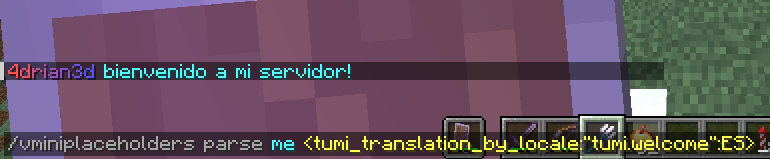
  • <tumi_translation_by_locale:"tumi.welcome":ES>

Returns a translation in the specified language.
If the translation does not exist in the specified language,
it will attempt to use the translation in the default language configured.
Usage in General Translations

The recommended use of TumiTranslator is through its MiniPlaceholders placeholders.
But if you want to use them anywhere else, it is possible. Here are some examples.

Please note that player placeholders are not yet supported in this way of displaying placeholders.
This feature will be applied to MiniMessage in future versions.

Lang Tag

  • <lang:"tumi.welcome":ES>

Videos

TumiTranslator with Velocitab

Watch the video

TumiTranslator with VCustomBrand

Watch the video

Support

Support is exclusively for those who have purchased the plugin from BuiltByBit or Polymart. You will be given a role on my Discord server with access to an exclusive channel.

👥 Team & Contributors

4drian3d
4drian3dOwner

⚙️ Compatibility

Environment
🖥️ Server-side
Loaders
foliapaperpurpurvelocity
Minecraft Versions
1.7.21.7.31.7.41.7.51.7.61.7.71.7.81.7.9+71 more

🔗 Links

Modrinth Page