Logo
MINECRAFTBIBLE
Items
Items

All game items

Blocks
Blocks

Building blocks

Mobs
Mobs

Creatures & monsters

Biomes
Biomes

World biomes

Structures
Structures

Generated structures

Recipes
Recipes

Crafting guides

Advancements
Advancements

Achievements

Loot Tables
Loot Tables

Drop rates

Tags
Tags

Item groupings

All Versions
View all data →
Capes
Cape ArchiveNEW

Browse rare Minecon capes, OptiFine capes, and custom capes from players worldwide

Browse

Player Database
Player DatabasePopular

Search any player

Skin Browser
Skin Browser

Browse & download skins

Cape Gallery
Cape GalleryNEW

Minecon & OptiFine capes

Seed Vault
Seed Vault

Curated seeds

Learn

Guides
GuidesNew

Tutorials & tips

Blog
Blog

News & updates

Community

Community Hub
Community HubHub

Posts, discussions & more

All Versions
View community →
Seed Analyzer
Seed Analyzer

World seed analysis

Loot Explorer
Loot Explorer

Drop rates

Crafting Calculator
Crafting Calculator

Material planning

Enchant Calculator
Enchant Calculator

Probability math

Redstone Lab
Redstone Lab

Signal timing

Trading Profit
Trading Profit

Villager ROI

All Versions
View all tools →
Mods
Mods

Browse all mods

Plugins
Plugins

Server plugins

Resource Packs
Resource Packs

Textures & sounds

Shaders
Shaders

Visual enhancements

Datapacks
Datapacks

World logic

Scanner
Mod Intelligence

Scan & analyze any mod

All Versions
View all mods →
Loading...
IntroductionIntroductionVersion HistoryVersion HistoryGuidesGuidesBlog & NewsBlog & News
ItemsItemsBlocksBlocksMobsMobsRecipesRecipesBiomesBiomesStructuresStructuresAdvancementsAdvancementsLoot TablesLoot TablesTagsTags
ModsModsPluginsPluginsResource PacksResource PacksShadersShadersDatapacksDatapacks

MinecraftBible

The Ultimate Wiki

Logo
MINECRAFTBIBLE

The ultimate Minecraft reference. Every item, block, mob, and recipe documented with precision.

Community

  • Skin Browser
  • Cape Gallery
  • Seed Vault
  • Blog
  • Guides

Database

  • Items
  • Blocks
  • Mobs
  • Recipes
  • Biomes
  • Structures

Tools

  • Seed Analyzer
  • Mod Intelligence
  • Crafting Calculator
  • Enchant Calculator

Mods & Packs

  • Mods
  • Plugins
  • Resource Packs
  • Shaders
  • Datapacks

Site & Legal

  • About
  • Authors
  • Editorial Policy
  • Corrections
  • Contact
  • Privacy Policy
  • Terms of Service
  • DMCA
  • Sitemap

© 2026 MinecraftBible. Not affiliated with Mojang or Microsoft.

PrivacyTermsContact
Trims Effect
PluginLicenseRef-All-Rights-Reserved

Trims Effect

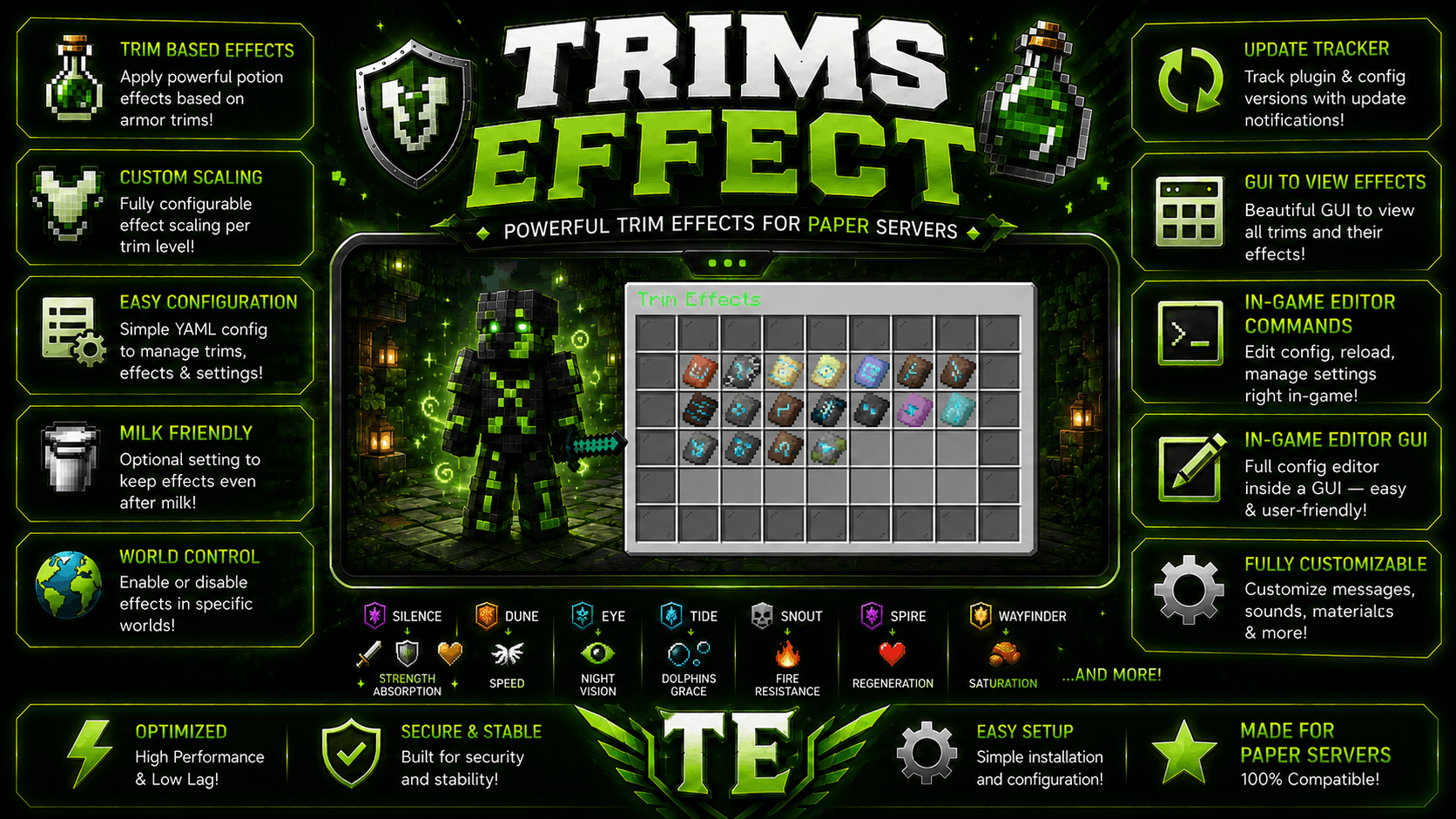
💎Adds configurable potion effects based on worn armor trims🤩, with smart scaling per trim and zero performance impact🚀.
499
Downloads
5
Followers
1 weeks ago
Updated
📦
14
Versions
equipmentgame-mechanicsmagicbukkitfoliapaperpurpur
Download Latestv1.0.13View on Modrinth

📖About Trims Effect

Banner

✨ TrimEffects (By GoldwarGlory)

  • ✨ TrimEffects is a lightweight Paper plugin.
  • ✨ Highly configurable, lag-free, and future-safe.
  • ✨ It gives potion effects based on worn armor trims.
  • ✨ Effects scale with the number of trimmed armor pieces.
  • ✨ Edit config.yml easily using in-game config editor. { /trimseffect edit }

⭐ Features of TrimsEffect

  • ⭐ Highly configurable via config.yml
  • ⭐ Safe against invalid trims or effects
  • ⭐ Multiple trims supported at the same time
  • ⭐ Optimized for large servers (500+ players)
  • ⭐ Potion effects based on armor trim patterns
  • ⭐ Ability to disable crafting of specific trim templates
  • ⭐ Reload config without restarting (/trimeffectsreload)
  • ⭐ Smart effect scaling depending on how many armor pieces share the same trim

⚙ How to Install TrimsEffect

  1. ✅ Download the plugin jar
  2. ✅ Place it in your server’s plugins/ folder
  3. ✅ Start the server once to generate config.yml
  4. ✅ Edit the config as you like
  5. ✅ Run /trimeffects reload or restart the server

🚀 Performance & Safety for servers

  • 🚀 No NMS, no packets
  • 🚀 Checks only 4 armor items per update
  • 🚀 Reload-safe (effects reapply correctly)
  • 🚀 Event-based (no repeating tasks, no ticking loops)
  • 🚀 Safe config parsing (invalid trims/effects are ignored)

💖 Need help? or report bugs

  • ❤️Join my Discord server for updates, support, and suggestions
  • ❤️My Modrinth Profile: https://modrinth.com/user/GoldwarGlory
  • ❤️My Discord Server: https://discord.gg/qwXHuyJbvX

➕Extra info of TrimsEffect

✅ plugin.yml
name: TrimsEffect
version: 1.0.11
main: me.goldwar.trimeffects.TrimsEffects
api-version: 1.20
author: GoldwarGlory
website: https://modrinth.com/plugin/trimseffect

commands:
  trimseffect:
    description: Main command
permissions:
  trimseffect.reload:
    default: op
    description: Reload the plugin's config
  trimseffect.gui:
    default: true
    description: Open the Trim Effects GUI
  trimseffect.edit:
    default: op
🌟 config.yml
# Basic Info:-
# Color codes use &: example "&6Gold", "&aGreen", "&cRed".
# Potion effect names use Bukkit names: SPEED, STRENGTH, RESISTANCE, etc.
# Effect levels are normal player-facing levels:
# 0 = disabled, 1 = level I, 2 = level II, 3 = level III

settings:
  prefix: "&6[TrimsEffect] &r" # plugin's prefix
  keep-effects-after-milk: true # If true, trim effects come back after a player drinks milk.
  check-for-updates: true # If true, admins with trimseffect.edit are notified when an update is available.
  disabled-worlds: [empty,emty,mty,mt] # Worlds where trim effects should not work.
  un-craftable-trims: [silence,sentry,"*"] # These armor trim templates cannot be crafted.

debug:
  missing-trims: true # should we send logs in console for missing trims in effects
  un-craftable-trims: true # should we send logs in console to get reminded which trims are un-craftable
  display-items: true # should we send logs in console for incorrect material names of display-items
  missing-display-items: true # should we send logs for missing trim-materials in config

gui: # Main /trimseffect gui menu.
  enabled: true # Toggle GUI
  title: "&aTrim Effects" # GUI Title
  size: 54 # Must be 27, 36, 45, or 54.
  show-missing-trims-in-gui: true # If true, GUI will also show the trims that are missing in config.

  display-items:
    default: NETHER_STAR # GUI item used when a trim has no item listed below.

    trims: # Items used by /trimseffect gui and the effects editor.
      silence: SILENCE_ARMOR_TRIM_SMITHING_TEMPLATE
      sentry: SENTRY_ARMOR_TRIM_SMITHING_TEMPLATE
      dune: DUNE_ARMOR_TRIM_SMITHING_TEMPLATE
      coast: COAST_ARMOR_TRIM_SMITHING_TEMPLATE
      wild: WILD_ARMOR_TRIM_SMITHING_TEMPLATE
      ward: WARD_ARMOR_TRIM_SMITHING_TEMPLATE
      eye: EYE_ARMOR_TRIM_SMITHING_TEMPLATE
      vex: VEX_ARMOR_TRIM_SMITHING_TEMPLATE
      tide: TIDE_ARMOR_TRIM_SMITHING_TEMPLATE
      snout: SNOUT_ARMOR_TRIM_SMITHING_TEMPLATE
      rib: RIB_ARMOR_TRIM_SMITHING_TEMPLATE
      spire: SPIRE_ARMOR_TRIM_SMITHING_TEMPLATE
      wayfinder: WAYFINDER_ARMOR_TRIM_SMITHING_TEMPLATE
      raiser: RAISER_ARMOR_TRIM_SMITHING_TEMPLATE
      shaper: SHAPER_ARMOR_TRIM_SMITHING_TEMPLATE
      host: HOST_ARMOR_TRIM_SMITHING_TEMPLATE
      flow: FLOW_ARMOR_TRIM_SMITHING_TEMPLATE
      bolt: BOLT_ARMOR_TRIM_SMITHING_TEMPLATE

effects:
  # Used when a trim does not define custom levels for a piece count.
  default-levels:
    1: 1
    2: 2
    3: 2
    4: 3

  # Trim names must be lowercase.
  # effects: potion effects this trim can give.
  # levels: optional per-piece override for that trim.
  # If levels is missing, default-levels above are used.
  trims:
    silence:
      effects:
        - STRENGTH
        - RESISTANCE
        - ABSORPTION
      levels:
        1:
          STRENGTH: 2
          RESISTANCE: 1
          ABSORPTION: 0
        2:
          STRENGTH: 3
          RESISTANCE: 2
          ABSORPTION: 1

    dune:
      effects:
        - SPEED

    coast:
      effects:
        - WATER_BREATHING

    wild:
      effects:
        - JUMP

    ward:
      effects:
        - RESISTANCE

    eye:
      effects:
        - NIGHT_VISION

    vex:
      effects:
        - HASTE

    tide:
      effects:
        - DOLPHINS_GRACE

    snout:
      effects:
        - FIRE_RESISTANCE

    rib:
      effects:
        - ABSORPTION

    spire:
      effects:
        - REGENERATION

    wayfinder:
      effects:
        - SATURATION

    raiser:
      effects:
        - STRENGTH

    shaper:
      effects:
        - HASTE

    host:
      effects:
        - HEALTH_BOOST

    flow:
      effects:
        - SPEED

    bolt:
      effects:
        - FAST_DIGGING

    # Empty effects means this trim appears in the GUI but gives no effects.
    sentry:
      effects: []

👥 Team & Contributors

GoldwarGlory
GoldwarGloryOwner

⚙️ Compatibility

Environment
🖥️ Server-side
Loaders
bukkitfoliapaperpurpur
Minecraft Versions
1.201.20.11.20.21.20.31.20.41.20.51.20.61.21+15 more

🔗 Links

Modrinth Page