
Logo
MINECRAFTBIBLE
Items
Items

All game items

Blocks
Blocks

Building blocks

Mobs
Mobs

Creatures & monsters

Biomes
Biomes

World biomes

Structures
Structures

Generated structures

Recipes
Recipes

Crafting guides

Advancements
Advancements

Achievements

Loot Tables
Loot Tables

Drop rates

Tags
Tags

Item groupings

All Versions
View all data →
Capes
Cape ArchiveNEW

Browse rare Minecon capes, OptiFine capes, and custom capes from players worldwide

Browse

Player Database
Player DatabasePopular

Search any player

Skin Browser
Skin Browser

Browse & download skins

Cape Gallery
Cape GalleryNEW

Minecon & OptiFine capes

Seed Vault
Seed Vault

Curated seeds

Learn

Guides
GuidesNew

Tutorials & tips

Blog
Blog

News & updates

Community

Community Hub
Community HubHub

Posts, discussions & more

All Versions
View community →
Seed Analyzer
Seed Analyzer

World seed analysis

Loot Explorer
Loot Explorer

Drop rates

Crafting Calculator
Crafting Calculator

Material planning

Enchant Calculator
Enchant Calculator

Probability math

Redstone Lab
Redstone Lab

Signal timing

Trading Profit
Trading Profit

Villager ROI

All Versions
View all tools →
Mods
Mods

Browse all mods

Plugins
Plugins

Server plugins

Resource Packs
Resource Packs

Textures & sounds

Shaders
Shaders

Visual enhancements

Datapacks
Datapacks

World logic

Scanner
Mod Intelligence

Scan & analyze any mod

All Versions
View all mods →
Loading...
IntroductionIntroductionVersion HistoryVersion HistoryGuidesGuidesBlog & NewsBlog & News
ItemsItemsBlocksBlocksMobsMobsRecipesRecipesBiomesBiomesStructuresStructuresAdvancementsAdvancementsLoot TablesLoot TablesTagsTags
ModsModsPluginsPluginsResource PacksResource PacksShadersShadersDatapacksDatapacks

MinecraftBible

The Ultimate Wiki

Logo
MINECRAFTBIBLE

The ultimate Minecraft reference. Every item, block, mob, and recipe documented with precision.

Community

  • Skin Browser
  • Cape Gallery
  • Seed Vault
  • Blog
  • Guides

Database

  • Items
  • Blocks
  • Mobs
  • Recipes
  • Biomes
  • Structures

Tools

  • Seed Analyzer
  • Mod Intelligence
  • Crafting Calculator
  • Enchant Calculator

Mods & Packs

  • Mods
  • Plugins
  • Resource Packs
  • Shaders
  • Datapacks

Site & Legal

  • About
  • Authors
  • Editorial Policy
  • Corrections
  • Contact
  • Privacy Policy
  • Terms of Service
  • DMCA
  • Sitemap

© 2026 MinecraftBible. Not affiliated with Mojang or Microsoft.

PrivacyTermsContact
TrimEditor
PluginMIT

TrimEditor

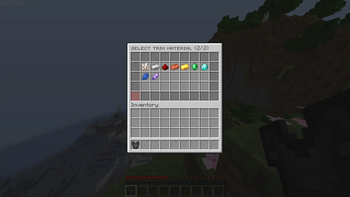
A GUI plugin to apply and remove Armor Trims in Minecraft 1.21+

50
Downloads
0
Followers
1 months ago
Updated
📦
1
Versions
equipmentgame-mechanicsutilitybukkitpaper
Download Latestv1.0View on Modrinth

📖About TrimEditor

Overview

TrimEditor provides a clean, two-step graphical interface for players to manage Armor Trims without requiring a Smithing Table or template items. It is designed specifically for Minecraft 1.21+ environments with a strict focus on maintaining server performance.

! Not suitable for survival servers. Users can edit without materials or a smithing table

Core Features

  • Two-Step GUI: Separate menus for choosing patterns and materials.
  • Instant Removal: One-click button to clear trims from armor.
  • Lag-Free: Pre-cached menus for instant loading without affecting server performance.
  • Custom Sounds: Configurable audio for clicks, success, and errors.
  • Vanilla Look: Uses default Minecraft item names and lore

Commands and Permissions

  • /trim (or /trimeditor) | trimeditor.use : Opens the customization GUI for the armor piece currently held in the main hand.
  • /trim reload | trimeditor.admin : Reloads the configuration file and rebuilds the interface cache.

System Requirements

  • Server Software: Spigot, Paper, Purpur, or compatible forks
  • Minecraft Version: 1.21 or higher
  • Java: Java 21 or higher

👥 Team & Contributors

lolfusrin6692
lolfusrin6692Owner

⚙️ Compatibility

Environment
🖥️ Server-side
Loaders
bukkitpaper
Minecraft Versions
1.211.21.11.21.21.21.31.21.41.21.51.21.61.21.7+4 more

🔗 Links

Modrinth Page