


TrialChamberPro
Because Trial Chambers deserve better than being a "one and done" dungeon.
📖About TrialChamberPro
TrialChamberPro
The Most Complete Premium Trial Chamber Plugin... that's free!?
Please share your "If it would do [THING], I would use it" feedback! 
Recently Added
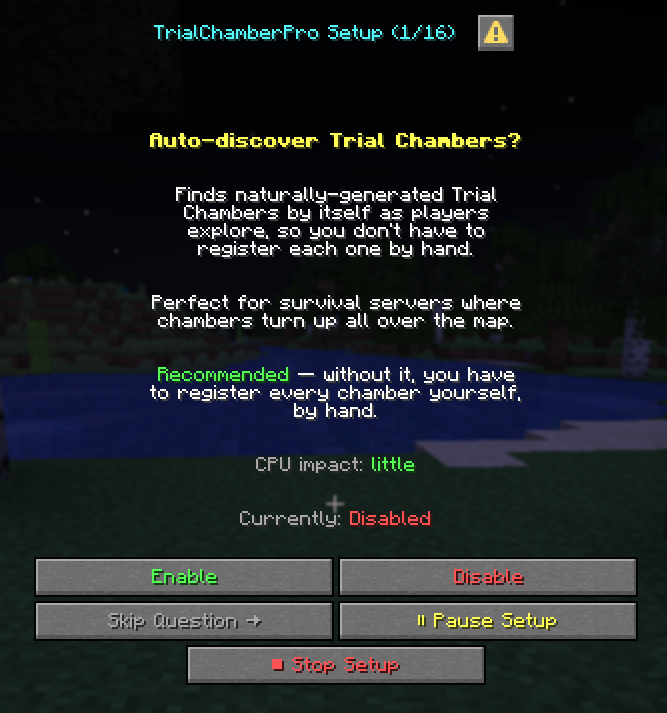
A guided setup tour — run
/tcp setupfor a friendly, one-setting-at-a-time walkthrough of the main options (Enable / Skip / Disable, nothing forced). Native Dialog UI on Paper 1.21.7+, with an automatic clickable-chat fallback on older servers. See the native Dialog UI (Paper 1.21.7+)
The whole chamber is now per-player — vaults and chests / barrels / dispensers / droppers each hand every player their own Lootr-style copy that resets with the chamber (decorated pots refill too).
Your chambers can't be claimed or blast-mined — blocks Residence / Lands / GriefPrevention claims from overlapping a chamber, and stops AdvancedEnchantments enchants (Blast Mining, etc.) from breaking into one.
/tcp claims scanhunts down existing conflicts.Vaults, expanded — native Vault economy rewards in loot tables, working time-based cooldowns, key-to-reopen vaults, and opt-in floating ✔ / ✘ hologram feedback.
Procedural dungeons + real loot tables — assemble modular dungeons with
/tcp dungeon, and pull genuine vanilla / datapack loot tables straight into vault drops.Self-updating & fully translatable — new config options and message keys merge into your existing files automatically on every update (with a backup), and every player-facing string can be localized.
This plugin is updated almost daily — and many of these features came straight from a server owner's suggestion. Got an idea? Share it (Discord above) and there's a good chance it ships within days. Thank you!
Upgrading? Re-run /tcp snapshot create on existing chambers so container & decorated-pot loot is captured.
Full documentation: https://darkstarworks.gitbook.io/plugins/mc/tcp-documentation — most questions are answered there, and every section below links to its own detailed page.
Premium Add-on Modules
TrialChamberPro is, and always will be, completely free. But after a lot of requests from server owners wanting to push things further, we now offer optional premium modules for servers that need more.
TCP-MythicTrials — per-player chamber progression with Mythic difficulty tiersEvery chamber clear bumps each participant's personal tier (T1–T20, then opt-in Mythic M1–M5): mobs scale in health, damage, speed, armor, gear and tactics — gear-adaptive AI, themed rooms, anti-heal, true damage — while rewards scale with them. In-chamber HUD, per-chamber leaderboards, seasons with seasonal loot, and full custom-mob-provider support. Built on TCP's ChamberClearedEvent, so it works on every registered chamber automatically.
Requires TrialChamberPro v1.5.4+ (free).
esmp.fun/plugins — purchase & download
TCP-WildSpawners — preset spawners anywhere on the mapPlace TCP preset spawners anywhere on your survival map — no Trial Chamber required. Hand them out via shops, crates, or staff commands. Wherever a player puts one down, it summons your custom mobs. Includes an in-game GUI editor, per-preset griefing protection, holograms, mob tether, creative pick-block, and state-preserving mining so players can relocate a live spawner without losing cooldown progress.
Requires TrialChamberPro v1.4.0+ (free).
esmp.fun/plugins — purchase & download
TCP-VaultCrates — the first crate plugin that doesn't use chestsVanilla Trial Vaults are the only Minecraft block with built-in per-player loot state, two visual tiers (normal + ominous), a key mechanic, and a dramatic open animation that doesn't need a resource pack. TCP-VaultCrates lets you register vaults anywhere on your map as crates with configurable loot pools and per-tier keys. Hand keys out via shops, missions, or — when paired with TCP-WildSpawners — drop them from spawner mobs.
Requires TrialChamberPro v1.4.0+ (free).
esmp.fun/plugins — purchase & download
Why TrialChamberPro?
It's the definitive Trial Chamber management plugin for multiplayer servers.
Vanilla Trial Chambers weren't designed for multiplayer. The first player takes everything, vaults stay locked forever, and griefers destroy spawners.
TrialChamberPro fixes all of that.
| Problem | Solution |
|---|---|
| First player gets all loot | Per-player vaults with individual cooldowns — and per-player chests/barrels too (new in 1.5.7) |
| No way to reset chambers | Automatic scheduled resets with player warnings |
| Vaults locked forever once opened | Time-based cooldowns, reset-based unlocks, or pay-keys-to-reopen (new in 1.5.7) |
| Griefers break spawners | Full protection system with optional WorldGuard support |
| Paper trial key bugs | Built-in fixes for known Paper issues |
| No progression tracking | Statistics, leaderboards, and PlaceholderAPI support |
| Setup overhead per chamber | Auto-discovery — chambers register themselves |
Two-Line Plug-and-Play Setup
For most servers, the only thing you need to configure is this:
# plugins/TrialChamberPro/config.yml
discovery:
  enabled: true        # find natural trial chambers automatically
  auto-snapshot: true  # capture blocks so resets can restore them
Restart once. Fly or walk through your world — every natural trial chamber registers itself as its chunks load, with per-player loot, protection, and automatic resets already active. Done.
Why it's opt-in: on old worlds that pre-date 1.21, players sometimes build decorative structures out of tuff and copper blocks. The auto-detector could register those as chambers. On fresh worlds there's no risk. More details in the docs →
Prefer manual control? You can still register chambers with WorldEdit (/tcp generate wand MyChamber) or by coordinates — see Your First Chamber.
Features
Core Systems
- Auto-Discovery — natural chambers register themselves on chunk load + startup sweep. Docs →
- Automatic Resets — chambers restore on schedule with configurable warnings, or set interval to
0for manual-only. - Per-Player Vaults — everyone gets their own loot with separate cooldowns, plus optional pay-keys-to-reopen.
- Per-Player Chests & Barrels (new in 1.5.7, opt-in) — Lootr-style private container copies, so the whole chamber is per-player.
- Procedural Dungeon Generation — build modular rooms with jigsaw-block doorways;
/tcp dungeon generatestitches them into brand-new chambers. - Full Protection — block break/place, container access, mob griefing, wild-vault placement. WorldGuard-aware.
- Statistics & Leaderboards — vaults opened, mobs killed, time spent. Docs →
- Admin GUI —
/tcp menudoes everything. No YAML editing required — and/tcp listdeep-links into it.
- Multi-Pool Tables — common / rare / unique pools like vanilla, fully configurable. Docs →
- Per-Chamber Overrides — assign a different loot table to any specific chamber.
- GUI Editing — open
/tcp menu→ Loot Tables, click a table, and edit it. Changes save toloot.ymlinstantly. - Custom Plugin Items — drop Nexo, ItemsAdder, or Oraxen items directly from vaults:
- type: CUSTOM_ITEM plugin: nexo # or itemsadder / oraxen / craftengine / mythiccrucible item-id: mythic_sword weight: 5 - Custom Model Data — set
custom-model-dataon any vanilla item for resource-pack integration. - Command Rewards — run any console command as loot (economy deposits, permission grants, XP).
- Vanilla & Datapack Tables (new in 1.5.7) — reference any registered loot table directly:
- type: VANILLA_TABLE table: "minecraft:chests/trial_chambers/reward" weight: 30 - Potion & Tipped Arrows — full attribute support including Bad Omen III–V ominous bottles.
- LUCK Integration — optional bonus rolls for players with the LUCK effect.
- Spawner Wave Tracking — boss bar shows wave progress as players fight. Hysteresis-based despawn means the bar disappears when you leave the area.
- Spawner Glow Outline (opt-in) — active spawners glow through walls;
chamber-remainingmode lights up every uncleared spawner so nobody hunts for the one they missed. - Spectator Mode — dead players can watch teammates complete the challenge, bounded to the chamber.
- PlaceholderAPI — 20+ placeholders for scoreboards, holograms, tab lists.
- Folia Native — full support for regionized multithreading.
- Paper / Purpur / Pufferfish — works on all major Paper forks.
- Async Architecture — Kotlin coroutines, zero main-thread blocking.
- Dual Database — SQLite (default) or MySQL with connection pooling.
- WorldEdit / FAWE — optional, used only if you want selection-based chamber creation.
Fully Translatable
Every user-facing string lives in plugins/TrialChamberPro/messages.yml. Want your server in French, Chinese, Spanish, or Klingon? Edit one file, /tcp reload, done.
Supports &-style color codes, {placeholder} substitution, and Adventure Components for boss bars.
Requirements
| Requirement | Version |
|---|---|
| Minecraft | 1.21.1+ (use the -mc26 JAR for 26.x) |
| Server | Paper, Folia, Purpur, or Pufferfish |
| Java | 21+ |
- WorldEdit / FastAsyncWorldEdit — selection-based chamber creation.
- WorldGuard — additional region protection.
- PlaceholderAPI — scoreboard / hologram placeholders.
- Vault — economy command rewards.
- Nexo / ItemsAdder / Oraxen / CraftEngine / MythicCrucible — custom items in loot tables.
- LuckPerms — permission command rewards.
Quick Start & Reference
Quick Start (manual mode) — the classic WorldEdit workflowPrefer not to use auto-discovery? Classic workflow still works:
1. Drop the JAR in your plugins folder
2. Start your server
3. Select a Trial Chamber with WorldEdit (//wand)
4. Run: /tcp generate wand MyChamber
5. Run: /tcp snapshot create MyChamber   (enables auto-reset)
6. Done!
| Command | Description |
|---|---|
/tcp setup |
Guided, opt-in settings tour (native Dialog UI, or clickable chat on older servers) |
/tcp menu [chamber] |
Open the admin GUI (does everything); with a name, jump straight to that chamber |
/tcp list [page|current] |
Interactive chamber list — click to copy names or open the GUI |
/tcp generate wand <name> |
Register chamber from WorldEdit selection |
/tcp reset <chamber> |
Force immediate reset |
/tcp snapshot create [chamber] |
Enable automatic resets (omit the name while standing inside) |
/tcp dungeon generate <name> |
Stitch a procedural chamber from your room templates |
/tcp loot set <chamber> <normal|ominous> <table> |
Override loot for a chamber |
/tcp stats [player] |
View statistics |
/tcp leaderboard <type> |
View top players |
/tcp reload |
Reload config & loot tables |
| Permission | Description | Default |
|---|---|---|
tcp.admin |
Full admin access | OP |
tcp.stats · tcp.leaderboard |
View own stats / leaderboards | Everyone |
tcp.spectate |
Use spectator mode after death | Everyone |
tcp.bypass.cooldown |
Ignore vault cooldowns (careful: removes progression!) | OP |
tcp.bypass.protection |
Build in protected chambers | OP |
tcp.discovery.notify |
Get notified when auto-discovery registers a chamber | OP |
Heads up:
tcp.bypass.cooldownis granted to OPs by default. If you're testing cooldowns as an OP, they'll appear broken — either test as a non-OP or explicitly negate the permission.
Full permissions guide with rank examples →
Essential Configuration — the three settings most servers tweakSensible defaults work out of the box. The three settings most servers actually tweak:
global:
  default-reset-interval: 172800   # 48 hours. Use 0 for manual-only resets.

vaults:
  normal-cooldown-hours: 0         # 0 = vanilla (locked until chamber reset)
  ominous-cooldown-hours: 0        # Set a positive number for per-player time cooldown.
  reopen-cost-keys: 0              # N = open an already-used vault again for N keys. 0 = off.

chests:
  per-player-loot: false           # true = every player gets their own chest loot (Lootr-style)

discovery:
  enabled: true                    # Auto-register natural chambers. Opt-in.
  auto-snapshot: true              # Allow auto-discovered chambers to restore on reset.
Full config.yml reference → · loot.yml reference →
PlaceholderAPI — 30+ placeholders30+ placeholders for player stats (%tcp_vaults_opened%, %tcp_mobs_killed%, %tcp_kdr%, %tcp_time_spent%), current state (%tcp_current_chamber%, %tcp_current_chamber_reset%, %tcp_chamber_count%), leaderboard rank (%tcp_leaderboard_vaults%), and top-10 boards (%tcp_top_vaults_1_name% … _value% for vaults/chambers/time/mobs). Built-in caching (stats 30 s, leaderboards 60 s).
Support
- Documentation — setup guides, configuration reference, troubleshooting. Please check here first! Most questions are already answered.
- Discord — community support, announcements, feature requests. Not everyone's a reader — that's fine, come chat.
- GitHub Issues — bug reports.
- Source Code — open source under CC-BY-NC-ND 4.0.
Target Audience
- Survival Servers — renewable endgame content that keeps players engaged.
- SMP Networks — fair loot distribution across your playerbase.
- Minigame Servers — competitive Trial Chamber runs with leaderboards.
- Adventure / RP Servers — protected dungeons with custom rewards.
Paper 1.21.1+ / 26.1.2+ · Folia Native · Java 21+
Made with Kotlin by darkstarworks
This plugin is free forever and actively maintained.
If you have questions or would like to just say Hi, come join the Discord.
Rather stay silent? (Anonymous) donations are also VERY welcome: https://ko-fi.com/darkstarworks