Logo
MINECRAFTBIBLE
Items
Items

All game items

Blocks
Blocks

Building blocks

Mobs
Mobs

Creatures & monsters

Biomes
Biomes

World biomes

Structures
Structures

Generated structures

Recipes
Recipes

Crafting guides

Advancements
Advancements

Achievements

Loot Tables
Loot Tables

Drop rates

Tags
Tags

Item groupings

All Versions
View all data →
Capes
Cape ArchiveNEW

Browse rare Minecon capes, OptiFine capes, and custom capes from players worldwide

Browse

Player Database
Player DatabasePopular

Search any player

Skin Browser
Skin Browser

Browse & download skins

Cape Gallery
Cape GalleryNEW

Minecon & OptiFine capes

Seed Vault
Seed Vault

Curated seeds

Learn

Guides
GuidesNew

Tutorials & tips

Blog
Blog

News & updates

Community

Community Hub
Community HubHub

Posts, discussions & more

All Versions
View community →
Seed Analyzer
Seed Analyzer

World seed analysis

Loot Explorer
Loot Explorer

Drop rates

Crafting Calculator
Crafting Calculator

Material planning

Enchant Calculator
Enchant Calculator

Probability math

Redstone Lab
Redstone Lab

Signal timing

Trading Profit
Trading Profit

Villager ROI

All Versions
View all tools →
Mods
Mods

Browse all mods

Plugins
Plugins

Server plugins

Resource Packs
Resource Packs

Textures & sounds

Shaders
Shaders

Visual enhancements

Datapacks
Datapacks

World logic

Scanner
Mod Intelligence

Scan & analyze any mod

All Versions
View all mods →
Loading...
IntroductionIntroductionVersion HistoryVersion HistoryGuidesGuidesBlog & NewsBlog & News
ItemsItemsBlocksBlocksMobsMobsRecipesRecipesBiomesBiomesStructuresStructuresAdvancementsAdvancementsLoot TablesLoot TablesTagsTags
ModsModsPluginsPluginsResource PacksResource PacksShadersShadersDatapacksDatapacks

MinecraftBible

The Ultimate Wiki

Logo
MINECRAFTBIBLE

The ultimate Minecraft reference. Every item, block, mob, and recipe documented with precision.

Community

  • Skin Browser
  • Cape Gallery
  • Seed Vault
  • Blog
  • Guides

Database

  • Items
  • Blocks
  • Mobs
  • Recipes
  • Biomes
  • Structures

Tools

  • Seed Analyzer
  • Mod Intelligence
  • Crafting Calculator
  • Enchant Calculator

Mods & Packs

  • Mods
  • Plugins
  • Resource Packs
  • Shaders
  • Datapacks

Site & Legal

  • About
  • Authors
  • Editorial Policy
  • Corrections
  • Contact
  • Privacy Policy
  • Terms of Service
  • DMCA
  • Sitemap

© 2026 MinecraftBible. Not affiliated with Mojang or Microsoft.

PrivacyTermsContact
DonutTPA
PluginCC-BY-NC-4.0

DonutTPA

A plugin to replicate the DonutSMP TPA system.

4.6K
Downloads
6
Followers
2 months ago
Updated
📦
1
Versions
game-mechanicstechnologybukkitpaperpurpurspigot
Download Latestvv1View on Modrinth

📖About DonutTPA

dtpa1
discord
dtpa2
DonutTPA

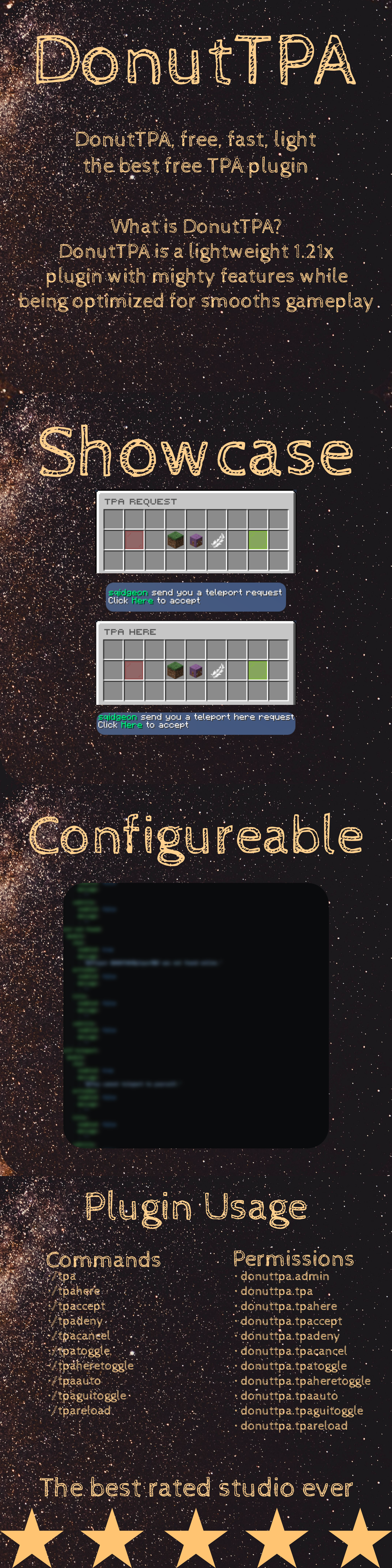
DonutTPA is a lightweight and easy-to-use teleport request plugin inspired by servers like DonutSMP. It allows players to send and accept teleport requests, making multiplayer survival more convenient without breaking the vanilla feel.

This plugin is designed to be simple, fast, and reliable, providing essential teleportation features without unnecessary complexity.

✨ Features
📩 Send teleport requests to other players using /tpa
✅ Accept requests with /tpaccept
❌ Deny requests with /tpdeny
⏱️ Optional cooldowns to prevent spam
🧼 Lightweight and optimized performance
🔧 Easy to configure and customize
🎮 How It Works

Players can send a teleport request to another player using a simple command. The receiving player can then choose to accept or deny the request. This system makes it easy to meet up with friends while still keeping gameplay balanced.

⚙️ Commands
/tpa – Send a teleport request
/tpaccept – Accept a teleport request
/tpdeny – Deny a teleport request
🧩 Compatibility
Works with most modern Minecraft server versions
Compatible with popular server software such as Spigot, Paper, and Bukkit
🚀 Why Use DonutTPA?

Teleportation is a core feature in many multiplayer servers, but not all plugins keep things simple. DonutTPA focuses on delivering exactly what you need:

Clean functionality
No unnecessary features
Smooth player experience

Perfect for survival servers, SMPs, and small communities.

📦 Installation
Download the plugin file
Place it in your server’s /plugins folder
Restart your server
(Optional) Edit the config file to customize settings
📜 Permissions (optional)
donuttpa.use – Allows use of teleport commands
donuttpa.accept – Allows accepting requests
📌 Notes
Make sure your server is running a supported platform
Avoid using multiple TPA plugins at the same time
Configuration options may vary depending on version
📢 Support & Usage

If you encounter any issues or have suggestions, feel free to reach out.

You are free to use this plugin on your server.
Do not reupload or redistribute without permission.

n.

👥 Team & Contributors

sqidgeon
sqidgeonOwner

⚙️ Compatibility

Environment
🖥️ Server-side
Loaders
bukkitpaperpurpurspigot
Minecraft Versions
1.211.21.11.21.21.21.31.21.41.21.51.21.61.21.7+7 more

🔗 Links

Modrinth Page