Logo
MINECRAFTBIBLE
Items
Items

All game items

Blocks
Blocks

Building blocks

Mobs
Mobs

Creatures & monsters

Biomes
Biomes

World biomes

Structures
Structures

Generated structures

Recipes
Recipes

Crafting guides

Advancements
Advancements

Achievements

Loot Tables
Loot Tables

Drop rates

Tags
Tags

Item groupings

All Versions
View all data →
Capes
Cape ArchiveNEW

Browse rare Minecon capes, OptiFine capes, and custom capes from players worldwide

Browse

Player Database
Player DatabasePopular

Search any player

Skin Browser
Skin Browser

Browse & download skins

Cape Gallery
Cape GalleryNEW

Minecon & OptiFine capes

Seed Vault
Seed Vault

Curated seeds

Learn

Guides
GuidesNew

Tutorials & tips

Blog
Blog

News & updates

Community

Community Hub
Community HubHub

Posts, discussions & more

All Versions
View community →
Seed Analyzer
Seed Analyzer

World seed analysis

Loot Explorer
Loot Explorer

Drop rates

Crafting Calculator
Crafting Calculator

Material planning

Enchant Calculator
Enchant Calculator

Probability math

Redstone Lab
Redstone Lab

Signal timing

Trading Profit
Trading Profit

Villager ROI

All Versions
View all tools →
Mods
Mods

Browse all mods

Plugins
Plugins

Server plugins

Resource Packs
Resource Packs

Textures & sounds

Shaders
Shaders

Visual enhancements

Datapacks
Datapacks

World logic

Scanner
Mod Intelligence

Scan & analyze any mod

All Versions
View all mods →
Loading...
IntroductionIntroductionVersion HistoryVersion HistoryGuidesGuidesBlog & NewsBlog & News
ItemsItemsBlocksBlocksMobsMobsRecipesRecipesBiomesBiomesStructuresStructuresAdvancementsAdvancementsLoot TablesLoot TablesTagsTags
ModsModsPluginsPluginsResource PacksResource PacksShadersShadersDatapacksDatapacks

MinecraftBible

The Ultimate Wiki

Logo
MINECRAFTBIBLE

The ultimate Minecraft reference. Every item, block, mob, and recipe documented with precision.

Community

  • Skin Browser
  • Cape Gallery
  • Seed Vault
  • Blog
  • Guides

Database

  • Items
  • Blocks
  • Mobs
  • Recipes
  • Biomes
  • Structures

Tools

  • Seed Analyzer
  • Mod Intelligence
  • Crafting Calculator
  • Enchant Calculator

Mods & Packs

  • Mods
  • Plugins
  • Resource Packs
  • Shaders
  • Datapacks

Site & Legal

  • About
  • Authors
  • Editorial Policy
  • Corrections
  • Contact
  • Privacy Policy
  • Terms of Service
  • DMCA
  • Sitemap

© 2026 MinecraftBible. Not affiliated with Mojang or Microsoft.

PrivacyTermsContact
TowerManaEvent
PluginMIT

TowerManaEvent

The plugin adds an event with abilities

8
Downloads
0
Followers
2 months ago
Updated
📦
1
Versions
game-mechanicsminigamepaper
Download Latestv1.4View on Modrinth

📖About TowerManaEvent

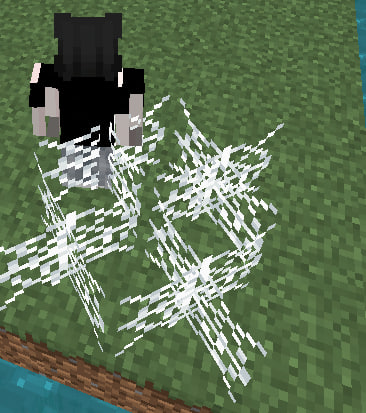
The essence of the event is that a schematic spawns at random coordinates (the range is specified in config.yml for the X and Z axes). The schematic is located at the path plugins/TowerManaEvent/schematics/ (the schematic name is specified in config.yml). After the schematic has spawned, a hologram appears above all chests (the hologram lines are configured in config.yml). The hologram displays information about the chest: the amount of mana the chest has, the current stage, the last ability used. A bossbar also appears (configured in config.yml), which can display event information: event coordinates, current stage, time remaining until the stage ends, PvP status (enabled/disabled). The chest spends mana on abilities. There are 4 abilities in total: Web: spawns a web beneath a player and deals damage; the web then disappears, Fireballs: spawns fireballs above the chest, which then fly towards players, Splash damage: particles appear around the chest in the form of a circle that expands and then contracts. Players within these circles take damage, Horses: horses spawn in front of the chest and move forward. Players who cross their path take damage and are knocked back. All abilities are configurable in the configuration file (config.yml). The chest replenishes mana through player deaths within the schematic area. After this, Stage 1 of the event begins. There are 3 stages in total (configurable in config.yml). For each stage, you can configure: PvP status (enabled/disabled), duration, available abilities, whether opening chests is allowed or forbidden. Player privileges such as FLY, GOD, and VANISH are disabled within the schematic area. Actions can be configured for, event start, event end, stage transitions (e.g., sending a message, playing a sound, etc.). Chests are specified in the configuration file (config.yml) in the settings.chests section, where the chest’s offset along the X, Y, and Z axes is defined. You can also configure, the initial amount of mana for a chest, how much mana a random chest gains per player death, how much mana is granted when transitioning to the next event stage.

👥 Team & Contributors

phrase
phraseOwner

⚙️ Compatibility

Environment
🖥️ Server-side
Loaders
paper
Minecraft Versions
1.161.171.181.191.201.21

🔗 Links

Modrinth Page