Logo
MINECRAFTBIBLE
Items
Items

All game items

Blocks
Blocks

Building blocks

Mobs
Mobs

Creatures & monsters

Biomes
Biomes

World biomes

Structures
Structures

Generated structures

Recipes
Recipes

Crafting guides

Advancements
Advancements

Achievements

Loot Tables
Loot Tables

Drop rates

Tags
Tags

Item groupings

All Versions
View all data →
Capes
Cape ArchiveNEW

Browse rare Minecon capes, OptiFine capes, and custom capes from players worldwide

Browse

Player Database
Player DatabasePopular

Search any player

Skin Browser
Skin Browser

Browse & download skins

Cape Gallery
Cape GalleryNEW

Minecon & OptiFine capes

Seed Vault
Seed Vault

Curated seeds

Learn

Guides
GuidesNew

Tutorials & tips

Blog
Blog

News & updates

Community

Community Hub
Community HubHub

Posts, discussions & more

All Versions
View community →
Seed Analyzer
Seed Analyzer

World seed analysis

Loot Explorer
Loot Explorer

Drop rates

Crafting Calculator
Crafting Calculator

Material planning

Enchant Calculator
Enchant Calculator

Probability math

Redstone Lab
Redstone Lab

Signal timing

Trading Profit
Trading Profit

Villager ROI

All Versions
View all tools →
Mods
Mods

Browse all mods

Plugins
Plugins

Server plugins

Resource Packs
Resource Packs

Textures & sounds

Shaders
Shaders

Visual enhancements

Datapacks
Datapacks

World logic

Scanner
Mod Intelligence

Scan & analyze any mod

All Versions
View all mods →
Loading...
IntroductionIntroductionVersion HistoryVersion HistoryGuidesGuidesBlog & NewsBlog & News
ItemsItemsBlocksBlocksMobsMobsRecipesRecipesBiomesBiomesStructuresStructuresAdvancementsAdvancementsLoot TablesLoot TablesTagsTags
ModsModsPluginsPluginsResource PacksResource PacksShadersShadersDatapacksDatapacks

MinecraftBible

The Ultimate Wiki

Logo
MINECRAFTBIBLE

The ultimate Minecraft reference. Every item, block, mob, and recipe documented with precision.

Community

  • Skin Browser
  • Cape Gallery
  • Seed Vault
  • Blog
  • Guides

Database

  • Items
  • Blocks
  • Mobs
  • Recipes
  • Biomes
  • Structures

Tools

  • Seed Analyzer
  • Mod Intelligence
  • Crafting Calculator
  • Enchant Calculator

Mods & Packs

  • Mods
  • Plugins
  • Resource Packs
  • Shaders
  • Datapacks

Site & Legal

  • About
  • Authors
  • Editorial Policy
  • Corrections
  • Contact
  • Privacy Policy
  • Terms of Service
  • DMCA
  • Sitemap

© 2026 MinecraftBible. Not affiliated with Mojang or Microsoft.

PrivacyTermsContact
Torch Protect
PluginLicenseRef-All-Rights-Reserved

Torch Protect

Keep hostile mobs from spawning within a radius.

98
Downloads
1
Followers
10 months ago
Updated
📦
2
Versions
game-mechanicsmobsutilitypaperspigot
Download Latestv1.0.1View on Modrinth

📖About Torch Protect

This plugin is directly inspired by MAGNUM TORCH


How it works?

With this plugin you can craft a special torch called "Protection Torch", which will prevent any hostile mobs from spawning on a configurable radius (capped at 100 blocks to avoid performance issues for now).
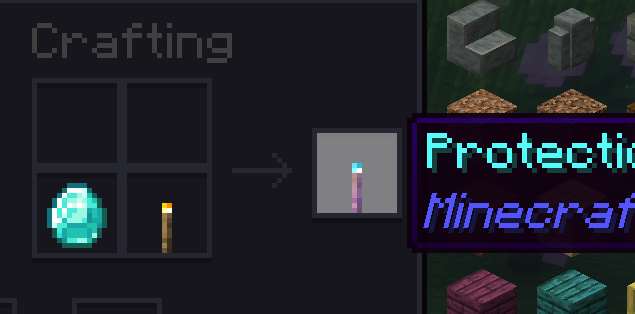
Item

Keep in mind: If you place a protection torch at night and there are already hostile mobs around it, they won't despawn, you are going to have to remove/kill them.

You can remove any torches within a radius with the command /torchprotect clear.

Configuration:

You can change the radius and the crafting recipe for the special torch. you can use the /torchprotect reload command to reload config.

# TorchProtect configuration
# Shapeless recipe for the Protection Torch (result is always 1 item).
# Up to 9 ingredients allowed. 'amount' counts how many of that material are required.
recipe:
  ingredients:
    - material: DIAMOND
      amount: 1
    - material: TORCH
      amount: 1

# Blocking radius in blocks (1 - 100). Values above 100 will be clamped to 100.
radius: 100

Bye!

👥 Team & Contributors

p0nx77
p0nx77Owner

⚙️ Compatibility

Environment
🖥️ Server-side
Loaders
paperspigot
Minecraft Versions
1.211.21.11.21.21.21.31.21.41.21.51.21.61.21.7+1 more

🔗 Links

Modrinth Page