Logo
MINECRAFTBIBLE
Items
Items

All game items

Blocks
Blocks

Building blocks

Mobs
Mobs

Creatures & monsters

Biomes
Biomes

World biomes

Structures
Structures

Generated structures

Recipes
Recipes

Crafting guides

Advancements
Advancements

Achievements

Loot Tables
Loot Tables

Drop rates

Tags
Tags

Item groupings

All Versions
View all data →
Capes
Cape ArchiveNEW

Browse rare Minecon capes, OptiFine capes, and custom capes from players worldwide

Browse

Player Database
Player DatabasePopular

Search any player

Skin Browser
Skin Browser

Browse & download skins

Cape Gallery
Cape GalleryNEW

Minecon & OptiFine capes

Seed Vault
Seed Vault

Curated seeds

Learn

Guides
GuidesNew

Tutorials & tips

Blog
Blog

News & updates

Community

Community Hub
Community HubHub

Posts, discussions & more

All Versions
View community →
Seed Analyzer
Seed Analyzer

World seed analysis

Loot Explorer
Loot Explorer

Drop rates

Crafting Calculator
Crafting Calculator

Material planning

Enchant Calculator
Enchant Calculator

Probability math

Redstone Lab
Redstone Lab

Signal timing

Trading Profit
Trading Profit

Villager ROI

All Versions
View all tools →
Mods
Mods

Browse all mods

Plugins
Plugins

Server plugins

Resource Packs
Resource Packs

Textures & sounds

Shaders
Shaders

Visual enhancements

Datapacks
Datapacks

World logic

Scanner
Mod Intelligence

Scan & analyze any mod

All Versions
View all mods →
Loading...
IntroductionIntroductionVersion HistoryVersion HistoryGuidesGuidesBlog & NewsBlog & News
ItemsItemsBlocksBlocksMobsMobsRecipesRecipesBiomesBiomesStructuresStructuresAdvancementsAdvancementsLoot TablesLoot TablesTagsTags
ModsModsPluginsPluginsResource PacksResource PacksShadersShadersDatapacksDatapacks

MinecraftBible

The Ultimate Wiki

Logo
MINECRAFTBIBLE

The ultimate Minecraft reference. Every item, block, mob, and recipe documented with precision.

Community

  • Skin Browser
  • Cape Gallery
  • Seed Vault
  • Blog
  • Guides

Database

  • Items
  • Blocks
  • Mobs
  • Recipes
  • Biomes
  • Structures

Tools

  • Seed Analyzer
  • Mod Intelligence
  • Crafting Calculator
  • Enchant Calculator

Mods & Packs

  • Mods
  • Plugins
  • Resource Packs
  • Shaders
  • Datapacks

Site & Legal

  • About
  • Authors
  • Editorial Policy
  • Corrections
  • Contact
  • Privacy Policy
  • Terms of Service
  • DMCA
  • Sitemap

© 2026 MinecraftBible. Not affiliated with Mojang or Microsoft.

PrivacyTermsContact
Timer & Clock
PluginGPL-3.0-only

Timer & Clock

Advanced Timer mod & plugin - Full customization + animation & gradient support - Automation support with goals & rules ⇒ Part of MUtils

7.4K
Downloads
34
Followers
10 months ago
Updated
📦
21
Versions
socialutilitypaperpurpur
Download Latestv134View on Modrinth

📖About Timer & Clock

M-Timer & Clock

Add a timer to your HUD to stop times or display the current time (ingame or real). You have full control over your timer with design customization or even automated actions like time stops on certain events (like killing the Ender Dragon) and rules like automatically set the gamemode to spectator after deaths.

You can also give players the opportunity to opt in or out to the global timer and let them use their own customized timer, only visible for them!

Access & customize the Timer

All commands (except config commands) can be used with /timer for global timer or with /ptimer for personal timer -> /timer resume resumes global timer & /ptimer pause pauses your personal timer

Command Permission Short Description
/timer ... mutils.command.timer Parent command for global timer
/ptimer ... mutils.command.ptimer Parent command for personal timers
... resume Parent Permission Resumes the timer
... pause Parent Permission Pauses the timer
... setup Parent Permission Modify timer settings & design
... reset Parent Permission Resets the time to zero
/timer language mutils.command.timer-config Switch between languages
/timer config mutils.command.timer-config Reload/ Reset/ Save your configuration

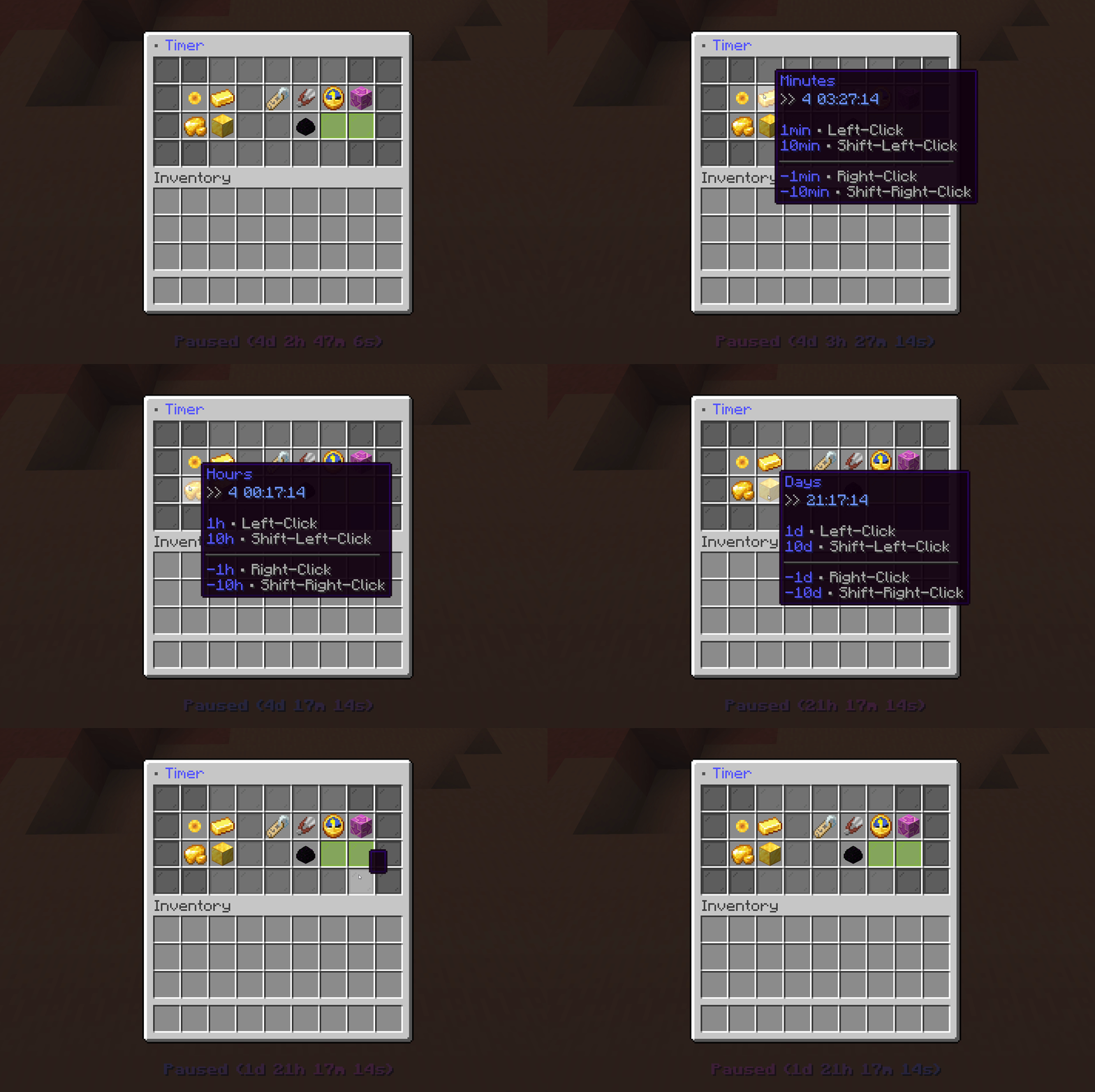
GUI

Create & Share Designs

The timer provides a complete design creator inside an easy to use GUI. Custom designs support:

  • Separate idle and running state design
  • Placeholder for time values to change your syntax
  • Separate prefix, suffix and hide rule for every placeholder
  • Custom animations like gradients

Adventure MiniMessage styling is supported! All designs are saved in a separate json file.

You can share your best designs in our global designs library for everyone to use or browse for designs you like to use yourself (Does not work in BETA!).

timer1
timer2
timer3

DataPack Version

We provide a data pack version of MTimer! This version is very simple and compact. You can still choose between multiple designs but can not create new ones.

Click here to visit it!

Support & FAQ

Check out our official FAQ and tutorials if you need help at MUtils.de/timer.

If you have any problems or unanswered questions join our Discord to contact us and share your experience with other users!

API Usage

API - Overview & Usage MTimer implements a public API that can be used by developers to manipulate or inject into the timer. The API is written in Kotlin like MTimer and is located at Maven Central, so no extra repo is needed. The API contains java docs.
dependencies {
    implementation("de.miraculixx:timer-api:1.1.2")
}

To receive more information about the API visit the official GitHub Repository:

-> MTimer API

-> (https://github.com/MUtils-MC/MTimer-API)

Privacy

M-Timer communicates with the MUtils.net servers for:

  • version checking (normally only on startup)
  • public design library access (only on manual access) (disabled in BETA)

While communicating the server IP is shared but not saved on our servers. Uploading/ downloading from the public design library requires account authentication


👥 Team & Contributors

Miraculixx
Miraculixx
Member

⚙️ Compatibility

Environment
🖥️ Server-side
Loaders
paperpurpur
Minecraft Versions
1.20.51.20.61.211.21.11.21.21.21.31.21.41.21.5+3 more

🔗 Links

Modrinth Page