Logo
MINECRAFTBIBLE
Items
Items

All game items

Blocks
Blocks

Building blocks

Mobs
Mobs

Creatures & monsters

Biomes
Biomes

World biomes

Structures
Structures

Generated structures

Recipes
Recipes

Crafting guides

Advancements
Advancements

Achievements

Loot Tables
Loot Tables

Drop rates

Tags
Tags

Item groupings

All Versions
View all data →
Capes
Cape ArchiveNEW

Browse rare Minecon capes, OptiFine capes, and custom capes from players worldwide

Browse

Player Database
Player DatabasePopular

Search any player

Skin Browser
Skin Browser

Browse & download skins

Cape Gallery
Cape GalleryNEW

Minecon & OptiFine capes

Seed Vault
Seed Vault

Curated seeds

Learn

Guides
GuidesNew

Tutorials & tips

Blog
Blog

News & updates

Community

Community Hub
Community HubHub

Posts, discussions & more

All Versions
View community →
Seed Analyzer
Seed Analyzer

World seed analysis

Loot Explorer
Loot Explorer

Drop rates

Crafting Calculator
Crafting Calculator

Material planning

Enchant Calculator
Enchant Calculator

Probability math

Redstone Lab
Redstone Lab

Signal timing

Trading Profit
Trading Profit

Villager ROI

All Versions
View all tools →
Mods
Mods

Browse all mods

Plugins
Plugins

Server plugins

Resource Packs
Resource Packs

Textures & sounds

Shaders
Shaders

Visual enhancements

Datapacks
Datapacks

World logic

Scanner
Mod Intelligence

Scan & analyze any mod

All Versions
View all mods →
Loading...
IntroductionIntroductionVersion HistoryVersion HistoryGuidesGuidesBlog & NewsBlog & News
ItemsItemsBlocksBlocksMobsMobsRecipesRecipesBiomesBiomesStructuresStructuresAdvancementsAdvancementsLoot TablesLoot TablesTagsTags
ModsModsPluginsPluginsResource PacksResource PacksShadersShadersDatapacksDatapacks

MinecraftBible

The Ultimate Wiki

Logo
MINECRAFTBIBLE

The ultimate Minecraft reference. Every item, block, mob, and recipe documented with precision.

Community

  • Player Database
  • Skin Browser
  • Cape Gallery
  • Community Hub
  • Seed Vault

Database

  • Items
  • Blocks
  • Mobs
  • Recipes
  • Biomes
  • Structures

Tools

  • Seed Analyzer
  • Mod Intelligence
  • Crafting Calculator
  • Enchant Calculator

Mods & Packs

  • Mods
  • Plugins
  • Resource Packs
  • Shaders
  • Datapacks

© 2026 MinecraftBible. Not affiliated with Mojang or Microsoft.

PrivacyTermsContact
Thizzy'z Tree Feller
PluginGPL-3.0-only

Thizzy'z Tree Feller

The most customizable tree feller ever made.

46.4K
Downloads
179
Followers
2 months ago
Updated
📦
20
Versions
equipmentgame-mechanicsbukkitpaperpurpurspigot
Download Latestv1.29.0View on Modrinth

📖About Thizzy'z Tree Feller

Default Behavior
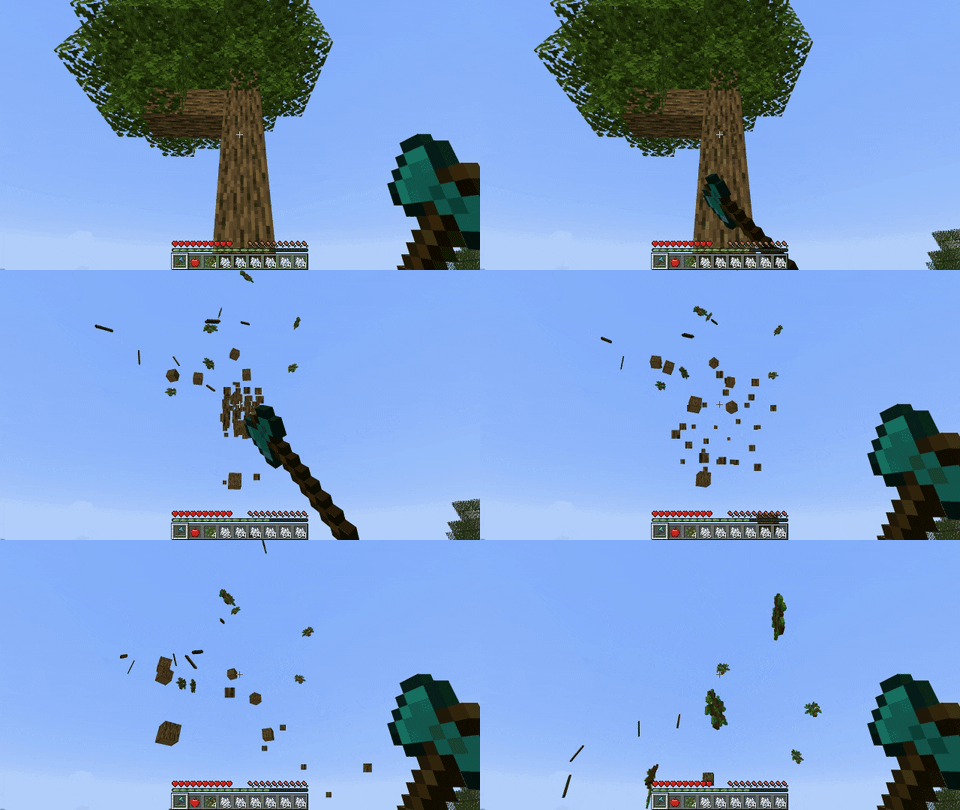
Large Oak Tree

Individual Tree Detection

Birch trees with Overlapping leaves

Advanced Structure Detection

Advanced Structure Detection
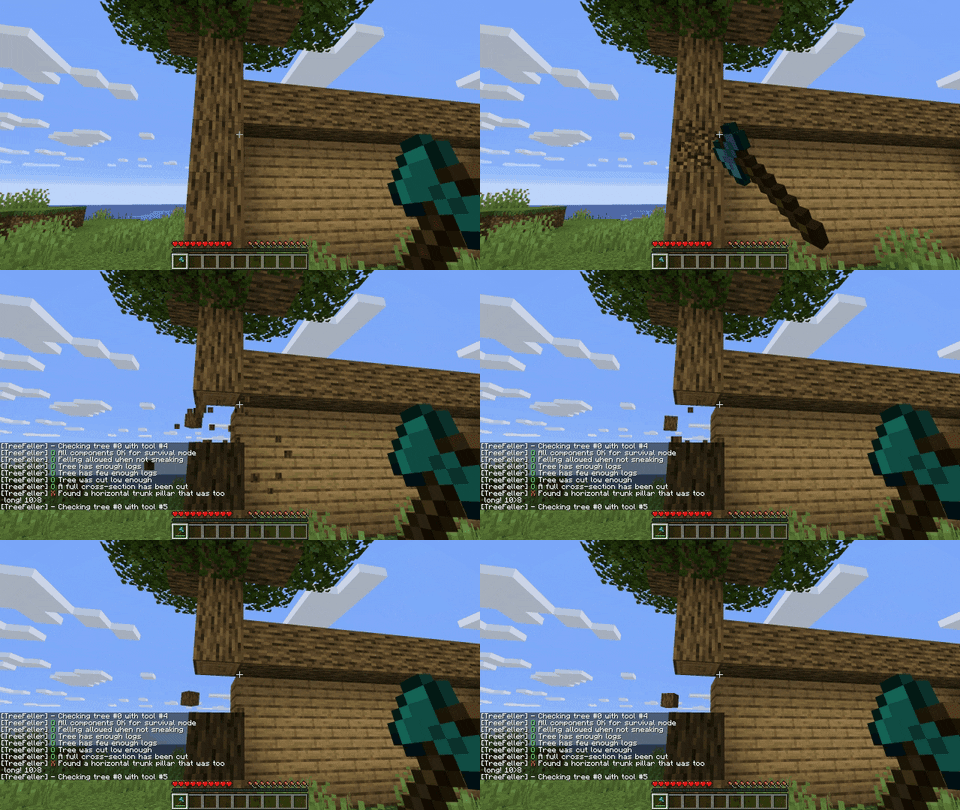
Fully Configurable
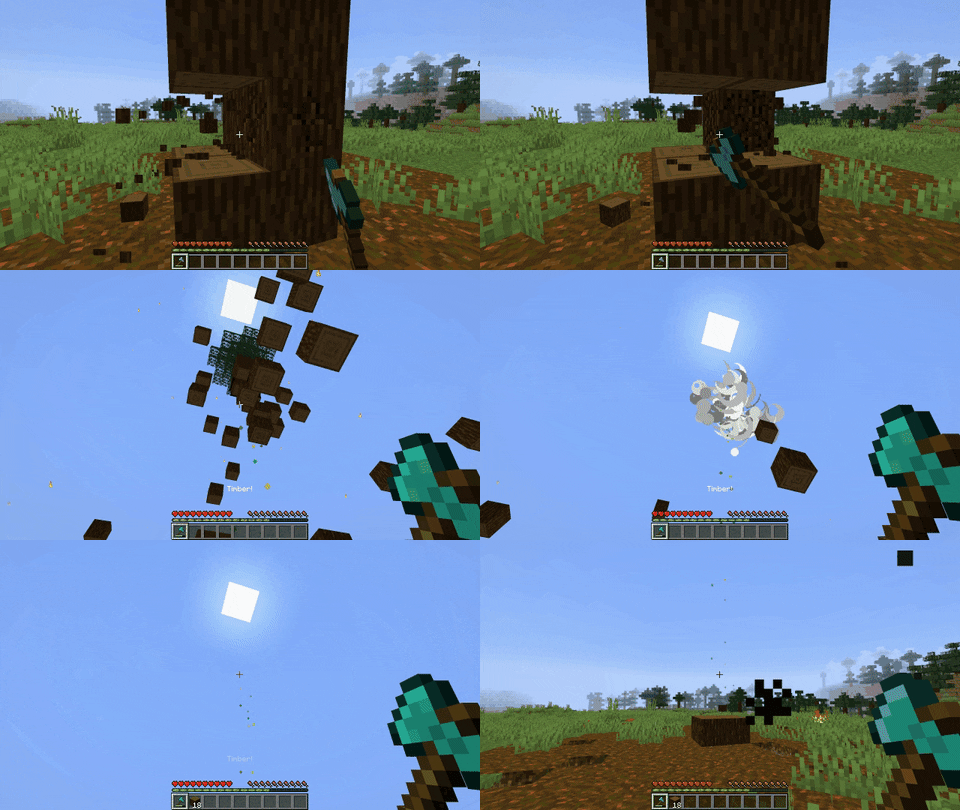
Total Insanity

In-game Configuration

Custom trees can be configured in seconds by auto-detecting the tree's features
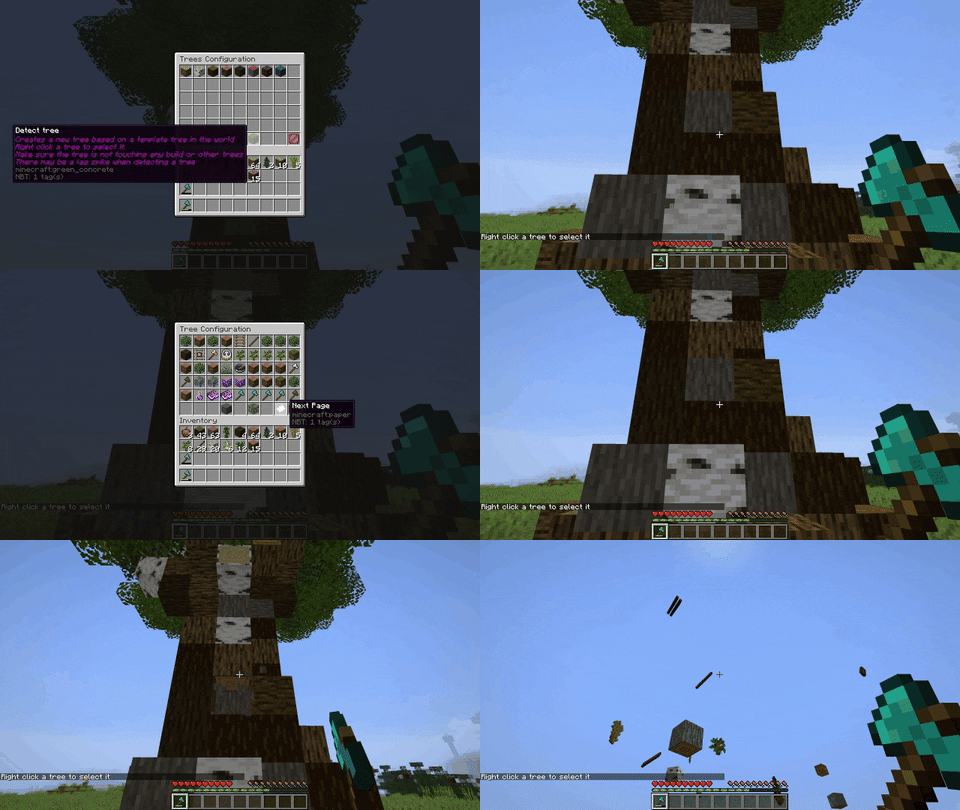
Configuring and felling a custom tree

Extensive Debugging info

Debugging info

  • Configure custom trees with any combination of blocks for its leaves and logs
  • Configure custom tools with custom name, durability, enchantments, and more
  • Almost any configuration option can be customized for each tree or tool
  • Tools or trees can be configured to only work in specific worlds, times of day, gamemodes, and more!

Plug-and-play

The default configuration will reliably cut down all vanilla trees, while not disturbing player-made structures.

Many user-requested features:

  • Customizable permissions for each tree or tool
  • Global and tool or tree-based cooldowns
  • Tree felling animation
  • Advanced falling trees
  • Effects (particles, sounds, and explosions)
  • /treefeller reload
  • And more!

Compatibility with the following plugins:

  • McMMO Classic
  • McMMO
  • EcoSkills
  • MMOCore
  • Zrip’s Jobs Reborn
  • CoreProtect
  • GriefPrevention
  • WorldGuard
  • Towny
  • Ore Regenerator
  • Drop2Inventory
  • And more!

FAQ

Does it work with custom trees?

Yes


The tree feller is fully capable of detecting and cutting down trees of any shape and size, provided that the logs are connected.

The default config is configured for vanilla trees. If you have very large trees or trees with multiple or mismatched wood or leaf types, you may have to add your own trees to the config.


Many custom trees are generated improperly, containing diagonally connected or persistent leaves.

If this is the case, you may have to enable ignore-leaf-data, diagonal-leaves, and player-leaves.

Troubleshooting?

If you can't get something to work:

  1. Make sure you’re using the latest version
  2. Run /treefeller debug and try to cut down a tree.
  3. Check the startup logs in the server console

If you are unable to pinpoint the problem, I’m happy to help on discord or GitHub. Make sure to provide the config, startup logs, and the debug information from /treefeller debug

Tips/Fun Facts

You can use the tree feller for ores

Add trees using ore for the trunk and with leaves disabled:

  • [COAL_ORE, COAL_ORE, {required-leaves: 0, leaf-detect-range: 0, leaf-break-range: 0, max-height: 256}]

Add tools for each pickaxe with allowed-trees set to ORE

  • {type: IRON_PICKAXE, allowed-trees: ORE}

Set allowed-trees for the axes to LOG

  • {type: IRON_AXE, allowed-trees: LOG}

Fore more specific configuration, allowed-trees should be set to a list of tree indexes, such as [0, 1, 2, 3, 4, 5] for the first 6 trees defined

(you may need to set max-height higher as well)

You can define more than one tool or tree of the same type

This is useful if you want OR behavior. In this example, a golden axe must have either unbreaking 1 or efficiency 2:

tools:

  • {type: GOLDEN_AXE, required-enchantments: {unbreaking: 1}}
  • {type: GOLDEN_AXE, required-enchantments: {efficiency: 2}}

Tools and trees are checked in order

If you have an item that matches two tools, the first one will always be used.

For example:

  • {type: IRON_AXE, required-enchantments: {unbreaking: 1}}
  • {type: IRON_AXE, required-enchantments: {unbreaking: 2}, effects: [explosion]}

An explosion will never occur, as an iron axe with unbreaking 2 also matches the first tool.

Commands

/treefeller reload
Permission: treefeller.reload
- Reloads the tree feller configuration
/treefeller help
Permission: treefeller.help
- Displays help for tree feller commands
/treefeller on
Permission: treefeller.toggle
- Toggles on the tree feller for the player who ran the command
/treefeller off
Permission: treefeller.toggle
- Toggles off the tree feller for the player who ran the command
/treefeller toggle
Permission: treefeller.toggle
- Toggles the tree feller for the player who ran the command
/treefeller debug [on|off]
Permission: treefeller.debug
- Toggles debug mode on or off globally
/treefeller config
Permission: treefeller.config
- Opens the ingame configuration

Configuration

When you update the tree feller, make sure to add any missing configuration options, as they will not be automatically added

(See config.yml)

👥 Team & Contributors

ThizThizzyDizzy
ThizThizzyDizzyOwner

⚙️ Compatibility

Environment
🖥️ Server-side
Loaders
bukkitpaperpurpurspigot
Minecraft Versions
1.161.16.11.16.21.16.31.16.41.16.51.171.17.1+27 more

🔗 Links

Modrinth Page