Logo
MINECRAFTBIBLE
Items
Items

All game items

Blocks
Blocks

Building blocks

Mobs
Mobs

Creatures & monsters

Biomes
Biomes

World biomes

Structures
Structures

Generated structures

Recipes
Recipes

Crafting guides

Advancements
Advancements

Achievements

Loot Tables
Loot Tables

Drop rates

Tags
Tags

Item groupings

All Versions
View all data →
Capes
Cape ArchiveNEW

Browse rare Minecon capes, OptiFine capes, and custom capes from players worldwide

Browse

Player Database
Player DatabasePopular

Search any player

Skin Browser
Skin Browser

Browse & download skins

Cape Gallery
Cape GalleryNEW

Minecon & OptiFine capes

Seed Vault
Seed Vault

Curated seeds

Learn

Guides
GuidesNew

Tutorials & tips

Blog
Blog

News & updates

Community

Community Hub
Community HubHub

Posts, discussions & more

All Versions
View community →
Seed Analyzer
Seed Analyzer

World seed analysis

Loot Explorer
Loot Explorer

Drop rates

Crafting Calculator
Crafting Calculator

Material planning

Enchant Calculator
Enchant Calculator

Probability math

Redstone Lab
Redstone Lab

Signal timing

Trading Profit
Trading Profit

Villager ROI

All Versions
View all tools →
Mods
Mods

Browse all mods

Plugins
Plugins

Server plugins

Resource Packs
Resource Packs

Textures & sounds

Shaders
Shaders

Visual enhancements

Datapacks
Datapacks

World logic

Scanner
Mod Intelligence

Scan & analyze any mod

All Versions
View all mods →
Loading...
IntroductionIntroductionVersion HistoryVersion HistoryGuidesGuidesBlog & NewsBlog & News
ItemsItemsBlocksBlocksMobsMobsRecipesRecipesBiomesBiomesStructuresStructuresAdvancementsAdvancementsLoot TablesLoot TablesTagsTags
ModsModsPluginsPluginsResource PacksResource PacksShadersShadersDatapacksDatapacks

MinecraftBible

The Ultimate Wiki

Logo
MINECRAFTBIBLE

The ultimate Minecraft reference. Every item, block, mob, and recipe documented with precision.

Community

  • Player Database
  • Skin Browser
  • Cape Gallery
  • Community Hub
  • Seed Vault

Database

  • Items
  • Blocks
  • Mobs
  • Recipes
  • Biomes
  • Structures

Tools

  • Seed Analyzer
  • Mod Intelligence
  • Crafting Calculator
  • Enchant Calculator

Mods & Packs

  • Mods
  • Plugins
  • Resource Packs
  • Shaders
  • Datapacks

© 2026 MinecraftBible. Not affiliated with Mojang or Microsoft.

PrivacyTermsContact
TheDriller
PluginCC-BY-4.0

TheDriller

New Block that drills the block in front of it

154
Downloads
1
Followers
1 years ago
Updated
📦
1
Versions
technologybukkitpaperpurpurspigot
Download Latestv1.0View on Modrinth

📖About TheDriller

(Experimental)
Click here for --> Forum for questions

The Driller Plugin

Important Note: This plugin can cause lag if left running without fuel. It is recommended to deactivate it when not in use.

Introduction

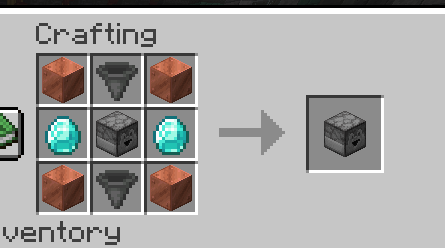
The Driller introduces a new block that can be crafted using the following materials:

  • 4 Copper Blocks
  • 1 Dropper (in the center)
  • 2 Diamonds
  • 2 Hoppers

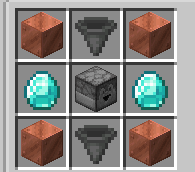
CraftingDriller

How It Works

  • Activation: To activate The Driller, place TNT in a hopper or directly by a player. Additionally, a copper block must be placed next to the driller to provide electricity.
  • Operation: Once activated, the driller will mine the block in front of it and expel that block from the back. If there's a chest or block behind it, the mined block will be deposited there.
  • Fuel: Each TNT provides 8 uses of fuel.

Common Uses

  • Automatic farms for stone, wood, basalt, etc.
  • Ideal for AFK areas and pairs well with the upcoming plugin The Builder, which will handle block placement.
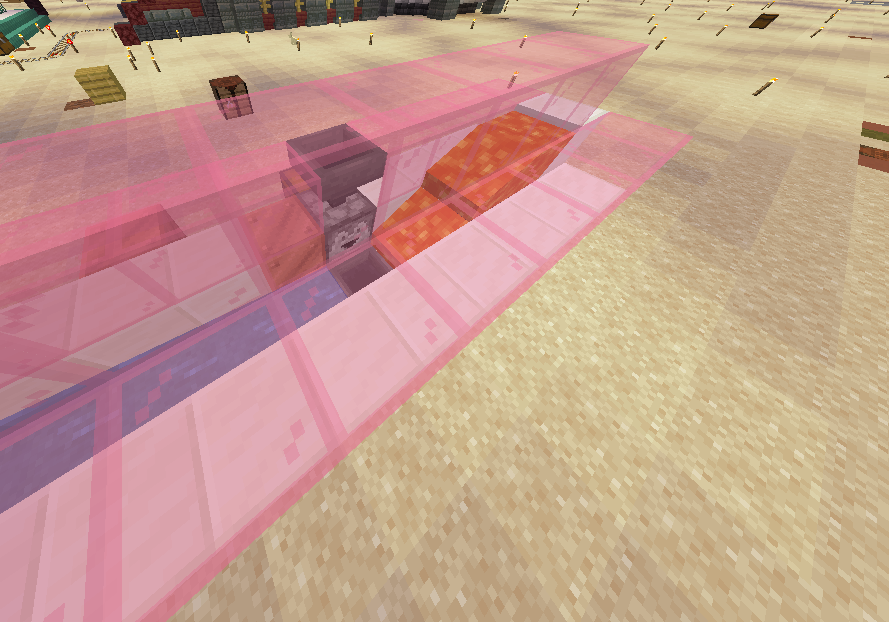
Stone automatic farm

Considerations

This plugin is experimental as I am just beginning to create plugins. If you decide to activate a driller, it is recommended to stay near it in AFK mode (not strictly necessary but helps prevent lag). When you're done using it, simply break the copper block to deactivate it.
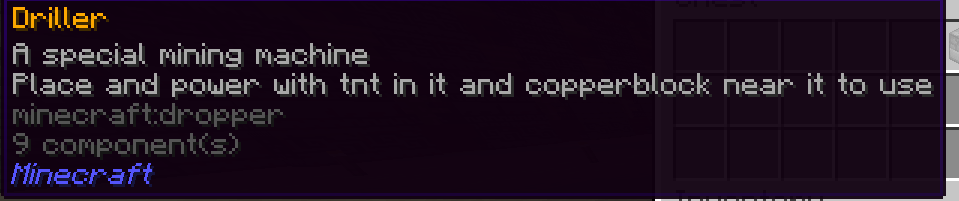
Driller

SPANISH

The Driller Plugin

Nota importante: Este plugin puede causar lag si se deja activado sin combustible. Se recomienda desactivarlo cuando no esté en uso.

Introducción

The Driller introduce un nuevo bloque que puede ser crafteado con los siguientes materiales:

  • 4 Bloques de Cobre
  • 1 Dropper (en el centro)
  • 2 Diamantes
  • 2 Hoppers

CraftingDriller

Funcionamiento

  • Activación: Para activar The Driller, se debe colocar TNT en un hopper o directamente por un jugador. Además, es necesario que haya un bloque de cobre al lado del driller para que reciba electricidad.
  • Operación: Una vez activado, el driller minará el bloque que tiene delante y expulsará ese bloque por la parte trasera. Si hay un cofre o un bloque detrás, lo depositará ahí.
  • Combustible: Cada TNT proporciona 8 usos de combustible.

Usos Comunes

  • Granja automática de roca, madera, basalto, etc.
  • Ideal para zonas AFK y se complementa muy bien con el próximo plugin The Builder, que se encargará de colocar bloques.
    Stone automatic farm

Consideraciones

Este plugin es experimental, ya que recién comienzo a crear plugins. Si decides activar un driller, es recomendable estar cerca de él en modo AFK (no es estrictamente necesario, pero ayuda a prevenir lag). Cuando termines de usarlo, simplemente rompe el bloque de cobre para desactivarlo.

Driller

👥 Team & Contributors

apoapiodev
apoapiodevOwner

⚙️ Compatibility

Environment
🖥️ Server-side
Loaders
bukkitpaperpurpurspigot
Minecraft Versions
1.191.19.11.19.21.19.31.19.41.201.20.11.20.2+6 more

🔗 Links

Modrinth Page