Logo
MINECRAFTBIBLE
Items
Items

All game items

Blocks
Blocks

Building blocks

Mobs
Mobs

Creatures & monsters

Biomes
Biomes

World biomes

Structures
Structures

Generated structures

Recipes
Recipes

Crafting guides

Advancements
Advancements

Achievements

Loot Tables
Loot Tables

Drop rates

Tags
Tags

Item groupings

All Versions
View all data →
Capes
Cape ArchiveNEW

Browse rare Minecon capes, OptiFine capes, and custom capes from players worldwide

Browse

Player Database
Player DatabasePopular

Search any player

Skin Browser
Skin Browser

Browse & download skins

Cape Gallery
Cape GalleryNEW

Minecon & OptiFine capes

Seed Vault
Seed Vault

Curated seeds

Learn

Guides
GuidesNew

Tutorials & tips

Blog
Blog

News & updates

Community

Community Hub
Community HubHub

Posts, discussions & more

All Versions
View community →
Seed Analyzer
Seed Analyzer

World seed analysis

Loot Explorer
Loot Explorer

Drop rates

Crafting Calculator
Crafting Calculator

Material planning

Enchant Calculator
Enchant Calculator

Probability math

Redstone Lab
Redstone Lab

Signal timing

Trading Profit
Trading Profit

Villager ROI

All Versions
View all tools →
Mods
Mods

Browse all mods

Plugins
Plugins

Server plugins

Resource Packs
Resource Packs

Textures & sounds

Shaders
Shaders

Visual enhancements

Datapacks
Datapacks

World logic

Scanner
Mod Intelligence

Scan & analyze any mod

All Versions
View all mods →
Loading...
IntroductionIntroductionVersion HistoryVersion HistoryGuidesGuidesBlog & NewsBlog & News
ItemsItemsBlocksBlocksMobsMobsRecipesRecipesBiomesBiomesStructuresStructuresAdvancementsAdvancementsLoot TablesLoot TablesTagsTags
ModsModsPluginsPluginsResource PacksResource PacksShadersShadersDatapacksDatapacks

MinecraftBible

The Ultimate Wiki

Logo
MINECRAFTBIBLE

The ultimate Minecraft reference. Every item, block, mob, and recipe documented with precision.

Community

  • Skin Browser
  • Cape Gallery
  • Seed Vault
  • Blog
  • Guides

Database

  • Items
  • Blocks
  • Mobs
  • Recipes
  • Biomes
  • Structures

Tools

  • Seed Analyzer
  • Mod Intelligence
  • Crafting Calculator
  • Enchant Calculator

Mods & Packs

  • Mods
  • Plugins
  • Resource Packs
  • Shaders
  • Datapacks

Site & Legal

  • About
  • Authors
  • Editorial Policy
  • Corrections
  • Contact
  • Privacy Policy
  • Terms of Service
  • DMCA
  • Sitemap

© 2026 MinecraftBible. Not affiliated with Mojang or Microsoft.

PrivacyTermsContact
The Elements Plugin
PluginLicenseRef-All-Rights-Reserved

The Elements Plugin

With this plugin, the four elements can be controlled: Water, earth, fire, and air

452
Downloads
1
Followers
1 years ago
Updated
📦
1
Versions
game-mechanicsmagicbukkitpaperspigot
Download Latestv1View on Modrinth

📖About The Elements Plugin

The Elements Plugin

When a player logs into the server for the first time (after the server has launched), they will be assigned one of four races: water, earth, fire, or air. Each of these races has unique abilities.

Water Race:

Passive Ability: The player cannot drown.
Ability 1: Grants the player "Dolphin’s Grace II" and "Speed IV" effects for 25 seconds.
Ability 2: Applies the "Slowness XXI" effect to all nearby players for 10 seconds.

Earth Race:

Passive Ability: The player takes no damage from suffocation or falling blocks such as anvils.
Ability 1: Grants the player the "Resistance II" effect for 25 seconds.
Ability 2: Creates a column of dirt beneath the player, raising them 5 blocks high.

Fire Race:

Passive Ability: The player takes no damage from lava or fire.
Ability 1: Triggers a small explosion beneath the player that emits a wave of fire, dealing explosive damage in the area.
Ability 2: Releases a large wave of fire, applying the "Wither II" effect to all nearby players.

Air Race:

Passive Ability: The player takes no fall damage.
Ability 1: Instantly launches the player high into the air with a strong boost.
Ability 2: Pushes all nearby players away and launches them upward.

Recipe for changing races:

(https://cdn.modrinth.com/data/cached_images/90e05b5259f7e527e35a3e157a15f60c2623c4db.png)
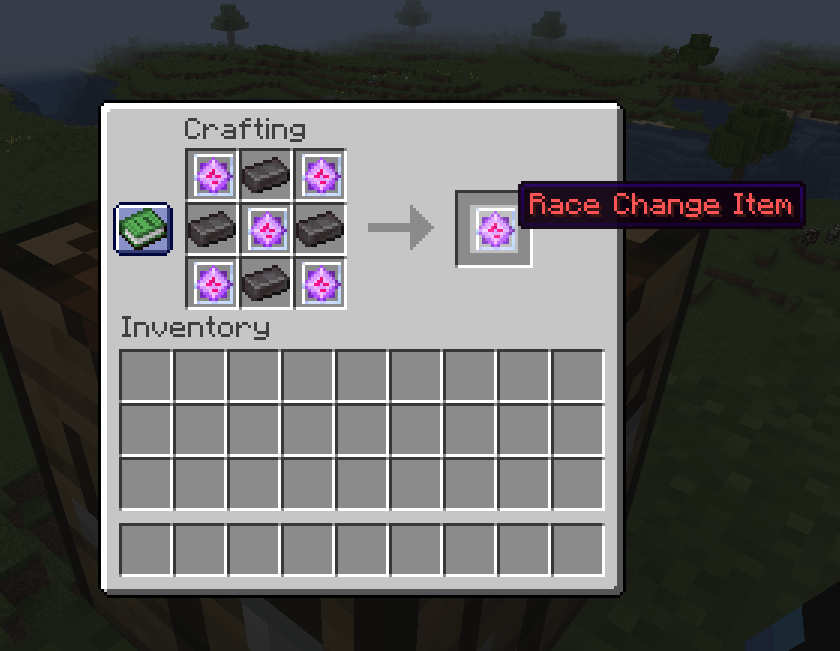
OP Commands:

/changerace: Changes the player’s race.
/resetcooldown: Resets the ability cooldowns for all players.

Note: To create this plugin, the ChatGPT tool by the company OpenAI was used.

👥 Team & Contributors

WindKG
WindKGOwner

⚙️ Compatibility

Environment
🖥️ Server-side
Loaders
bukkitpaperspigot
Minecraft Versions
1.211.21.11.21.21.21.3

🔗 Links

Modrinth Page