


PluginMIT
TakeYourTime
Lightweight Minecraft plugin that adds a customizable in-game clock and day counter
94
Downloads
1
Followers
10 months ago
Updated
📦
1
Versions
📖About TakeYourTime
TakeYourTime
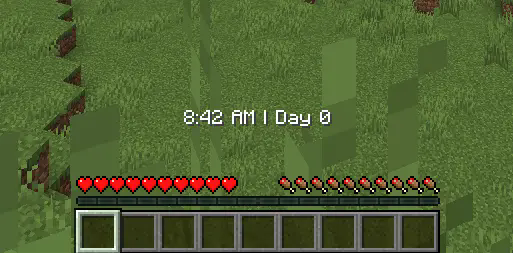
TakeYourTime is a lightweight Minecraft plugin that displays in-game time and day count via action bar or boss bar. Players can choose their preferred display, and server owners can configure colors, update intervals, and display modes. Optional color-coded phases mark dawn, day, dusk, and night.
Commands
/clock on- Enable the plugin./clock off- Disable the plugin./clock mode [actionbar|bossbar]- Choose display type./tyt- Show plugin information./tyt reload- Reload configuration without restarting the server.
The plugin automatically tracks in-game time and days since world creation. Display settings and colors are configurable in
config.yml.
config.yml Example
# Day counting mode: "gametime" (default) or "fulltime"
counter-mode: gametime

# Update interval in ticks (20 ticks = 1 second)
update-interval: 1200

# Boss bar colors (optional phase colors)
bossbar:
  defaultColor: WHITE
  # dawnColor: RED
  # dayColor: YELLOW
  # duskColor: BLUE
  # nightColor: PURPLE
Roadmap & Limitations
⚠️ Disclaimer:
I made this plugin for me and my friends' 10-player SMP. Works on Paper and some Paper forks, but not tested on all server types. May not perform well on very large servers due to per-player .yml storage.
Current Limitations
- Player data stored in
.yml, may slow on large servers. - Updates every real-life minute, minor overhead possible with many players.
- Focuses on the first world only, no multi-world support.
- Boss bar colors are optional; misconfigured colors default to WHITE.
Planned Improvements
- Move to database storage (SQLite/MySQL) for scalability.
- Add multi-world support.
- Additional display modes (sidebar/scoreboard).
- Optional player-specific update intervals.
- Optimization for large servers.
- More boss bar customization options.
Usage Recommendation
- Best for small to medium servers or single-player worlds.
- Use with caution on servers with hundreds of players.