

PluginMIT
SyPVP
A PVP control plugin for Minecraft Purpur 1.21.x
67
Downloads
2
Followers
1 months ago
Updated
📦
6
Versions
📖About SyPVP
SyPVP
A PVP control plugin for Minecraft Purpur/Paper 1.21.x
Features
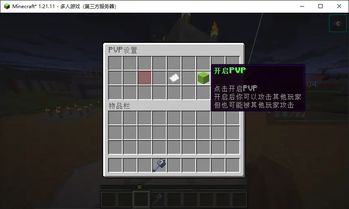
- PVP Toggle Control - Players can freely enable or disable PVP status
- GUI Interface - Use
/pvpcommand to open an intuitive settings interface - Combat Cooldown - Cannot disable PVP for 1 minute after engaging in combat
- Invite System - Invite players who haven't enabled PVP to battle
- PVP Arena System - Admin can create PVP arenas and players can host PVP matches
- Broadcast Invite - Players can send server-wide PVP invites
- Queue System - Auto queue when all arenas are occupied
- Multiple Game Modes - Free-for-all, 1vMany, 2vMany, Random 2 Teams, Random 3 Teams
Commands
Player Commands
| Command | Description | Permission |
|---|---|---|
/pvp |
Open PVP settings GUI | sypvp.use |
/sypvp |
Alias for /pvp |
sypvp.use |
/pvpinvite <player> |
Invite a player to enable PVP | sypvp.use |
/svp send <count> |
Send server-wide PVP invite | sypvp.use |
Admin Commands
| Command | Description | Permission |
|---|---|---|
/sypvp set pvp <id> |
Create PVP arena with stone hoe selection | sypvp.admin |
/sypvp remove pvp <id> |
Remove a PVP arena | sypvp.admin |
/sypvp list |
List all PVP arenas | sypvp.admin |
Permissions
sypvp.use- Allow using PVP related commands (default: true)sypvp.admin- Allow using admin commands (default: op)
Usage
Enable/Disable PVP
- Type
/pvpto open the settings interface - Click the green wool to enable PVP
- Click the red wool to disable PVP
Invite Players
When attacking a player who hasn't enabled PVP:
- The system will prompt "The other player has not enabled PVP"
- Click the "[Invite player to enable PVP]" button to send an invitation
- The recipient will receive an invitation message and can click "[Click to open PVP settings]" to enable
Create PVP Arena (Admin)
- Hold a stone hoe
- Left-click a block to set corner 1
- Right-click a block to set corner 2
- Type
/sypvp set pvp <arena-id>to create the arena
Host a PVP Match (Player)
- Type
/svp send <invite-count>to send a server-wide invite - Other players can click "[Accept]" or "[Reject]" in the chat message
- When enough players accept, the team will be teleported to a random arena
- The host selects the game mode from the GUI
- Fight until one team remains!
Queue System
If all arenas are occupied when a match starts:
- Players will see a "Queueing..." message with a "[Stop Queueing]" button
- The system will automatically check for available arenas every 5 seconds
- Click "[Stop Queueing]" or type
/sypvp queue stopto cancel
Game Modes
- Free-for-All - Every player fights alone, last one standing wins
- 1vMany - One player vs all others
- 2vMany - Two players team up against all others
- Random 2 Teams - Players are randomly split into 2 teams
- Random 3 Teams - Players are randomly split into 3 teams
Configuration
Edit plugins/SyPVP/config.yml:
# Max invites per hour per player
max-invites-per-hour: 5

# Max players per PVP game
max-players-per-game: 10
Technical Specifications
- Supported Version: Purpur/Paper 1.21.x
- JDK: Java 21
Installation
- Download
SyPVP-1.1.0.jar - Place the JAR file into your server's
pluginsfolder - Restart the server or load the plugin
Data Storage
plugins/SyPVP/data.yml- Players' PVP status settingsplugins/SyPVP/regions.yml- PVP arena definitions
Author
Shiyuan