

Synix
Secure Discord ↔ Minecraft sync bridge for Spigot/Paper with embedded high-performance bot, bi-directional chat, and automation features.
📖About Synix
🌌 Synix: Ultimate Minecraft-Discord Synchronization Plugin
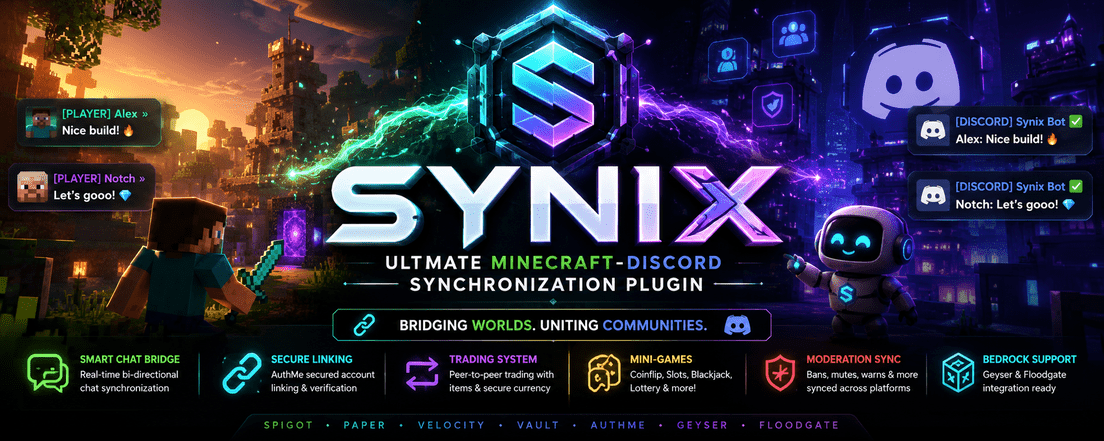
Synix bridges your Minecraft server (Spigot/Paper) and Discord guild with a secure, feature-rich, high-performance embedded JDA bot. Experience seamless chat bridging, robust in-game and Discord moderation, an advanced item/currency trading system, AuthMe-secured linking flows, and mini-games.
Main = 🎰 Integrated Economy Games, Smart Chat Bridge, 🤝 Interactive Peer-to-Peer Trading
🚀 Key Features
- 🎙️ Smart Chat Bridge: Bi-directional chat with clean Markdown formatting, attachment support, and server status updates.
- 🔒 AuthMe Secure Linking: Account verification via DM with dynamic Captchas and direct AuthMe API validation—no plaintext password storage.
- 🤝 Interactive Peer-to-Peer Trading: Secure trades via private Discord DMs featuring item swaps (supporting NBT, offline inventories) and secure Vault currency transfers using JDA Modals.
- 🎰 Integrated Economy Games: Play Coinflip, Coinflip, Slots, Blackjack, and Lottery with Vault integration and animated slot emojis.
- 🛡️ Comprehensive Moderation: Full punishment synchronizations (
ban,tempban,mute,warn,kick,jail) with Discord logs. - 🛏️ Geyser & Floodgate Aware: Built-in Bedrock player handling and independent account linking.
🛠️ Step 1: Discord Bot Setup
Before installing the plugin, you must register your bot application on the Discord Developer Portal:
- Create Application:
- Go to Discord Developer Portal.
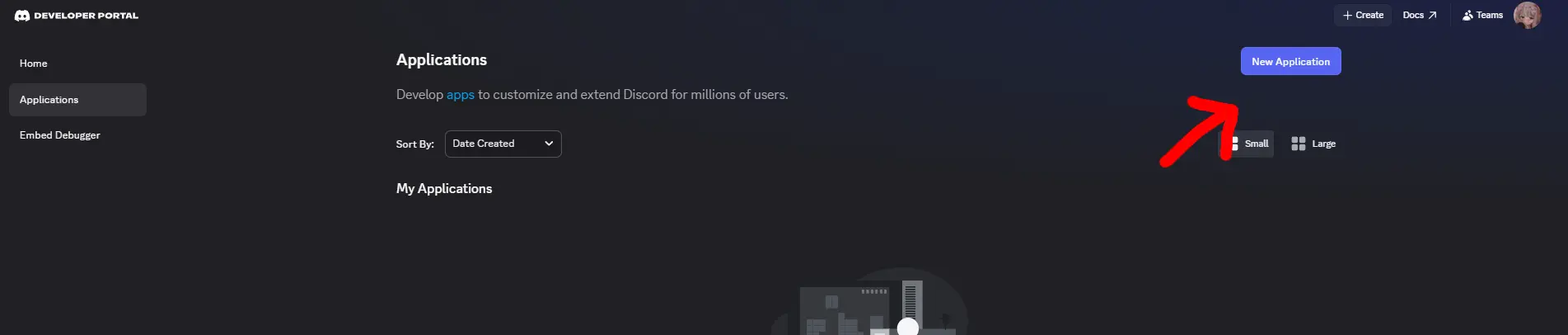
- Click New Application at the top right, name it (e.g.,
MineSync Bot), and accept the Terms of Service.
- Generate Bot Token:
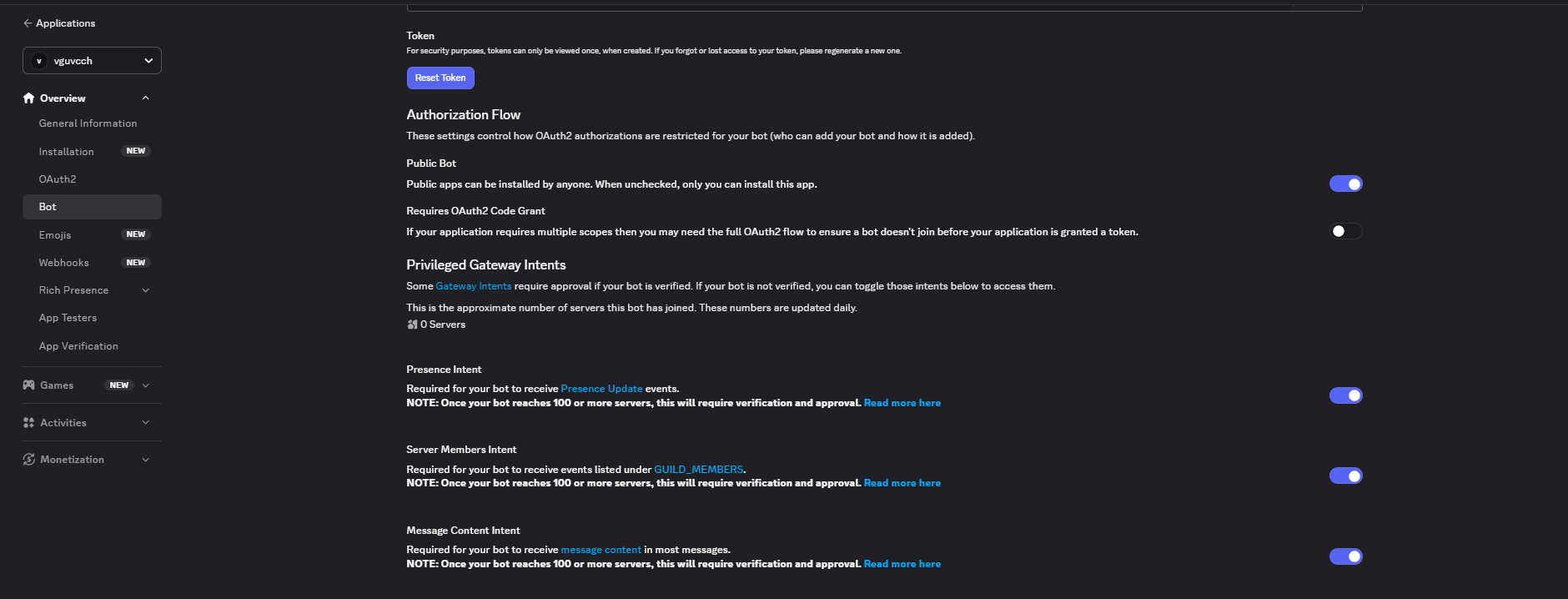
- Navigate to the Bot tab on the left sidebar.
- Click Add Bot and confirm.
- Under Token, click Reset Token and copy the generated token. Keep this secret!
- Enable Gateway Intents:
- Scroll down on the Bot page to the Privileged Gateway Intents section.
- Enable the following intents (required for commands, linking, and bridging to function):
PRESENCE INTENTSERVER MEMBERS INTENTMESSAGE CONTENT INTENT
- Click Save Changes.
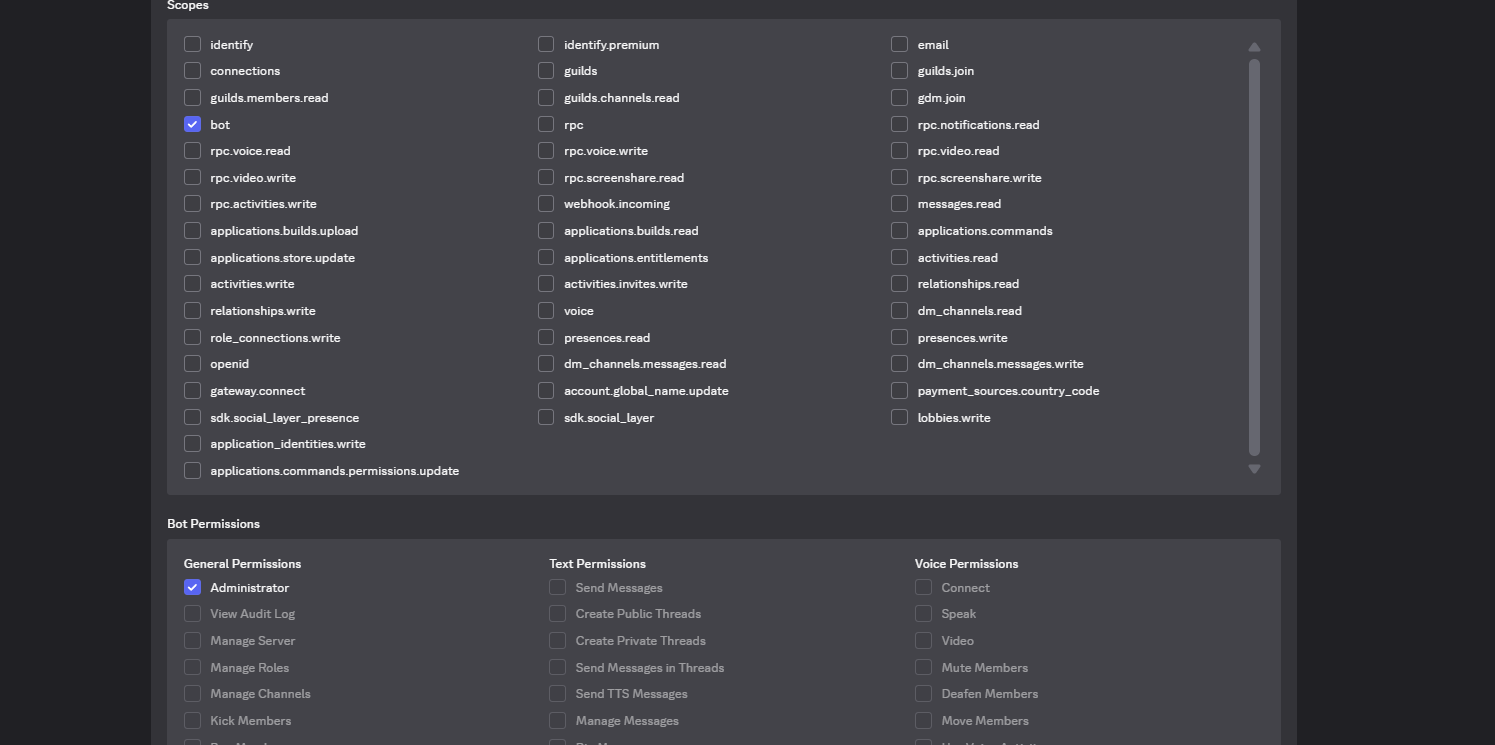
- Generate Invite Link:
- Navigate to the OAuth2 tab, then select URL Generator.
- Under Scopes, check:
botapplications.commands
- Under Bot Permissions, check:
Manage Webhooks(if webhook formatting is enabled)Read Messages/View ChannelsSend MessagesSend Messages in ThreadsCreate Public ThreadsEmbed LinksAttach FilesRead Message HistoryUse External EmojisAdd ReactionsManage Messages(for moderation/cleaning)
- Copy the URL at the bottom and open it in a browser to invite the bot to your Discord Server.

📥 Step 2: Installation
- Ensure you have Java 21+ and a Paper/Spigot 1.20+ server.
- Install the following required dependency plugins in your
plugins/directory:- Vault (along with an economy provider like EssentialsX)
- AuthMeReloaded (Highly recommended for secure player linking)
- Floodgate / Geyser (Optional, if you wish to support Bedrock players)
- Download or build the latest
synix-0.1.0-SNAPSHOT.jarand place it into theplugins/directory. - Start the server once to generate the default configuration files, then stop it.
⚙️ Step 3: Configuration Guide
Open the generated plugins/Synix/config.yml and configure the settings. Below is the full breakdown of the configuration options:
bot:
  token: "YOUR_DISCORD_BOT_TOKEN_HERE"  # Put the token copied from Discord Portal
  prefix: "!"                           # Prefix used for text/legacy commands (Guild only)
  enabled: true                         # Enable/Disable the entire Discord integration
  slash-commands: true                  # Register modern Discord Slash Commands (/link, etc.)
  status-text: "Watching the server"    # The bot's playing/watching status message
  linked-role-id: "987654321012345678"  # (Optional) Role automatically given to linked players

chat:
  channel-id: "123456789012345678"      # ID of the text channel for Minecraft <-> Discord bridging
  mention-filter: true                  # Replaces Discord @mentions with plain-text on Minecraft
  allow-attachments: true               # Notifies Minecraft players when attachments are sent
  minecraft-format: "&8[Discord]&r {user}: {message}" # In-game appearance of Discord messages
  discord-format: "**[{server}]** {user}: {message}"  # Discord appearance of in-game chat messages
  webhook-style-formatting: false       # Use webhooks to show custom player avatars in Discord

economy:
  max-bet: 25000                        # Maximum bet allowed in blackjack, coinflip, slots, etc.
  daily-reward: 1000                    # Coins awarded daily via /daily
  enable-gambling: true                 # Toggle gambling mini-games
  lottery-multiplier: 4.0               # Payout multiplier for the lottery
  coinflip-multiplier: 1.95             # Payout multiplier for coinflip
  slots-jackpot-multiplier: 6.0         # Payout multiplier for hitting a slots jackpot

logs:
  enabled: true                         # Keep SQLite/MySQL audit logs for in-game activities
  send-to-discord: true                 # Direct game logs (joins, linkings, commands) to Discord log channel
  send-ip: false                        # Whether to include IP addresses in admin logs (Security Risk)
  keep-days: 30                         # Auto-purge logs older than X days

database:
  type: sqlite                          # DB Engine: 'sqlite' (local file) or 'mysql' (external)
  sqlite-file: "minesync.db"
  mysql:
    host: localhost
    port: 3306
    name: minesync
    username: root
    password: ""
    ssl: false

security:
  use-verification-code: true
  code-length: 5
  code-expiry-seconds: 300              # Linking code validity duration
  password-hash: bcrypt
  max-login-attempts: 5
  login-cooldown-seconds: 10
  lockout-seconds: 300
  session-duration-minutes: 30
  captcha-expiry-seconds: 300
  allow-bedrock: true                   # Allow Bedrock players to link via Geyser/Floodgate
  allow-java: true                      # Allow Java players to link

auth:
  provider: authme                      # Account validation engine
  manage-minecraft-auth: false
  require-authme-for-linking: true      # Ensure players register & log into AuthMe before linking
  import-authme: false

staff:
  role-ids: ["888888888888888888"]      # Discord Role IDs that can run staff-level command suites
  owner-role-ids: ["777777777777777777"]
  admin-role-ids: ["666666666666666666"]
  moderator-role-ids: ["555555555555555555"]
  log-channel-id: "444444444444444444"  # Channel where moderation actions & admin logs are posted
  verification-channel-id: ""

moderation:
  sync-to-discord: true                 # Auto-punish Discord user when Minecraft account is banned
  default-tempban-minutes: 60           # Default fallback duration for tempbans

features:
  whitelist-discord-management: true    # Toggle server maintenance mode via /maintenance
  maintenance-whitelist-bypass-permission: "minesync.maintenance.bypass"
Save the file and restart your server or run /synix reload to apply!
🔗 Step 4: The Account Linking Flow
To verify players, Synix utilizes a secure double-ended verification system that prevents unauthorized linking and protects account passwords.

Java Players
- Join the Minecraft server.
- Log in via AuthMe using
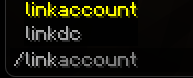
/login <password>. - Type
/linkin-game. A 5-digit verification code will print in-game (expires in 5 minutes). - In the Discord Server, use
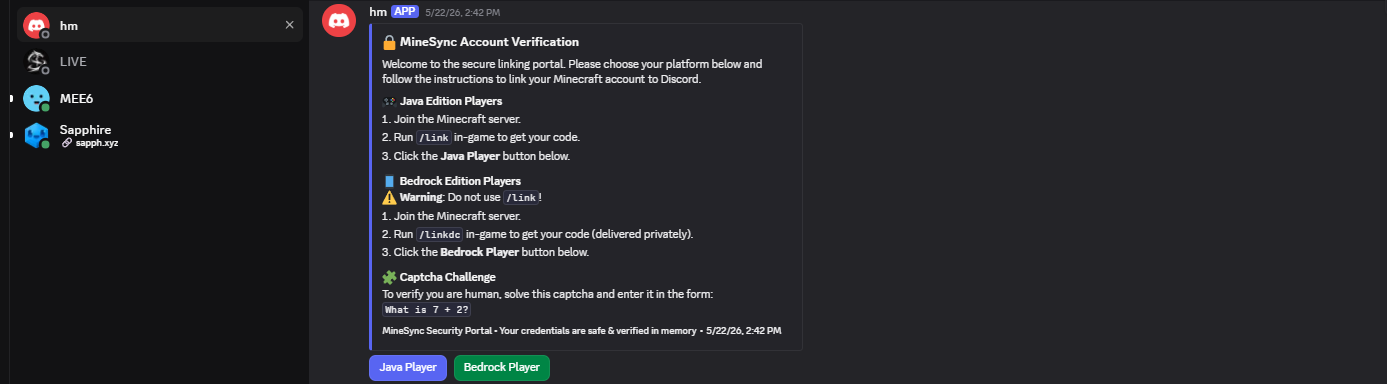
/linkor type!linkin a public guild channel. - The bot will send you a Private Message (DM) containing a dynamic Captcha challenge.
- Complete the Captcha and enter your Minecraft Username, AuthMe Password, and 5-digit Code securely.
- Once verified, the bot grants you the configured Linked Role!
Bedrock Players (Geyser/Floodgate)
- Join the server via Geyser.
- Type
/linkdc(or/link) in-game to obtain your verification code. - Use
/linkon the Discord server, select Bedrock Player, complete the Captcha, and enter the code to finish. No password required for Bedrock linking if utilizing Floodgate autologin.
🎮 Command Reference
Synix provides matching In-game (Slash) commands and Discord (Slash/Prefix) commands. Prefix commands do not work in Discord DMs for safety.
👥 Player Commands
| Minecraft | Discord | Description |
|---|---|---|
/link |
/link or !link |
Starts account linking flow. |
/unlink |
/unlink or !unlink |
Decouples Discord account from Minecraft account. |
/profile [player] |
/profile or !profile |
View player profile card featuring Minecraft skin embeds. |
/bal [player] |
/bal or !bal |
Checks current in-game coin/economy balance. |
/daily |
/daily or !daily |
Claims daily coin reward. |
/serverstatus |
/serverstatus |
Views server TPS, RAM usage, and online time. |
/players |
/players |
Lists all online players. |
🎰 Gambling & Trade Commands
| Command | Options | Description |
|---|---|---|
/coinflip |
<amount> <heads/tails> |
Flip a coin to double your bet! |
/blackjack |
<amount> |
Play dynamic Blackjack against the dealer. |
/slots |
<amount> |
Spin the slots with stunning animated emojis! |
/lottery |
<amount> |
Purchase lottery tickets for a grand prize draw. |
/trade |
[discord_user] [mc_username] |
Initiates an interactive DM-based trade session. |
/sell |
<item> <amount> |
Sell server items directly from inventory for coins. |
🛡️ Admin & Moderation Commands
These commands require configured Role IDs in config.yml or specific Minecraft OP permissions.
| Minecraft | Discord | Role Required | Description |
|---|---|---|---|
/ban <player> <reason> |
/ban |
Moderator | Permabans player in-game + syncs to Discord. |
/tempban <player> <time> <reason> |
/tempban |
Moderator | Tempbans player (e.g. 1d, 12h). |
/mute <player> <time> <reason> |
/mute |
Moderator | Mutes player in Minecraft chat. |
/warn <player> <reason> |
/warn |
Moderator | Warns a player. |
/kick <player> <reason> |
/kick |
Moderator | Kicks player from the server. |
/maintenance <on/off> |
/maintenance |
Admin | Toggles server whitelist mode. |
/logmc <player> [event] |
/logmc |
Admin | Queries database logs for auditing. |
/eco give <player> <amount> |
/eco give |
Owner | Grants currency to player balance. |
/giveaway <duration> <prize> |
/giveaway |
Staff | Starts an interactive Discord giveaway. |
🎨 Emoji Setup for Animated Slots
To make the /slots or !slots games visually stunning, add these custom emojis to your Discord Server. The bot will automatically render them during spins:
8311skeletonjuggleheartsHappyblackfiredogeburger1AS_brow
💡 Troubleshooting
- Bot isn't responding in Discord DMs: Ensure you have enabled Message Content Intent and Server Members Intent in the Discord Developer Portal under the bot section. Also check if the user has "Allow direct messages from server members" enabled.
- Linking issues: Make sure the player is registered and logged into AuthMe before executing
/link. - Chat bridge not working: Verify that
chat.channel-idin yourconfig.ymlis an exact match for your Discord text channel ID. Ensure the bot hasSend MessagesandEmbed Linkspermissions in that channel.