Logo
MINECRAFTBIBLE
Items
Items

All game items

Blocks
Blocks

Building blocks

Mobs
Mobs

Creatures & monsters

Biomes
Biomes

World biomes

Structures
Structures

Generated structures

Recipes
Recipes

Crafting guides

Advancements
Advancements

Achievements

Loot Tables
Loot Tables

Drop rates

Tags
Tags

Item groupings

All Versions
View all data →
Capes
Cape ArchiveNEW

Browse rare Minecon capes, OptiFine capes, and custom capes from players worldwide

Browse

Player Database
Player DatabasePopular

Search any player

Skin Browser
Skin Browser

Browse & download skins

Cape Gallery
Cape GalleryNEW

Minecon & OptiFine capes

Seed Vault
Seed Vault

Curated seeds

Learn

Guides
GuidesNew

Tutorials & tips

Blog
Blog

News & updates

Community

Community Hub
Community HubHub

Posts, discussions & more

All Versions
View community →
Seed Analyzer
Seed Analyzer

World seed analysis

Loot Explorer
Loot Explorer

Drop rates

Crafting Calculator
Crafting Calculator

Material planning

Enchant Calculator
Enchant Calculator

Probability math

Redstone Lab
Redstone Lab

Signal timing

Trading Profit
Trading Profit

Villager ROI

All Versions
View all tools →
Mods
Mods

Browse all mods

Plugins
Plugins

Server plugins

Resource Packs
Resource Packs

Textures & sounds

Shaders
Shaders

Visual enhancements

Datapacks
Datapacks

World logic

Scanner
Mod Intelligence

Scan & analyze any mod

All Versions
View all mods →
Loading...
IntroductionIntroductionVersion HistoryVersion HistoryGuidesGuidesBlog & NewsBlog & News
ItemsItemsBlocksBlocksMobsMobsRecipesRecipesBiomesBiomesStructuresStructuresAdvancementsAdvancementsLoot TablesLoot TablesTagsTags
ModsModsPluginsPluginsResource PacksResource PacksShadersShadersDatapacksDatapacks

MinecraftBible

The Ultimate Wiki

Logo
MINECRAFTBIBLE

The ultimate Minecraft reference. Every item, block, mob, and recipe documented with precision.

Community

  • Skin Browser
  • Cape Gallery
  • Seed Vault
  • Blog
  • Guides

Database

  • Items
  • Blocks
  • Mobs
  • Recipes
  • Biomes
  • Structures

Tools

  • Seed Analyzer
  • Mod Intelligence
  • Crafting Calculator
  • Enchant Calculator

Mods & Packs

  • Mods
  • Plugins
  • Resource Packs
  • Shaders
  • Datapacks

Site & Legal

  • About
  • Authors
  • Editorial Policy
  • Corrections
  • Contact
  • Privacy Policy
  • Terms of Service
  • DMCA
  • Sitemap

© 2026 MinecraftBible. Not affiliated with Mojang or Microsoft.

PrivacyTermsContact
Synced
PluginLicenseRef-All-Rights-Reserved

Synced

Sync inventories, health, hunger, XP, potion effects, ender chests and positions across teams of players, fully configurable via in-game GUI.

41
Downloads
1
Followers
4 months ago
Updated
📦
1
Versions
game-mechanicsminigamesocialbukkitpaperspigot
Download Latestv1.0-SNAPSHOTView on Modrinth

📖About Synced

Synced

Synced is a Paper plugin that lets players link together in teams and share their game state in real time. When one player in a team takes damage, eats food, gains XP, or picks up items, the change is reflected across every member of the team instantly.

Features

  • Inventory sync — all 36 slots and offhand stay identical across teammates
  • Health sync — damage and healing is shared
  • Hunger sync — food level, saturation, and exhaustion stay in step
  • XP sync — experience points and levels are mirrored
  • Potion effects sync — active effects propagate to all members
  • Ender chest sync — shared ender chest contents across the team
  • Position sync — optional teleporting to keep the team together

How to use

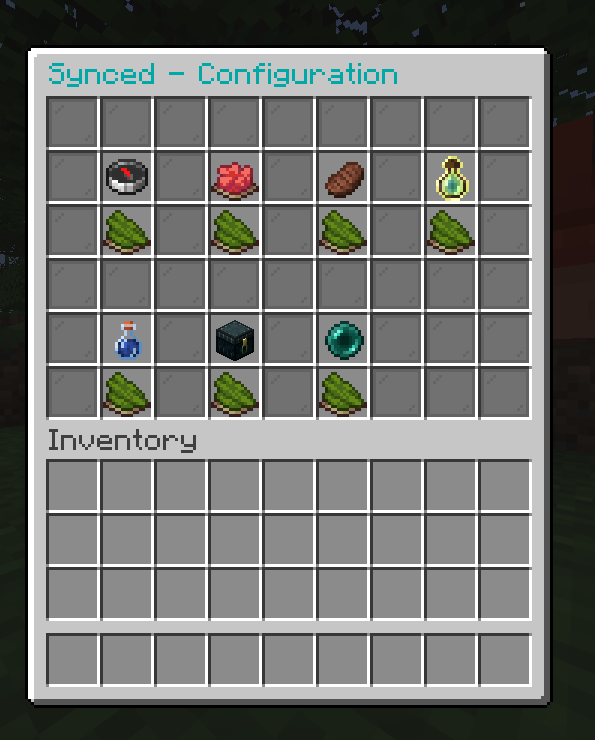
Run /synced start to open the configuration menu. From there you can toggle each sync feature on or off. Invite other players with /synced invite and they join with /synced join .

Commands

Command Description
/synced start Open the config menu and create your team
/synced invite <player> Invite a player to your team
/synced join <name> Join a team by name
/synced leave Leave your current team
/synced disband Disband your team (leader only)
/synced info View your team and current settings

Server-side only, no client mod required
Position sync is disabled by default
All settings are configurable per team via the in-game GUI

👥 Team & Contributors

aspectxlol
aspectxlolOwner

⚙️ Compatibility

Environment
🖥️ Server-side
Loaders
bukkitpaperspigot
Minecraft Versions
1.211.21.11.21.21.21.31.21.41.21.51.21.61.21.7+4 more

🔗 Links

Modrinth Page