Logo
MINECRAFTBIBLE
Items
Items

All game items

Blocks
Blocks

Building blocks

Mobs
Mobs

Creatures & monsters

Biomes
Biomes

World biomes

Structures
Structures

Generated structures

Recipes
Recipes

Crafting guides

Advancements
Advancements

Achievements

Loot Tables
Loot Tables

Drop rates

Tags
Tags

Item groupings

All Versions
View all data →
Capes
Cape ArchiveNEW

Browse rare Minecon capes, OptiFine capes, and custom capes from players worldwide

Browse

Player Database
Player DatabasePopular

Search any player

Skin Browser
Skin Browser

Browse & download skins

Cape Gallery
Cape GalleryNEW

Minecon & OptiFine capes

Seed Vault
Seed Vault

Curated seeds

Learn

Guides
GuidesNew

Tutorials & tips

Blog
Blog

News & updates

Community

Community Hub
Community HubHub

Posts, discussions & more

All Versions
View community →
Seed Analyzer
Seed Analyzer

World seed analysis

Loot Explorer
Loot Explorer

Drop rates

Crafting Calculator
Crafting Calculator

Material planning

Enchant Calculator
Enchant Calculator

Probability math

Redstone Lab
Redstone Lab

Signal timing

Trading Profit
Trading Profit

Villager ROI

All Versions
View all tools →
Mods
Mods

Browse all mods

Plugins
Plugins

Server plugins

Resource Packs
Resource Packs

Textures & sounds

Shaders
Shaders

Visual enhancements

Datapacks
Datapacks

World logic

Scanner
Mod Intelligence

Scan & analyze any mod

All Versions
View all mods →
Loading...
IntroductionIntroductionVersion HistoryVersion HistoryGuidesGuidesBlog & NewsBlog & News
ItemsItemsBlocksBlocksMobsMobsRecipesRecipesBiomesBiomesStructuresStructuresAdvancementsAdvancementsLoot TablesLoot TablesTagsTags
ModsModsPluginsPluginsResource PacksResource PacksShadersShadersDatapacksDatapacks

MinecraftBible

The Ultimate Wiki

Logo
MINECRAFTBIBLE

The ultimate Minecraft reference. Every item, block, mob, and recipe documented with precision.

Community

  • Skin Browser
  • Cape Gallery
  • Seed Vault
  • Blog
  • Guides

Database

  • Items
  • Blocks
  • Mobs
  • Recipes
  • Biomes
  • Structures

Tools

  • Seed Analyzer
  • Mod Intelligence
  • Crafting Calculator
  • Enchant Calculator

Mods & Packs

  • Mods
  • Plugins
  • Resource Packs
  • Shaders
  • Datapacks

Site & Legal

  • About
  • Authors
  • Editorial Policy
  • Corrections
  • Contact
  • Privacy Policy
  • Terms of Service
  • DMCA
  • Sitemap

© 2026 MinecraftBible. Not affiliated with Mojang or Microsoft.

PrivacyTermsContact
Survival Debugged
PluginLicenseRef-All-Rights-Reserved

Survival Debugged

This project adds survival functionality to the debug stick on 1.21.11 Paper servers.

27
Downloads
0
Followers
2 months ago
Updated
📦
1
Versions
decorationgame-mechanicsutilitybukkitpaperspigot
Download Latestv1.0.0View on Modrinth

📖About Survival Debugged

Survival Debugged

Survival Debugged is a lightweight Bukkit, Paper, and Spigot plugin that brings the power of Minecraft's debug stick to players in survival. Designed for builders and server administrators, this plugin allows users to seamlessly edit the physical properties of blocks—such as rotation, shape, half-states, and open/closed statuses—without needing native Creative mode access or operator permissions.


Plugin made by imNikos.

Follow my socials!

https://www.instagram.com/imnikos_/

https://www.youtube.com/@imnikoss

https://discord.gg/9xJgzNqEaJ


How It Works

Equipped with the custom debug stick, players can interact with any block that contains block states (like stairs, doors, fences, and signs).

Left-Click: Scans the block and cycles through its available properties (e.g., facing, half, waterlogged).

Right-Click: Toggles or cycles through the valid values for the currently selected property.

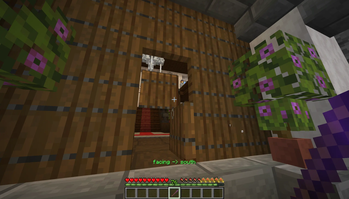
Image of the survival debug stick being used on a spruce door.

Core Features

Safe State Calculations: The plugin dynamically calculates valid block states. When you right-click to change a value, the plugin safely tests the new data behind the scenes. It natively supports toggling booleans (true/false), integer ranges (0-30 for ages and rotations), and cycling through a massive built-in dictionary of over 60 complex string states (such as stair shapes, slab types, wall attachments, and note block instruments).

Physics & Neighbor Update Prevention: Modifying blocks with this stick intentionally ignores block physics. This allows builders to achieve "impossible" block states without them instantly breaking or updating—meaning you can edit the top half of a door without it popping off, or force a fence post to disconnect from a neighboring block.

Per-Player Material Memory: The stick features a smart memory system. It tracks the last property a player edited on a per-material basis. If you left-click to select the facing property on an Oak Stair, the next Oak Stair you click will automatically default to facing, saving you from having to cycle through the options all over again.

Clean Action-Bar UI: To prevent chat spam, all interactions are elegantly displayed via the Action Bar. Players receive color-coded notifications when selecting properties (Yellow), successfully changing values (Green), or attempting to modify a block with no states (Red).

Secure Item Tracking: The custom stick is generated using Bukkit's PersistentDataContainer (PDC). This ensures that the debug stick is completely unique and secure—players cannot simply rename a normal stick in an anvil to gain access to these powers.

Simple Commands: Server administrators can grant the item using the /sdebug or /debugstick commands (requires the customdebugstick.give permission).

👥 Team & Contributors

imNikos
imNikosOwner

⚙️ Compatibility

Environment
🖥️ Server-side
Loaders
bukkitpaperspigot
Minecraft Versions
1.211.21.11.21.21.21.31.21.41.21.51.21.61.21.7+4 more

🔗 Links

Modrinth Page