

SubwayAnnouncer
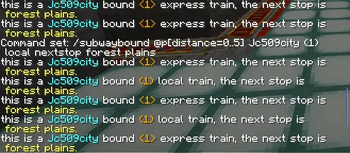
It adds a new command for your command block which you use for your minecart rails or subway by placing any block that triggers the command block.
📖About SubwayAnnouncer
The way the plugin works is you have place a command block around the rail and with a redstone triggering it. Then promt a command (which is on the bottom for reference) on the command block for the announcement to work and be triggered by the redstone.
Here are the command you're suppose to put:
Command 1: The Next Stop Announcement
Use this when the train is moving between stations to announce where it is heading.
The Syntax: /subwaybound <local|express> nextstop
Example: /subwaybound @a Manhattan A express nextstop Times Square
What it prints in chat: > this is a Manhattan bound A express train, the next stop is Times Square.
Command 2: The Current Stop Announcement
Use this when the train arrives at a station to announce the current stop and any available transfers.
The Syntax (Without Transfers): /this-stop
Example: /this-stop @a Times Square
What it prints in chat: > this is Times Square
The Syntax (With Transfers): /this-stop transfer <lines...>
Example: /this-stop @a Times Square transfer the N Q R W 1 2 3 and 7 trains
What it prints in chat: > this is Times Square, transfer is available to the N Q R W 1 2 3 and 7 trains