Logo
MINECRAFTBIBLE
Items
Items

All game items

Blocks
Blocks

Building blocks

Mobs
Mobs

Creatures & monsters

Biomes
Biomes

World biomes

Structures
Structures

Generated structures

Recipes
Recipes

Crafting guides

Advancements
Advancements

Achievements

Loot Tables
Loot Tables

Drop rates

Tags
Tags

Item groupings

All Versions
View all data →
Capes
Cape ArchiveNEW

Browse rare Minecon capes, OptiFine capes, and custom capes from players worldwide

Browse

Player Database
Player DatabasePopular

Search any player

Skin Browser
Skin Browser

Browse & download skins

Cape Gallery
Cape GalleryNEW

Minecon & OptiFine capes

Seed Vault
Seed Vault

Curated seeds

Learn

Guides
GuidesNew

Tutorials & tips

Blog
Blog

News & updates

Community

Community Hub
Community HubHub

Posts, discussions & more

All Versions
View community →
Seed Analyzer
Seed Analyzer

World seed analysis

Loot Explorer
Loot Explorer

Drop rates

Crafting Calculator
Crafting Calculator

Material planning

Enchant Calculator
Enchant Calculator

Probability math

Redstone Lab
Redstone Lab

Signal timing

Trading Profit
Trading Profit

Villager ROI

All Versions
View all tools →
Mods
Mods

Browse all mods

Plugins
Plugins

Server plugins

Resource Packs
Resource Packs

Textures & sounds

Shaders
Shaders

Visual enhancements

Datapacks
Datapacks

World logic

Scanner
Mod Intelligence

Scan & analyze any mod

All Versions
View all mods →
Loading...
IntroductionIntroductionVersion HistoryVersion HistoryGuidesGuidesBlog & NewsBlog & News
ItemsItemsBlocksBlocksMobsMobsRecipesRecipesBiomesBiomesStructuresStructuresAdvancementsAdvancementsLoot TablesLoot TablesTagsTags
ModsModsPluginsPluginsResource PacksResource PacksShadersShadersDatapacksDatapacks

MinecraftBible

The Ultimate Wiki

Logo
MINECRAFTBIBLE

The ultimate Minecraft reference. Every item, block, mob, and recipe documented with precision.

Community

  • Player Database
  • Skin Browser
  • Cape Gallery
  • Community Hub
  • Seed Vault

Database

  • Items
  • Blocks
  • Mobs
  • Recipes
  • Biomes
  • Structures

Tools

  • Seed Analyzer
  • Mod Intelligence
  • Crafting Calculator
  • Enchant Calculator

Mods & Packs

  • Mods
  • Plugins
  • Resource Packs
  • Shaders
  • Datapacks

© 2026 MinecraftBible. Not affiliated with Mojang or Microsoft.

PrivacyTermsContact
Stopwatch
PluginMIT

Stopwatch

Simple stopwatch plugin.

64
Downloads
0
Followers
9 months ago
Updated
📦
2
Versions
equipmentgame-mechanicsminigamepaperpurpurspigot
Download Latestv1.1View on Modrinth

📖About Stopwatch

A simple yet powerful plugin that adds a craftable, fully functional stopwatch. Perfect for races, parkour, and any time-based server events.

The stopwatch's timer starts and stops automatically when a player holding it steps on specific blocks, making it seamless for players to use.

✨ Features

  • Automatic Timer: The timer starts when stepping above a Diamond Block and stops on an Emerald Block.
  • Custom Assets: Features a unique item model, custom textures for active/idle states, and a ticking sound (Resource Pack required).
  • Real-Time Display: See your time tick down to the millisecond in your action bar.
  • Broadcasts: Announce player start times and final results to others within a configurable radius.
  • Breaking Mechanic: The stopwatch “breaks” if removed from your main hand while active, encouraging fair play.

🚀 How to Use

  1. Craft the stopwatch.
  2. Hold it in your main hand.
  3. Step on the block above a Diamond Block to start the timer.
  4. Step on the block above an Emerald Block to finish. Your result will be announced in chat!

Warning! Dropping or moving the active stopwatch from your main hand will break it.

⚙️ Installation

  1. Download the plugin's .jar file.
  2. Place it into your server's plugins folder.
  3. Download and install the accompanying resource pack (from releases) on your server. It is required for the custom textures and sounds.
  4. Restart your server.

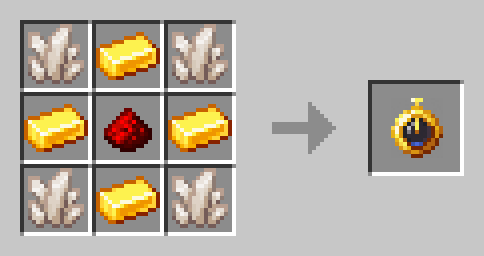
🛠️ Crafting

Crafting recipe

🛠️ Configuration & Management

Configuration (config.yml)

  • locale: Plugin language. Specify the language code (e.g., en, ru, uk) that corresponds to a file in the lang folder.
  • update-frequency-ticks: Timer update frequency in the action bar (in ticks). A lower value provides a smoother display but slightly increases the load. (20 ticks = 1 second).
  • message-distance: The radius (in blocks) within which other players will see the start, finish, or break messages for the stopwatch.
  • resource-pack-manager: The namespace for the resource pack. This is typically minecraft.

Commands

  • /stopwatch reload
    Reloads the plugin's configuration, including language files. Requires the stopwatch.admin permission.

Permissions

  • stopwatch.admin: Grants access to the /stopwatch reload command. It is given to all server operators by default.

❤️ Special Thanks

Special thanks to Vahgard, who made the original DataPack!

👥 Team & Contributors

Renwixx
RenwixxOwner

⚙️ Compatibility

Environment
🖥️ Server-side
Loaders
paperpurpurspigot
Minecraft Versions
1.21.4

🔗 Links

Modrinth Page