Logo
MINECRAFTBIBLE
Items
Items

All game items

Blocks
Blocks

Building blocks

Mobs
Mobs

Creatures & monsters

Biomes
Biomes

World biomes

Structures
Structures

Generated structures

Recipes
Recipes

Crafting guides

Advancements
Advancements

Achievements

Loot Tables
Loot Tables

Drop rates

Tags
Tags

Item groupings

All Versions
View all data →
Capes
Cape ArchiveNEW

Browse rare Minecon capes, OptiFine capes, and custom capes from players worldwide

Browse

Player Database
Player DatabasePopular

Search any player

Skin Browser
Skin Browser

Browse & download skins

Cape Gallery
Cape GalleryNEW

Minecon & OptiFine capes

Seed Vault
Seed Vault

Curated seeds

Learn

Guides
GuidesNew

Tutorials & tips

Blog
Blog

News & updates

Community

Community Hub
Community HubHub

Posts, discussions & more

All Versions
View community →
Seed Analyzer
Seed Analyzer

World seed analysis

Loot Explorer
Loot Explorer

Drop rates

Crafting Calculator
Crafting Calculator

Material planning

Enchant Calculator
Enchant Calculator

Probability math

Redstone Lab
Redstone Lab

Signal timing

Trading Profit
Trading Profit

Villager ROI

All Versions
View all tools →
Mods
Mods

Browse all mods

Plugins
Plugins

Server plugins

Resource Packs
Resource Packs

Textures & sounds

Shaders
Shaders

Visual enhancements

Datapacks
Datapacks

World logic

Scanner
Mod Intelligence

Scan & analyze any mod

All Versions
View all mods →
Loading...
IntroductionIntroductionVersion HistoryVersion HistoryGuidesGuidesBlog & NewsBlog & News
ItemsItemsBlocksBlocksMobsMobsRecipesRecipesBiomesBiomesStructuresStructuresAdvancementsAdvancementsLoot TablesLoot TablesTagsTags
ModsModsPluginsPluginsResource PacksResource PacksShadersShadersDatapacksDatapacks

MinecraftBible

The Ultimate Wiki

Logo
MINECRAFTBIBLE

The ultimate Minecraft reference. Every item, block, mob, and recipe documented with precision.

Community

  • Skin Browser
  • Cape Gallery
  • Seed Vault
  • Blog
  • Guides

Database

  • Items
  • Blocks
  • Mobs
  • Recipes
  • Biomes
  • Structures

Tools

  • Seed Analyzer
  • Mod Intelligence
  • Crafting Calculator
  • Enchant Calculator

Mods & Packs

  • Mods
  • Plugins
  • Resource Packs
  • Shaders
  • Datapacks

Site & Legal

  • About
  • Authors
  • Editorial Policy
  • Corrections
  • Contact
  • Privacy Policy
  • Terms of Service
  • DMCA
  • Sitemap

© 2026 MinecraftBible. Not affiliated with Mojang or Microsoft.

PrivacyTermsContact
Step Erosion
PluginCC-BY-ND-4.0

Step Erosion

A dynamic Minecraft plugin that simulates environmental wear. High-traffic areas naturally degrade from grass into trails over time, making player activity visible on the landscape.

69
Downloads
1
Followers
1 months ago
Updated
📦
2
Versions
adventuregame-mechanicstransportationpaperpurpurspigot
Download Latestv1.0.1View on Modrinth

📖About Step Erosion

StepErosion

StepErosion is a lightweight Paper plugin that makes your Minecraft world feel alive - paths form naturally wherever players walk most often.

How it works

Every step a player takes is tracked using a sliding time window. Once a block accumulates enough footsteps within that window, it erodes to the next stage:

GRASS_BLOCK ──[20 steps]──► DIRT ──[50 steps]──► DIRT_PATH

Paths are not permanent - if a DIRT_PATH block goes unwalked for long enough, it slowly reverts back to DIRT, simulating natural recovery.

Features

  • Gradual erosion — blocks degrade step-by-step based on real player activity
  • Natural recovery — dirt paths revert to dirt after inactivity
  • Sliding window — only recent footsteps count; old traffic fades away
  • Persistent — erosion state is saved to disk and survives server restarts
  • Explosion-aware — TNT and creeper blasts clear erosion data for destroyed blocks
  • Spread-aware — grass naturally overgrowing dirt resets its erosion progress
  • Fully configurable — thresholds and time windows are all adjustable in config.yml
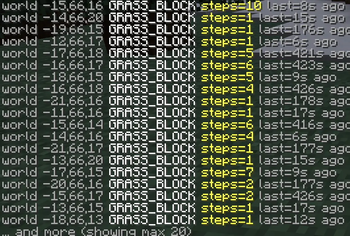
  • Debug command — /se lets admins inspect, simulate, and reset erosion data

Configuration

erosion:
  dirt-threshold: 20        # steps to erode GRASS → DIRT
  path-threshold: 50        # steps to erode DIRT → DIRT_PATH
  step-window-ticks: 1728000    # 1 day — sliding window size
  recovery-window-ticks: 5184000  # 3 days — idle time before path reverts

Commands & Permissions

Command Description
/se info Show erosion data for the block under your feet
/se list List all currently tracked blocks
/se reset Clear erosion data for the block under your feet
/se simulate <n> Simulate N footsteps on the block under your feet
/se config Display active configuration values
/se reload Reload config.yml without restarting the server

Permission: steperosion.admin (default: op)

Requirements

  • Paper 26.1.2+ (2026 build series)
  • Java 25+

⚠️ Region Plugin Compatibility

Currently, StepErosion does not integrate with region protection plugins such as Towny, WorldGuard, GriefPrevention, PlotSquared, or similar plot-based solutions.

This means erosion can occur in protected areas if players are allowed to walk there.

Full region plugin support is planned for a future update.

👥 Team & Contributors

LanoHere
LanoHereOwner

⚙️ Compatibility

Environment
🖥️ Server-side
Loaders
paperpurpurspigot
Minecraft Versions
26.1.2

🔗 Links

Modrinth Page