

StarCodes
This is a plugin that lets you create Starcodes, which are codes that player can redeem only once(configurable) and that executes a command, fully customisable also with a GUI
📖About StarCodes
⭐ StarCodes
StarCodes is a lightweight redeem-code plugin for Paper and Folia servers with one-time codes, configurable console rewards and an in-game admin GUI.
If you find any bug, contact me on Discord: pupillaviolaalt
⭐ StarCodes
Simple, clean and lightweight redeem codes for modern Minecraft servers.
StarCodes lets players redeem custom server codes with a simple command, for example:
/code <code>
When a player redeems a code, StarCodes executes the configured console reward commands for that player.
It is designed for server owners who want a fast and easy code system for events, promotions, creator campaigns, compensation rewards, launch rewards, and community giveaways without setting up a database or a complicated external service.
✨ What does StarCodes do?
StarCodes adds a configurable redeem-code system to your server.
You can use it for:
- 🎁 Launch rewards
- 🎉 Event codes
- 📢 TikTok, YouTube, Discord or community campaigns
- 👑 Creator codes
- 🛠️ Bug compensation rewards
- ⭐ Limited-time promotions
- 💎 Crate keys, money, ranks, permissions or any command-based reward
✅ Why use StarCodes?
StarCodes is made to be simple, readable and practical.
No bloated systems.
No required database.
No unnecessary setup.
No remote service.
Just codes, rewards, limits and a clean admin GUI.
It is useful if you want to quickly give your players a redeemable code like:
- /code launch
- /code discord
- /code tiktok
- /code sorry
- /code creatorname
and reward them with commands from your existing plugins.
✨ Features
- ⭐ Simple /code <code> command
- 🎁 Configurable reward commands
- 🔒 One-time use per player
- 📊 Optional global max uses per code
- ✅ Enable or disable codes
- 🖥️ Clean in-game admin GUI
- 📝 Editable display names
- 🧩 Internal placeholders for reward commands
- ⚡ Lightweight local file storage
- 🎨 MiniMessage-style configurable messages
- 🔁 Reload support
- 🧵 Paper and Folia support
- 🛡️ No NMS
- 📁 No database required
- 🔐 No telemetry or hidden remote uploads
🎮 Player Command
/code <code>
Redeems a configured code.
🛠️ Admin Commands
/starcodes
Opens the admin GUI.
/starcodes reload
Reloads the plugin configuration and code files.
Aliases
- /codeadmin
- /scodes
🔐 Permissions
starcodes.admin
Allows access to the admin GUI and admin commands.
Players do not need any permission to use:
/code <code>
🧩 Reward Command Placeholders
StarCodes supports internal placeholders inside reward commands.
Available placeholders
%player%
The name of the player redeeming the code.
Example
commands:
- "eco give %player% 5000"
- "crate key give %player% rare 1"
- "lp user %player% permission set event.reward true"
These commands are executed from the console.
⚙️ Example Code Configuration
Example codes.yml:
codes:
welcome:
- display-name: "Welcome Code"
- enabled: true
- max-global-uses: -1
- commands:
- "eco give %player% 5000"
- "crate key give %player% rare 1"
tiktok:
- display-name: "TikTok Reward"
- enabled: true
- max-global-uses: 500
- commands:
- "eco give %player% 10000"
- "crate key give %player% epic 1"
- "say %player% redeemed the TikTok code!"
🧾 Configuration Options
display-name
display-name: "Welcome Code"
The readable name shown in the admin GUI.
enabled
enabled: true
Controls whether the code can currently be redeemed.
Set it to:
enabled: false
to temporarily disable the code.
max-global-uses
max-global-uses: <number>
Controls how many total times the code can be redeemed globally.
Use:
max-global-uses: -1
for unlimited global uses.
Use a number like:
max-global-uses: 100
to limit the code to 100 total redemptions.
🖥️ Admin GUI
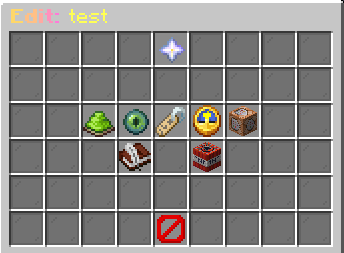
StarCodes includes an in-game admin GUI for easier code management.
Open it with:
/starcodes
From the GUI you can manage your codes without manually editing every value.
The GUI allows you to:
- ➕ Create codes
- ❌ Delete codes
- ✅ Enable or disable codes
- 📝 Edit display names
- 📊 Edit global max uses
- 🎁 Add reward commands
- 🧹 Remove reward commands
- 🔁 Reload plugin files
📦 Installation
- Download the plugin jar.
- Put the jar inside your server plugins folder.
- Restart the server.
- Edit the generated files if needed.
- Use /starcodes to manage codes from the admin GUI.
- Give players codes to redeem with /code <code>.
✅ Compatibility
StarCodes is designed for modern server environments.
- ✅ Paper
- ✅ Folia
- ✅ Minecraft 1.21+
- ✅ No NMS
- ✅ No required database
- ✅ Console-command based rewards
🔒 Privacy and Data
StarCodes uses local server files to store code and redemption data.
StarCodes does not intentionally upload player data to any remote server.
Stored data is limited to what is needed for code redemption tracking, such as which players have already redeemed a code and how many times a code has been used globally.
❓ FAQ
Can a player redeem the same code twice?
No. Each player can redeem each code only once.
Can I limit how many total players can redeem a code?
Yes.
Use:
max-global-uses: 100
Set it to:
max-global-uses: -1
for unlimited global uses.
Are reward commands executed as console?
Yes. All reward commands are executed from console.
Does StarCodes need a database?
No. StarCodes uses local files.
Does StarCodes support Folia?
Yes. StarCodes is designed to support both Paper and Folia.
Can I use rewards from other plugins?
Yes. If another plugin has a console command, you can use it as a StarCodes reward command.
Examples
commands:
- "eco give %player% 5000"
- "crate key give %player% rare 1"
- "lp user %player% permission set example.permission true"
👤 Author
Made by PupillaViola.