Logo
MINECRAFTBIBLE
Items
Items

All game items

Blocks
Blocks

Building blocks

Mobs
Mobs

Creatures & monsters

Biomes
Biomes

World biomes

Structures
Structures

Generated structures

Recipes
Recipes

Crafting guides

Advancements
Advancements

Achievements

Loot Tables
Loot Tables

Drop rates

Tags
Tags

Item groupings

All Versions
View all data →
Capes
Cape ArchiveNEW

Browse rare Minecon capes, OptiFine capes, and custom capes from players worldwide

Browse

Player Database
Player DatabasePopular

Search any player

Skin Browser
Skin Browser

Browse & download skins

Cape Gallery
Cape GalleryNEW

Minecon & OptiFine capes

Seed Vault
Seed Vault

Curated seeds

Learn

Guides
GuidesNew

Tutorials & tips

Blog
Blog

News & updates

Community

Community Hub
Community HubHub

Posts, discussions & more

All Versions
View community →
Seed Analyzer
Seed Analyzer

World seed analysis

Loot Explorer
Loot Explorer

Drop rates

Crafting Calculator
Crafting Calculator

Material planning

Enchant Calculator
Enchant Calculator

Probability math

Redstone Lab
Redstone Lab

Signal timing

Trading Profit
Trading Profit

Villager ROI

All Versions
View all tools →
Mods
Mods

Browse all mods

Plugins
Plugins

Server plugins

Resource Packs
Resource Packs

Textures & sounds

Shaders
Shaders

Visual enhancements

Datapacks
Datapacks

World logic

Scanner
Mod Intelligence

Scan & analyze any mod

All Versions
View all mods →
Loading...
IntroductionIntroductionVersion HistoryVersion HistoryGuidesGuidesBlog & NewsBlog & News
ItemsItemsBlocksBlocksMobsMobsRecipesRecipesBiomesBiomesStructuresStructuresAdvancementsAdvancementsLoot TablesLoot TablesTagsTags
ModsModsPluginsPluginsResource PacksResource PacksShadersShadersDatapacksDatapacks

MinecraftBible

The Ultimate Wiki

Logo
MINECRAFTBIBLE

The ultimate Minecraft reference. Every item, block, mob, and recipe documented with precision.

Community

  • Skin Browser
  • Cape Gallery
  • Seed Vault
  • Blog
  • Guides

Database

  • Items
  • Blocks
  • Mobs
  • Recipes
  • Biomes
  • Structures

Tools

  • Seed Analyzer
  • Mod Intelligence
  • Crafting Calculator
  • Enchant Calculator

Mods & Packs

  • Mods
  • Plugins
  • Resource Packs
  • Shaders
  • Datapacks

Site & Legal

  • About
  • Authors
  • Editorial Policy
  • Corrections
  • Contact
  • Privacy Policy
  • Terms of Service
  • DMCA
  • Sitemap

© 2026 MinecraftBible. Not affiliated with Mojang or Microsoft.

PrivacyTermsContact
StaffUI
PluginMIT

StaffUI

A fully customizable modern staff punishment panel featuring Discord log support, Hex colors, and ItemsAdder compatibility.

42
Downloads
0
Followers
4 months ago
Updated
📦
1
Versions
librarymanagementtechnologybukkitpaperpurpurspigot
Download Latestv1.0.0View on Modrinth

📖About StaffUI

🛡️ StaffUI - Professional Staff & Punishment Management Panel
Take your server management to the next level! StaffUI is designed to allow your staff members to perform punishment actions through a fully customizable interface (GUI) without wasting time with complex commands. Developed with the Hazelnut Network infrastructure, this system brings speed and aesthetics together.

✨ Key Features

🎨 Unlimited Customization: Change slot layouts, glass colors, item names, and descriptions in seconds via .yml files.

💎 ItemsAdder Support: Use custom textures and ItemsAdder items in your menus. Fully compatible with custom texture IDs.

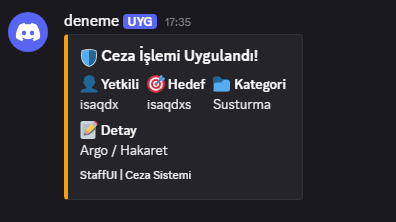
🌐 Discord Webhook Integration: Every punishment action (Staff, Target, Reason, and Category) is sent to your Discord channel as a professional Embed message.

🌈 Hex Color Support: Supports all color codes in #FFFFFF format. Reflect your server's corporate identity in the menu.

🚀 Maximum Performance: No database (MySQL/SQLite) setup required. Thanks to its lightweight code structure, it does not cause TPS loss even on the busiest servers.

📦 Standalone Structure: Works with a plug-and-play logic without the need for Vault or any other plugins.

🛠️ Installation Guide

Upload the StaffUI.jar file to your server's plugins folder.

Start the server and wait for the files to be generated.

Paste your Discord Webhook link into the webhook-url section in the config.yml file.

Edit your menus as you wish and activate them with the /cezaver reload command.

📄 License and Ownership
This project is provided under the MIT License. It is developer-friendly and follows the open-source philosophy.

Developer: (isaqdx)

👥 Team & Contributors

I
isaqdxOwner
xxewanxx
xxewanxx
Member

⚙️ Compatibility

Environment
🖥️ Server-side
Loaders
bukkitpaperpurpurspigot
Minecraft Versions
1.201.20.11.20.21.20.31.20.41.20.51.20.61.21+11 more

🔗 Links

Modrinth Page