Logo
MINECRAFTBIBLE
Items
Items

All game items

Blocks
Blocks

Building blocks

Mobs
Mobs

Creatures & monsters

Biomes
Biomes

World biomes

Structures
Structures

Generated structures

Recipes
Recipes

Crafting guides

Advancements
Advancements

Achievements

Loot Tables
Loot Tables

Drop rates

Tags
Tags

Item groupings

All Versions
View all data →
Capes
Cape ArchiveNEW

Browse rare Minecon capes, OptiFine capes, and custom capes from players worldwide

Browse

Player Database
Player DatabasePopular

Search any player

Skin Browser
Skin Browser

Browse & download skins

Cape Gallery
Cape GalleryNEW

Minecon & OptiFine capes

Seed Vault
Seed Vault

Curated seeds

Learn

Guides
GuidesNew

Tutorials & tips

Blog
Blog

News & updates

Community

Community Hub
Community HubHub

Posts, discussions & more

All Versions
View community →
Seed Analyzer
Seed Analyzer

World seed analysis

Loot Explorer
Loot Explorer

Drop rates

Crafting Calculator
Crafting Calculator

Material planning

Enchant Calculator
Enchant Calculator

Probability math

Redstone Lab
Redstone Lab

Signal timing

Trading Profit
Trading Profit

Villager ROI

All Versions
View all tools →
Mods
Mods

Browse all mods

Plugins
Plugins

Server plugins

Resource Packs
Resource Packs

Textures & sounds

Shaders
Shaders

Visual enhancements

Datapacks
Datapacks

World logic

Scanner
Mod Intelligence

Scan & analyze any mod

All Versions
View all mods →
Loading...
IntroductionIntroductionVersion HistoryVersion HistoryGuidesGuidesBlog & NewsBlog & News
ItemsItemsBlocksBlocksMobsMobsRecipesRecipesBiomesBiomesStructuresStructuresAdvancementsAdvancementsLoot TablesLoot TablesTagsTags
ModsModsPluginsPluginsResource PacksResource PacksShadersShadersDatapacksDatapacks

MinecraftBible

The Ultimate Wiki

Logo
MINECRAFTBIBLE

The ultimate Minecraft reference. Every item, block, mob, and recipe documented with precision.

Community

  • Skin Browser
  • Cape Gallery
  • Seed Vault
  • Blog
  • Guides

Database

  • Items
  • Blocks
  • Mobs
  • Recipes
  • Biomes
  • Structures

Tools

  • Seed Analyzer
  • Mod Intelligence
  • Crafting Calculator
  • Enchant Calculator

Mods & Packs

  • Mods
  • Plugins
  • Resource Packs
  • Shaders
  • Datapacks

Site & Legal

  • About
  • Authors
  • Editorial Policy
  • Corrections
  • Contact
  • Privacy Policy
  • Terms of Service
  • DMCA
  • Sitemap

© 2026 MinecraftBible. Not affiliated with Mojang or Microsoft.

PrivacyTermsContact
Spill N' Drop
PluginGPL-3.0-only

Spill N' Drop

Spill your inventory on impact! Items scatter when you fall, get rammed by a goat, or caught in a sonic boom. Configurable drop chances, water spills, potion smashing and more.

28
Downloads
1
Followers
1 months ago
Updated
📦
2
Versions
adventurecursedgame-mechanicsbukkitpaperpurpurspigot
Download Latestv0.2+1.19-26.1.2View on Modrinth

📖About Spill N' Drop

Spill N' Drop

Supports Minecraft 1.19 – 26.1.2
Modrinth Downloads

Drop your items when you get hurt — literally.

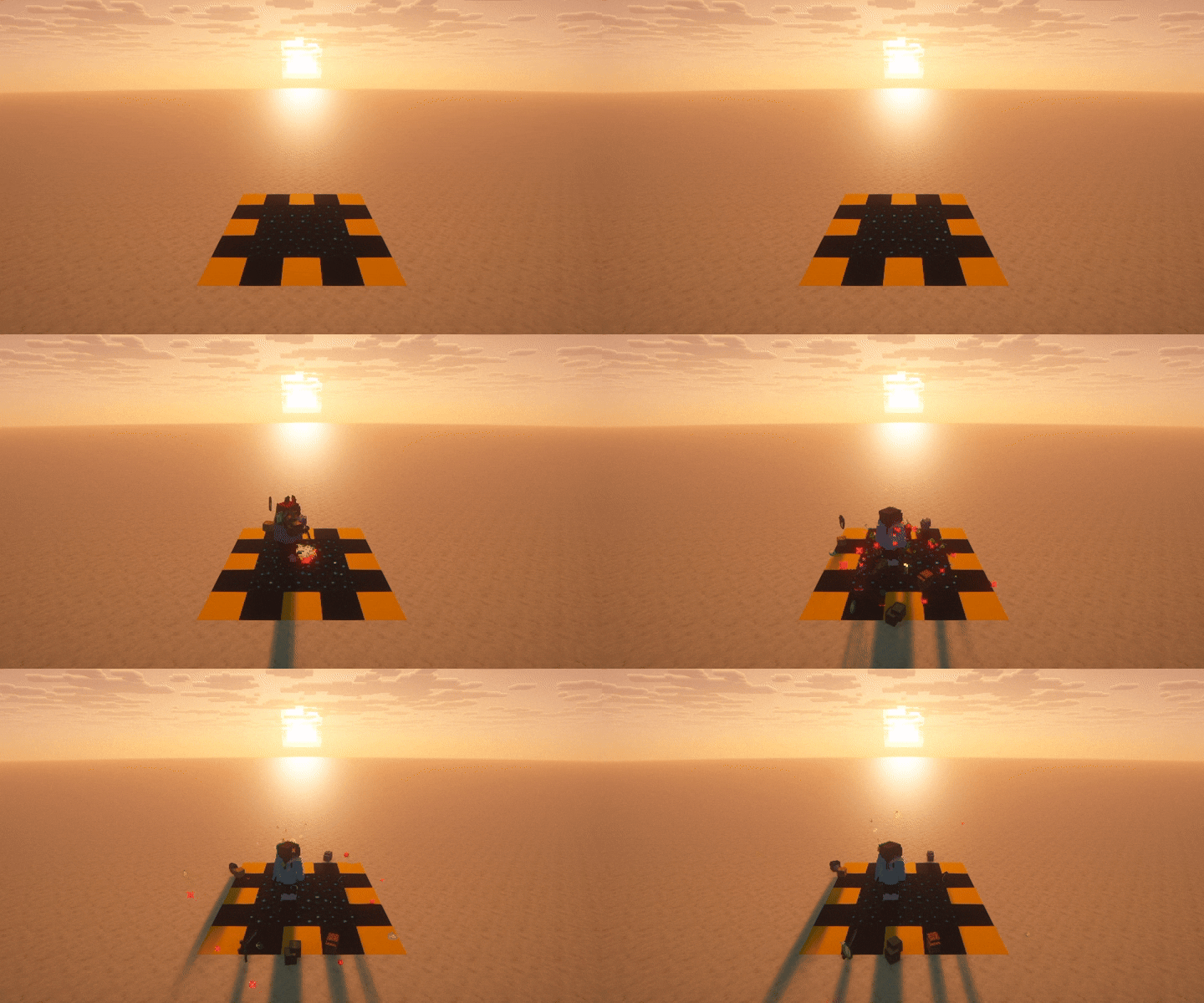
SpillNDrop makes taking damage more impactful. When players fall, get rammed by a goat, or are hit by a Warden's sonic boom, their inventory items may spill onto the ground.

Drop chances, supported worlds, item behavior, and individual features can be configured by server administrators.

Presentation

SpillNDrop presentation

Compatibility

  • Supports Minecraft versions from 1.19 through 26.1.2
  • Compatible with Spigot, Paper, and compatible server software
  • The plugin is compiled for Java 17
  • Your server may require a newer Java version depending on its Minecraft version

Tested on:

  • Paper 1.19
  • Paper 1.21.11
  • Spigot 26.1.2

Features

  • Inventory drop — random items from the player's inventory may scatter onto the ground
  • Held item drop — optionally only affect the item held in the player's main hand
  • Water spill — dropped water buckets place water at the player's feet
  • Potion smash — drinking, splash, and lingering potions shatter and apply their effects
  • Configurable drop chance — use a flat percentage or damage-based multiplier
  • Per-cause control — configure fall damage, sonic boom, and goat attacks independently
  • World selection — choose exactly which worlds the plugin affects
  • Scatter physics — dropped items fly outward with configurable force
  • Pickup delay — prevent dropped items from being immediately picked up
  • Multi-language support — includes English and Polish language files

Damage Causes

Cause Config key Default chance
Fall damage FALL 6.0 × damage
Warden sonic boom SONIC_BOOM 10.0 × damage
Goat ram GOAT_ATTACK 20.0 × damage

Drop chances can use either:

  • A damage multiplier, such as 6.0
  • A fixed percentage, such as 20%

Configuration

The default configuration enables SpillNDrop in the overworld, Nether, and End:

language: en  # Available: en, pl

# Worlds in which SpillNDrop is enabled
# Use '*' to enable SpillNDrop in all worlds
enabled-worlds:
  - world
  - world_nether
  - world_the_end

multipliers:
  FALL: 6.0
  SONIC_BOOM: 10.0
  GOAT_ATTACK: 20.0

drop-height-offset: 0.5
pickup-delay: 20
scatter-force: 0.2

features:
  drop-items: true
  drop-held-item: false
  spill-water: true
  smash-potions: true

To enable SpillNDrop in every world:

enabled-worlds:
  - '*'

Use /snd reload after manually editing the configuration.

Commands

All commands require the spillndrop.admin permission.

Command Description
/snd help Show the command list
/snd reload Reload configuration and language files
/snd version Show plugin version and author
/snd set <cause> <value> Change the drop chance for a damage cause
/snd toggle <feature> [true/false] Enable, disable, or toggle a feature

Examples:

/snd set FALL 8.0
/snd set SONIC_BOOM 50%
/snd toggle spill-water false
/snd reload

Toggleable Features

Feature Description
drop-items Drops random items from the entire inventory
drop-held-item Only affects the item held in the main hand
spill-water Water buckets place water instead of dropping
smash-potions Potions shatter and apply their effects

Enabling both drop-items and drop-held-item causes the held item to receive an additional drop chance.

Language Support

SpillNDrop includes English and Polish translations.

Language files are stored inside the plugin's langs directory. To add another language:

  1. Copy an existing language file, such as en.yml.
  2. Rename it, for example to de.yml.
  3. Set language: de inside config.yml.
  4. Run /snd reload.

Permissions

Permission Description Default
spillndrop.admin Access to all /snd administration commands Operators

👥 Team & Contributors

GDLev
GDLevOwner

⚙️ Compatibility

Environment
🖥️ Server-side
Loaders
bukkitpaperpurpurspigot
Minecraft Versions
1.191.19.11.19.21.19.31.19.41.201.20.11.20.2+19 more

🔗 Links

Modrinth Page