Logo
MINECRAFTBIBLE
Items
Items

All game items

Blocks
Blocks

Building blocks

Mobs
Mobs

Creatures & monsters

Biomes
Biomes

World biomes

Structures
Structures

Generated structures

Recipes
Recipes

Crafting guides

Advancements
Advancements

Achievements

Loot Tables
Loot Tables

Drop rates

Tags
Tags

Item groupings

All Versions
View all data →
Capes
Cape ArchiveNEW

Browse rare Minecon capes, OptiFine capes, and custom capes from players worldwide

Browse

Player Database
Player DatabasePopular

Search any player

Skin Browser
Skin Browser

Browse & download skins

Cape Gallery
Cape GalleryNEW

Minecon & OptiFine capes

Seed Vault
Seed Vault

Curated seeds

Learn

Guides
GuidesNew

Tutorials & tips

Blog
Blog

News & updates

Community

Community Hub
Community HubHub

Posts, discussions & more

All Versions
View community →
Seed Analyzer
Seed Analyzer

World seed analysis

Loot Explorer
Loot Explorer

Drop rates

Crafting Calculator
Crafting Calculator

Material planning

Enchant Calculator
Enchant Calculator

Probability math

Redstone Lab
Redstone Lab

Signal timing

Trading Profit
Trading Profit

Villager ROI

All Versions
View all tools →
Mods
Mods

Browse all mods

Plugins
Plugins

Server plugins

Resource Packs
Resource Packs

Textures & sounds

Shaders
Shaders

Visual enhancements

Datapacks
Datapacks

World logic

Scanner
Mod Intelligence

Scan & analyze any mod

All Versions
View all mods →
Loading...
IntroductionIntroductionVersion HistoryVersion HistoryGuidesGuidesBlog & NewsBlog & News
ItemsItemsBlocksBlocksMobsMobsRecipesRecipesBiomesBiomesStructuresStructuresAdvancementsAdvancementsLoot TablesLoot TablesTagsTags
ModsModsPluginsPluginsResource PacksResource PacksShadersShadersDatapacksDatapacks

MinecraftBible

The Ultimate Wiki

Logo
MINECRAFTBIBLE

The ultimate Minecraft reference. Every item, block, mob, and recipe documented with precision.

Community

  • Skin Browser
  • Cape Gallery
  • Seed Vault
  • Blog
  • Guides

Database

  • Items
  • Blocks
  • Mobs
  • Recipes
  • Biomes
  • Structures

Tools

  • Seed Analyzer
  • Mod Intelligence
  • Crafting Calculator
  • Enchant Calculator

Mods & Packs

  • Mods
  • Plugins
  • Resource Packs
  • Shaders
  • Datapacks

Site & Legal

  • About
  • Authors
  • Editorial Policy
  • Corrections
  • Contact
  • Privacy Policy
  • Terms of Service
  • DMCA
  • Sitemap

© 2026 MinecraftBible. Not affiliated with Mojang or Microsoft.

PrivacyTermsContact
SoulLock
PluginMIT

SoulLock

Trap player souls on death and revive them by placing their head. Perfect for survival, PvP, and co-op servers.

120
Downloads
3
Followers
3 months ago
Updated
📦
1
Versions
adventurecursedgame-mechanicsbukkitpaperpurpurspigot
Download Latestv1.0View on Modrinth

📖About SoulLock

💀 SoulLock — Death is not the end...

When a player dies, their soul is trapped inside their head.
They cannot return… unless someone places it back.

Will your friends save you — or leave you behind?


🎮 What is SoulLock?

SoulLock is a Paper plugin (1.21+) that transforms Minecraft’s death system into a revival-based mechanic.

Instead of respawning normally:

  • 💀 Players become soul-locked
  • 🪦 Their head drops at death location
  • ⚡ They can only return when someone places their head

✨ Features

💀 Soul Lock System

  • Player dies → soul is locked
  • Real player head drops (with skin)
  • Only one active head per player
  • Fully persistent (survives restarts)

👻 Locked Player Behavior

Locked players are restricted until revived:

  • Cannot break or place blocks
  • Cannot use items
  • Cannot interact with entities

Join behavior:

  • 👁️ Spectator mode (default)
  • 🚫 Kick mode (configurable)

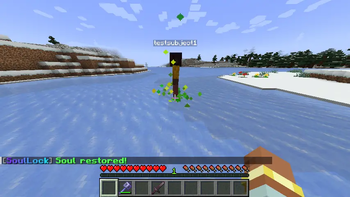
⚡ Revival System

When a player head is placed:

  • 🔍 Automatically detects the player
  • 🆓 Instantly unlocks their soul
  • 📩 Message: "Your soul has been restored! ✨"

If the player is online:

  • Teleported to revival location
  • Restored to SURVIVAL mode
  • Spawn point updated

Effects:

  • ⚡ Lightning strike (optional)
  • 🌟 Particle effects (optional)
  • 💀 The head disappears after placement

🤔 Why SoulLock?

  • 🧠 Adds strategy to survival gameplay
  • 🤝 Encourages teamwork and cooperation
  • ⚔️ Makes PvP more intense
  • 🧭 Turns death into a mission

⚙️ Configuration

revive-mode: SPECTATOR
lightning-effect: true
particle-effect: true
prevent-head-despawn: true

🛠️ Installation

  1. Download the plugin .jar
  2. Place it in /plugins/
  3. Start your server
  4. Edit /plugins/SoulLock/config.yml

Requirements:

  • Paper 1.21+
  • Java 21+

💬 Commands

Admin Commands

/soullockadmin unlock <player|uuid>

Permission: soullock.admin


📊 Data Storage

  • Stored in /plugins/SoulLock/data.yml
  • Automatically saved
  • Persistent across restarts

🎯 Perfect For

  • 🏰 Survival servers
  • 💀 Hardcore gameplay
  • ⚔️ PvP challenges
  • 🎭 Roleplay servers

📦 Version Info

  • Version: 1.0
  • Minecraft: 1.21+
  • Platform: Paper

📸 Screenshots (Coming Soon)

  • Player head drop on death
  • Revival lightning effect
  • Spectator gameplay

💀 Made by Slimeey Studios

Enjoy the soul-locking experience ✨

👥 Team & Contributors

SlimeeyYt
SlimeeyYtOwner

⚙️ Compatibility

Environment
🖥️ Server-side
Loaders
bukkitpaperpurpurspigot
Minecraft Versions
1.211.21.11.21.21.21.31.21.41.21.51.21.61.21.7+4 more

🔗 Links

Modrinth Page