Logo
MINECRAFTBIBLE
Items
Items

All game items

Blocks
Blocks

Building blocks

Mobs
Mobs

Creatures & monsters

Biomes
Biomes

World biomes

Structures
Structures

Generated structures

Recipes
Recipes

Crafting guides

Advancements
Advancements

Achievements

Loot Tables
Loot Tables

Drop rates

Tags
Tags

Item groupings

All Versions
View all data →
Capes
Cape ArchiveNEW

Browse rare Minecon capes, OptiFine capes, and custom capes from players worldwide

Browse

Player Database
Player DatabasePopular

Search any player

Skin Browser
Skin Browser

Browse & download skins

Cape Gallery
Cape GalleryNEW

Minecon & OptiFine capes

Seed Vault
Seed Vault

Curated seeds

Learn

Guides
GuidesNew

Tutorials & tips

Blog
Blog

News & updates

Community

Community Hub
Community HubHub

Posts, discussions & more

All Versions
View community →
Seed Analyzer
Seed Analyzer

World seed analysis

Loot Explorer
Loot Explorer

Drop rates

Crafting Calculator
Crafting Calculator

Material planning

Enchant Calculator
Enchant Calculator

Probability math

Redstone Lab
Redstone Lab

Signal timing

Trading Profit
Trading Profit

Villager ROI

All Versions
View all tools →
Mods
Mods

Browse all mods

Plugins
Plugins

Server plugins

Resource Packs
Resource Packs

Textures & sounds

Shaders
Shaders

Visual enhancements

Datapacks
Datapacks

World logic

Scanner
Mod Intelligence

Scan & analyze any mod

All Versions
View all mods →
Loading...
IntroductionIntroductionVersion HistoryVersion HistoryGuidesGuidesBlog & NewsBlog & News
ItemsItemsBlocksBlocksMobsMobsRecipesRecipesBiomesBiomesStructuresStructuresAdvancementsAdvancementsLoot TablesLoot TablesTagsTags
ModsModsPluginsPluginsResource PacksResource PacksShadersShadersDatapacksDatapacks

MinecraftBible

The Ultimate Wiki

Logo
MINECRAFTBIBLE

The ultimate Minecraft reference. Every item, block, mob, and recipe documented with precision.

Community

  • Skin Browser
  • Cape Gallery
  • Seed Vault
  • Blog
  • Guides

Database

  • Items
  • Blocks
  • Mobs
  • Recipes
  • Biomes
  • Structures

Tools

  • Seed Analyzer
  • Mod Intelligence
  • Crafting Calculator
  • Enchant Calculator

Mods & Packs

  • Mods
  • Plugins
  • Resource Packs
  • Shaders
  • Datapacks

Site & Legal

  • About
  • Authors
  • Editorial Policy
  • Corrections
  • Contact
  • Privacy Policy
  • Terms of Service
  • DMCA
  • Sitemap

© 2026 MinecraftBible. Not affiliated with Mojang or Microsoft.

PrivacyTermsContact
SoulChest
PluginMIT

SoulChest

Modern Paper plugin for creating protected death chests with GUI management, teleportation, XP storage, holograms, and inventory recovery, built for performance, reliability, and seamless gameplay.

8
Downloads
1
Followers
1 months ago
Updated
📦
1
Versions
game-mechanicsstorageutilitybukkitfoliapaperpurpurspigot
Download Latestv1.0.0View on Modrinth

📖About SoulChest

⚰ SoulChest

SoulChest is a modern, high-performance death chest plugin for Paper servers. It automatically stores a player's inventory, armor, off-hand items, and XP inside protected death chests, ensuring items are never lost after death. Built with asynchronous data handling and a powerful management GUI, SoulChest provides a reliable and lag-free death recovery experience.


⚙️ How It Works

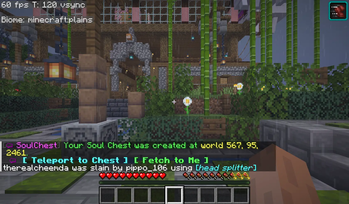
  • When a player dies, a protected soul chest is created automatically
  • The chest stores inventory contents, armor, off-hand items, and XP
  • Use /sc chests to open a GUI and manage all active soul chests
  • Players can teleport to, fetch, unlock, preview, or delete their chests
  • Holograms display chest information, death cause, and expiration time
  • Safe location detection prevents chests from spawning in void or lava
  • Permissions control chest limits and available features
  • Fully asynchronous database operations ensure zero TPS impact

📋 Commands

  • /sc chests → Open your soul chest GUI
  • /sc chests <player> → View another player's chests (admin)
  • /sc tp <id> → Teleport to a soul chest
  • /sc fetch <id> → Move a soul chest to your location
  • /sc unlock <id> → Unlock a soul chest
  • /sc delete <id> → Delete a soul chest
  • /sc toggle → Enable or disable soul chest spawning
  • /sc version → Show plugin version
  • /sc reload → Reload configuration
  • /sc admin delete <player> <id> → Delete a player's chest
  • /sc admin tp <player> <id> → Teleport to a player's chest
  • /sc admin view <player> <id> → Preview chest contents
  • /sc admin setlimit <player> <n> → Set a player's chest limit
  • /sc admin resetlimit <player> → Reset a player's chest limit

👥 Team & Contributors

trynafindbhumik
trynafindbhumikOwner

⚙️ Compatibility

Environment
🖥️ Server-side
Loaders
bukkitfoliapaperpurpurspigot
Minecraft Versions
1.211.21.11.21.21.21.31.21.41.21.51.21.61.21.7+7 more

🔗 Links

Modrinth Page