Logo
MINECRAFTBIBLE
Items
Items

All game items

Blocks
Blocks

Building blocks

Mobs
Mobs

Creatures & monsters

Biomes
Biomes

World biomes

Structures
Structures

Generated structures

Recipes
Recipes

Crafting guides

Advancements
Advancements

Achievements

Loot Tables
Loot Tables

Drop rates

Tags
Tags

Item groupings

All Versions
View all data →
Capes
Cape ArchiveNEW

Browse rare Minecon capes, OptiFine capes, and custom capes from players worldwide

Browse

Player Database
Player DatabasePopular

Search any player

Skin Browser
Skin Browser

Browse & download skins

Cape Gallery
Cape GalleryNEW

Minecon & OptiFine capes

Seed Vault
Seed Vault

Curated seeds

Learn

Guides
GuidesNew

Tutorials & tips

Blog
Blog

News & updates

Community

Community Hub
Community HubHub

Posts, discussions & more

All Versions
View community →
Seed Analyzer
Seed Analyzer

World seed analysis

Loot Explorer
Loot Explorer

Drop rates

Crafting Calculator
Crafting Calculator

Material planning

Enchant Calculator
Enchant Calculator

Probability math

Redstone Lab
Redstone Lab

Signal timing

Trading Profit
Trading Profit

Villager ROI

All Versions
View all tools →
Mods
Mods

Browse all mods

Plugins
Plugins

Server plugins

Resource Packs
Resource Packs

Textures & sounds

Shaders
Shaders

Visual enhancements

Datapacks
Datapacks

World logic

Scanner
Mod Intelligence

Scan & analyze any mod

All Versions
View all mods →
Loading...
IntroductionIntroductionVersion HistoryVersion HistoryGuidesGuidesBlog & NewsBlog & News
ItemsItemsBlocksBlocksMobsMobsRecipesRecipesBiomesBiomesStructuresStructuresAdvancementsAdvancementsLoot TablesLoot TablesTagsTags
ModsModsPluginsPluginsResource PacksResource PacksShadersShadersDatapacksDatapacks

MinecraftBible

The Ultimate Wiki

Logo
MINECRAFTBIBLE

The ultimate Minecraft reference. Every item, block, mob, and recipe documented with precision.

Community

  • Skin Browser
  • Cape Gallery
  • Seed Vault
  • Blog
  • Guides

Database

  • Items
  • Blocks
  • Mobs
  • Recipes
  • Biomes
  • Structures

Tools

  • Seed Analyzer
  • Mod Intelligence
  • Crafting Calculator
  • Enchant Calculator

Mods & Packs

  • Mods
  • Plugins
  • Resource Packs
  • Shaders
  • Datapacks

Site & Legal

  • About
  • Authors
  • Editorial Policy
  • Corrections
  • Contact
  • Privacy Policy
  • Terms of Service
  • DMCA
  • Sitemap

© 2026 MinecraftBible. Not affiliated with Mojang or Microsoft.

PrivacyTermsContact
Sophisticated Gamemodes
PluginLicenseRef-CTK-Minecraft-Creations

Sophisticated Gamemodes

This plugin remakes the way gamemodes work in Minecraft! Sophisticated Gamemodes makes it easier to control who can be in different gamemodes, and can also alert other admins when a player switches into another gamemode

45
Downloads
0
Followers
2 months ago
Updated
📦
2
Versions
utilitybukkitfabricpaperspigot
Download LatestvFb1.0.0View on Modrinth

📖About Sophisticated Gamemodes

Sophisticated Gamemodes

Logo
This plugin completely changes the way Gamemodes work in Minecraft, by adding simpler commands (/gm 1) instead of longer ones (/gamemode creative).

Main feature is Customisation, the plugin is fully customisable,

Config file (config.yml)
# Supports legacy color codes like &a, &c, &l, etc.
# Placeholders:
# %player% - player name
# %gamemode% - lowercase gamemode name
# %gamemode_display% - configured gamemode display name

messages:
  prefix: "&8[&aGM&8]&r "
  usage: "&cUsage: /gm <0|1|2|3|survival|creative|adventure|spectator|reload>"
  only-players: "&cOnly players can use this command."
  no-permission: "&cYou do not have permission to use that gamemode."
  changed: "&aYour gamemode was changed to &f%gamemode_display%&a."
  alert: "&e%player% &7changed gamemode to &f%gamemode_display%&7."
  reloaded: "&aSophisticatedGamemodes config reloaded."

permissions:
  survival: "sophisticatedgamemodes.use.survival"
  creative: "sophisticatedgamemodes.use.creative"
  adventure: "sophisticatedgamemodes.use.adventure"
  spectator: "sophisticatedgamemodes.use.spectator"
  alert: "sophisticatedgamemodes.alert"
  reload: "sophisticatedgamemodes.reload"

gamemode-display-names:
  survival: "&aSurvival"
  creative: "&bCreative"
  adventure: "&6Adventure"
  spectator: "&dSpectator"

settings:
  # If false, the player who changed gamemode will not see their own alert,
  # even if they have the alert permission.
  send-alert-to-self: false

When a player switches gamemodes, it gets announced to all admins who have the permission specified in config.yml
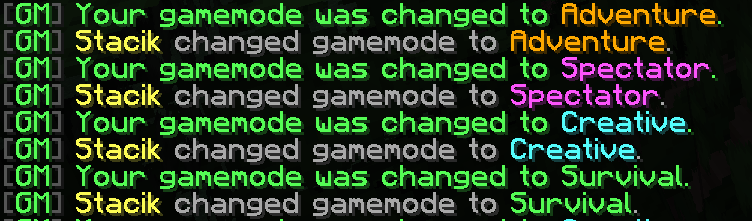
All gamemodes announcements

FAQ

Why would I ever use this?

It's more faster to type, has admin logs and also if you are using plugins like EssentialsX it will override their commands for you to have a better gamemode system

Just use Essentials!

It doesn't have that deep of customisation and alerts

Does it have Discord webhook support?

Not yet, but I will add it in the future

Is it bug free?

During testing, I didn't spot any bugs, but no project is perfect. If you spot a bug, please DM me on discord stacik_

Can you make it a mod for servers also?

That's also available on the Download page, even though its less maintaned it should work perfectly

Do I need to give any credit?

No, absolutely! You can give us credit though and we will appreciate it a lot, but you aren't required to credit us anywhere.

What is the license you're using

We use a custom license called CTK Minecraft Creations license, it allows personal and public use of our creations but doesn't allow reuploading and reselling our creations.

👥 Team & Contributors

stacik_
stacik_
Owner & Developer

⚙️ Compatibility

Environment
❓ Unknown
Loaders
bukkitfabricpaperspigot
Minecraft Versions
1.21.4

🔗 Links

Modrinth Page