Logo
MINECRAFTBIBLE
Items
Items

All game items

Blocks
Blocks

Building blocks

Mobs
Mobs

Creatures & monsters

Biomes
Biomes

World biomes

Structures
Structures

Generated structures

Recipes
Recipes

Crafting guides

Advancements
Advancements

Achievements

Loot Tables
Loot Tables

Drop rates

Tags
Tags

Item groupings

All Versions
View all data →
Capes
Cape ArchiveNEW

Browse rare Minecon capes, OptiFine capes, and custom capes from players worldwide

Browse

Player Database
Player DatabasePopular

Search any player

Skin Browser
Skin Browser

Browse & download skins

Cape Gallery
Cape GalleryNEW

Minecon & OptiFine capes

Seed Vault
Seed Vault

Curated seeds

Learn

Guides
GuidesNew

Tutorials & tips

Blog
Blog

News & updates

Community

Community Hub
Community HubHub

Posts, discussions & more

All Versions
View community →
Seed Analyzer
Seed Analyzer

World seed analysis

Loot Explorer
Loot Explorer

Drop rates

Crafting Calculator
Crafting Calculator

Material planning

Enchant Calculator
Enchant Calculator

Probability math

Redstone Lab
Redstone Lab

Signal timing

Trading Profit
Trading Profit

Villager ROI

All Versions
View all tools →
Mods
Mods

Browse all mods

Plugins
Plugins

Server plugins

Resource Packs
Resource Packs

Textures & sounds

Shaders
Shaders

Visual enhancements

Datapacks
Datapacks

World logic

Scanner
Mod Intelligence

Scan & analyze any mod

All Versions
View all mods →
Loading...
IntroductionIntroductionVersion HistoryVersion HistoryGuidesGuidesBlog & NewsBlog & News
ItemsItemsBlocksBlocksMobsMobsRecipesRecipesBiomesBiomesStructuresStructuresAdvancementsAdvancementsLoot TablesLoot TablesTagsTags
ModsModsPluginsPluginsResource PacksResource PacksShadersShadersDatapacksDatapacks

MinecraftBible

The Ultimate Wiki

Logo
MINECRAFTBIBLE

The ultimate Minecraft reference. Every item, block, mob, and recipe documented with precision.

Community

  • Player Database
  • Skin Browser
  • Cape Gallery
  • Community Hub
  • Seed Vault

Database

  • Items
  • Blocks
  • Mobs
  • Recipes
  • Biomes
  • Structures

Tools

  • Seed Analyzer
  • Mod Intelligence
  • Crafting Calculator
  • Enchant Calculator

Mods & Packs

  • Mods
  • Plugins
  • Resource Packs
  • Shaders
  • Datapacks

© 2026 MinecraftBible. Not affiliated with Mojang or Microsoft.

PrivacyTermsContact
Sneak Jump
PluginGPL-3.0-only

Sneak Jump

Adds a smooth and intuitive movement upgrade that lets players jump higher by holding SHIFT and jumping, with a fully configurable jump height.

57
Downloads
2
Followers
3 months ago
Updated
📦
2
Versions
adventuregame-mechanicsutilitybukkitpaperpurpurspigot
Download Latestv1.1.0View on Modrinth

📖About Sneak Jump

banner

youtubebutton-min discordbutton donatebutton curseforgebutton modrinthbutton

Overview

SneakJump adds enhanced jumping mechanics triggered by holding the SHIFT key.
The plugin calculates vertical velocity using an accurate simulation of Minecraft’s gravity and tick-based motion, ensuring consistent and predictable jump heights.
The jump height can be fully customized in the config, up to the maximum reliable limit of 61 blocks.

Features

  • Configurable jump height
  • Accurate physics-based calculation with gravity and velocity decay
  • Ability to enable or disable the plugin via config
  • Customizable messages and permissions
  • Works seamlessly on any server type, including RPG, PvP, and minigame setups
  • Provides controlled and predictable jump boosts for gameplay mechanics
Config
# Enable or disable SneakJump functionality
# Default: true
enabled: true
# Permission required to use sneak + jump
# Default: empty string, which means no permission required
permission: ""

# Minecraft gravity approximation used in jump calculation
# Default: 0.0882
gravity: 0.0882
# How many blocks high the player should jump when sneaking
# Default: 2, Maximum: 61 blocks (Minecraft limit, maybe I will fix it in the future...)
jump-height: 2
# Multiplier applied to vertical velocity each tick
# Default: 0.997
multiplier: 0.997
# Cooldown between jumps in milliseconds
# Default: 3000 milliseconds (3 seconds)
cooldown: 3000
# List of worlds where SneakJump is active
# Only players in these worlds will be able to sneak + jump
# Default: ["world", "world_nether", "world_the_end"]
allowed-worlds:
  - world
  - world_nether
  - world_the_end

# Cooldown message settings (ACTIONBAR, CHAT, SYSTEM, or nothing)
# Default: ACTIONBAR
cooldown-message-type: "ACTIONBAR"
cooldown-message: "§8[§aSneakJump§8] §fWait {cooldown} milliseconds before jumping again."
# Shows useful commands
# {0} replaces with a command label
# /sneakjump help
help-messages:
  - "§7=== §aSneakJump Commands §7==="
  - "§e/{0} help §8- §fShows this help message."
  - "§e/{0} reload §8- §fReloads the config."
# Reloads the config
# /sneakjump reload
reload-message: "§8[§aSneakJump§8] §fSuccessfully reloaded the config."

# Config version (do not modify)
version: 1

Permissions

sneakjump.jump - Allows the player to use the enhanced jump. Players without this permission will jump normally.

Commands

  • /sneakjump help - Displays all available commands.
  • /sneakjump reload - Reloads the plugin configuration.

bStats
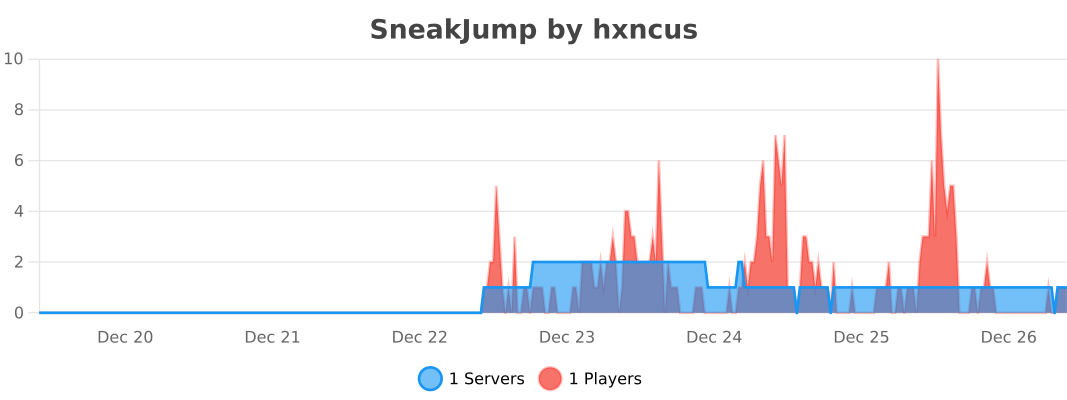

You can also take a look to my other plugins

sneakjump stonecutterdamage

👥 Team & Contributors

No authors recorded.

⚙️ Compatibility

Environment
🖥️ Server-side
Loaders
bukkitpaperpurpurspigot
Minecraft Versions
1.7.21.7.31.7.41.7.51.7.61.7.71.7.81.7.9+71 more

🔗 Links

Modrinth Page