Logo
MINECRAFTBIBLE
Items
Items

All game items

Blocks
Blocks

Building blocks

Mobs
Mobs

Creatures & monsters

Biomes
Biomes

World biomes

Structures
Structures

Generated structures

Recipes
Recipes

Crafting guides

Advancements
Advancements

Achievements

Loot Tables
Loot Tables

Drop rates

Tags
Tags

Item groupings

All Versions
View all data →
Capes
Cape ArchiveNEW

Browse rare Minecon capes, OptiFine capes, and custom capes from players worldwide

Browse

Player Database
Player DatabasePopular

Search any player

Skin Browser
Skin Browser

Browse & download skins

Cape Gallery
Cape GalleryNEW

Minecon & OptiFine capes

Seed Vault
Seed Vault

Curated seeds

Learn

Guides
GuidesNew

Tutorials & tips

Blog
Blog

News & updates

Community

Community Hub
Community HubHub

Posts, discussions & more

All Versions
View community →
Seed Analyzer
Seed Analyzer

World seed analysis

Loot Explorer
Loot Explorer

Drop rates

Crafting Calculator
Crafting Calculator

Material planning

Enchant Calculator
Enchant Calculator

Probability math

Redstone Lab
Redstone Lab

Signal timing

Trading Profit
Trading Profit

Villager ROI

All Versions
View all tools →
Mods
Mods

Browse all mods

Plugins
Plugins

Server plugins

Resource Packs
Resource Packs

Textures & sounds

Shaders
Shaders

Visual enhancements

Datapacks
Datapacks

World logic

Scanner
Mod Intelligence

Scan & analyze any mod

All Versions
View all mods →
Loading...
IntroductionIntroductionVersion HistoryVersion HistoryGuidesGuidesBlog & NewsBlog & News
ItemsItemsBlocksBlocksMobsMobsRecipesRecipesBiomesBiomesStructuresStructuresAdvancementsAdvancementsLoot TablesLoot TablesTagsTags
ModsModsPluginsPluginsResource PacksResource PacksShadersShadersDatapacksDatapacks

MinecraftBible

The Ultimate Wiki

Logo
MINECRAFTBIBLE

The ultimate Minecraft reference. Every item, block, mob, and recipe documented with precision.

Community

  • Skin Browser
  • Cape Gallery
  • Seed Vault
  • Blog
  • Guides

Database

  • Items
  • Blocks
  • Mobs
  • Recipes
  • Biomes
  • Structures

Tools

  • Seed Analyzer
  • Mod Intelligence
  • Crafting Calculator
  • Enchant Calculator

Mods & Packs

  • Mods
  • Plugins
  • Resource Packs
  • Shaders
  • Datapacks

Site & Legal

  • About
  • Authors
  • Editorial Policy
  • Corrections
  • Contact
  • Privacy Policy
  • Terms of Service
  • DMCA
  • Sitemap

© 2026 MinecraftBible. Not affiliated with Mojang or Microsoft.

PrivacyTermsContact
SMP Essentials plugin
PluginLicenseRef-All-Rights-Reserved

SMP Essentials plugin

SMP Essentials is an all-in-one Paper plugin for managing SMP servers with GUI controls, item/recipe/enchant restrictions, safe start tools, PvP protection, world access toggles, and configurable border events.

45
Downloads
0
Followers
3 weeks ago
Updated
📦
4
Versions
managementtechnologyutilitypaperspigot
Download Latestv1.0.0View on Modrinth

📖About SMP Essentials plugin

✨ SMP Essentials

SMP Essentials is a powerful all-in-one Minecraft Paper plugin made for server owners who want full control over their SMP without needing tons of separate plugins.
It gives you clean GUI menus, configurable gameplay restrictions, SMP start tools, PvP protection, world border systems, item limits, cooldowns, enchant controls, and end-game event tools in one polished package.


✅ Built For SMP Servers

SMP Essentials is designed to help owners create a balanced, fair, and easy-to-manage SMP experience.

Whether you are starting a private SMP, public survival server, event SMP, lifesteal-style server, or competitive end-game SMP, this plugin gives you the tools to control the most important gameplay rules directly from config or in-game GUI.


🖥️ Premium In-Game GUI

Use:

/smp menu

to open the main SMP Essentials control panel.

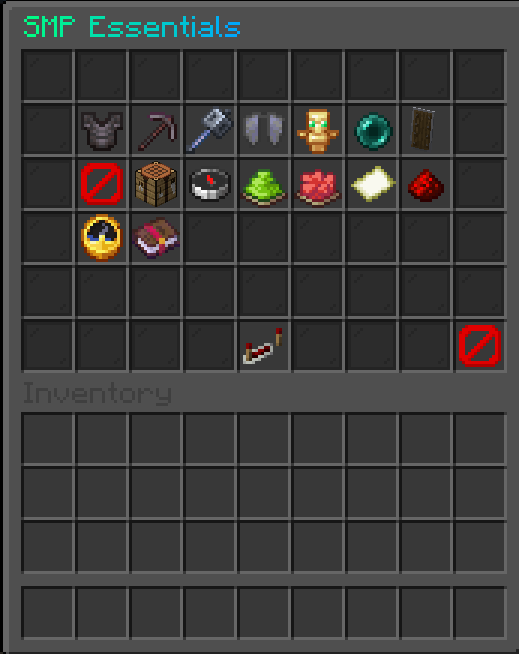
The GUI includes:

  • ✅ Clean 54-slot layout
  • ✅ Glass pane styling
  • ✅ No italic item names or lore
  • ✅ Clear status indicators
  • ✅ Green/red toggle states
  • ✅ Confirmation menus for dangerous actions
  • ✅ Fast admin control without editing files every time

You can toggle major SMP rules directly in-game.


🚫 Item Restrictions

SMP Essentials can block common overpowered SMP items and gear.

You can toggle:

  • 🛡️ Netherite armor
  • ⚔️ Netherite tools
  • 🔨 Mace usage and crafting
  • 🪽 Elytra usage
  • 💀 Totems of Undying
  • 🟣 Ender pearls
  • 🛡️ Shields
  • 🚧 Custom blocked items

Blocked items can be prevented from:

  • being used
  • being equipped
  • being picked up
  • being moved in inventories
  • being stored in bundles/shulkers
  • being used from offhand
  • being used by dispensers
  • staying in player inventories

Strict protection can automatically remove blocked items from players.


🧰 Recipe Blocking

You can block crafting outputs by material.

Examples:

/smp blockrecipe MACE
/smp blockrecipe ELYTRA
/smp unblockrecipe MACE

The plugin blocks:

  • crafting table results
  • crafter block recipes
  • smithing results
  • stonecutter-style result taking
  • furnace-like smelting results
  • inventory result exploits

This helps prevent players from bypassing restrictions through automation.


✨ Enchant Controls

SMP Essentials lets you block enchantments from a specific level upward.

Examples:

/smp blockenchant SHARPNESS 5
/smp blockenchant PROTECTION 4
/smp unblockenchant SHARPNESS

This means:

  • Sharpness IV can still be allowed
  • Sharpness V can be blocked
  • Protection III can still be allowed
  • Protection IV can be blocked

Blocked enchant levels are downgraded or prevented from:

  • existing player inventories
  • enchanted books
  • bundles
  • shulkers
  • anvil results
  • enchantment table offers
  • picked-up items

Perfect for SMPs that want strong gear progression without letting players become unkillable.


⏱️ Item Limits And Cooldowns

You can set global item limits and cooldowns.

Examples:

/smp limit ENDER_PEARL 16
/smp cooldown ENDER_PEARL 10
/smp limit TOTEM_OF_UNDYING 1

Useful for balancing:

  • ender pearls
  • golden apples
  • totems
  • potions
  • bows
  • any other material

Limits also check inside bundles and shulkers.


🚀 SMP Ready System

Use:

/smp ready

to prepare your SMP before launch.

It can:

  • find a safe spawn location
  • avoid unsafe areas
  • avoid water-heavy ready zones
  • teleport all online players
  • set the world border to a small ready size
  • heal players
  • feed players
  • clear potion effects
  • set players to survival
  • disable PvP before launch

Default ready border size:

16 blocks

This is perfect for organized SMP openings.


🟢 SMP Start System

Use:

/smp start

to officially start the SMP.

It can:

  • smoothly expand the world border
  • enable PvP after a protection timer
  • show a bossbar countdown
  • give starter items
  • broadcast launch messages

Default settings:

Ready border: 16
Final border: 5000
Expansion time: 300 seconds
PvP protection: 120 seconds

The border uses vanilla smooth animation for a clean launch experience.


🟥 End Event System

Use:

/smp end

to start the final border event.

The end event can:

  • shrink the border over time
  • show bossbar progress
  • show actionbar updates
  • search for a low-water final arena
  • shrink in phases

Example phased shrink:

100 → 80 → 60 → 40 → 20

You can also stop the active end border event:

/smp end stop

This freezes the current border size and cancels the event task.


🌍 Nether And End Access Control

SMP Essentials can control access to dimensions.

You can enable or disable:

  • Nether portals
  • End portals

The protection covers multiple bypass cases, including:

  • normal portal entry
  • ender pearl portal tricks
  • boats entering portals
  • minecarts entering portals
  • teleport attempts into disabled dimensions

This is useful for servers that want to unlock dimensions later in the season.


🧭 Border Commands

Admins can control the world border directly:

/smp border set <size>
/smp border center <x> <z>
/smp border expand <size> <seconds>
/smp border shrink <size> <seconds>

Great for events, SMP launches, world progression, and final fights.


🔐 Permissions

Main permissions:

smpessentials.admin
smpessentials.menu
smpessentials.reload
smpessentials.bypass.items
smpessentials.bypass.crafting
smpessentials.bypass.elytra
smpessentials.bypass.totem
smpessentials.bypass.pearls
smpessentials.bypass.shield
smpessentials.bypass.limits
smpessentials.bypass.enchants

By default, admin permissions are intended for operators.


⚙️ Fully Configurable

Almost everything can be edited in config.yml, including:

  • GUI title
  • GUI filler material
  • messages
  • prefix
  • blocked item groups
  • custom blocked items
  • custom blocked recipes
  • enchant restrictions
  • item limits
  • item cooldowns
  • PvP protection time
  • SMP ready settings
  • SMP start settings
  • end border event settings
  • Nether and End access
  • world border defaults

Messages support MiniMessage formatting.


📦 Commands Overview

/smp menu
/smp reload
/smp ready
/smp start
/smp end
/smp end stop
/smp border set <size>
/smp border center <x> <z>
/smp border expand <size> <seconds>
/smp border shrink <size> <seconds>
/smp blockitem <material>
/smp unblockitem <material>
/smp blockrecipe <material>
/smp unblockrecipe <material>
/smp blockenchant <enchant> <min-level>
/smp unblockenchant <enchant>
/smp limit <material> <amount|off>
/smp cooldown <material> <seconds|off>
/smp list blockeditems
/smp list blockedrecipes
/smp help

Aliases:

/smpessentials
/smputils

🧩 Requirements

  • Minecraft Paper 1.21.x
  • Java 21
  • Server-side plugin only

This is a Paper plugin, not a Fabric mod.


👑 Made For Server Owners

SMP Essentials is made for owners who want simple but powerful control over their SMP season.

Instead of installing many small plugins for borders, restrictions, launch control, PvP protection, recipe blocking, and event management, SMP Essentials puts the most important SMP tools into one clean system.


📜 License

ARR / All Rights Reserved
Created by Duuchniuk

👥 Team & Contributors

Duuchniuk
DuuchniukOwner

⚙️ Compatibility

Environment
🖥️ Server-side
Loaders
paperspigot
Minecraft Versions
26.126.1.126.1.226.2

🔗 Links

Modrinth Page