Logo
MINECRAFTBIBLE
Items
Items

All game items

Blocks
Blocks

Building blocks

Mobs
Mobs

Creatures & monsters

Biomes
Biomes

World biomes

Structures
Structures

Generated structures

Recipes
Recipes

Crafting guides

Advancements
Advancements

Achievements

Loot Tables
Loot Tables

Drop rates

Tags
Tags

Item groupings

All Versions
View all data →
Capes
Cape ArchiveNEW

Browse rare Minecon capes, OptiFine capes, and custom capes from players worldwide

Browse

Player Database
Player DatabasePopular

Search any player

Skin Browser
Skin Browser

Browse & download skins

Cape Gallery
Cape GalleryNEW

Minecon & OptiFine capes

Seed Vault
Seed Vault

Curated seeds

Learn

Guides
GuidesNew

Tutorials & tips

Blog
Blog

News & updates

Community

Community Hub
Community HubHub

Posts, discussions & more

All Versions
View community →
Seed Analyzer
Seed Analyzer

World seed analysis

Loot Explorer
Loot Explorer

Drop rates

Crafting Calculator
Crafting Calculator

Material planning

Enchant Calculator
Enchant Calculator

Probability math

Redstone Lab
Redstone Lab

Signal timing

Trading Profit
Trading Profit

Villager ROI

All Versions
View all tools →
Mods
Mods

Browse all mods

Plugins
Plugins

Server plugins

Resource Packs
Resource Packs

Textures & sounds

Shaders
Shaders

Visual enhancements

Datapacks
Datapacks

World logic

Scanner
Mod Intelligence

Scan & analyze any mod

All Versions
View all mods →
Loading...
IntroductionIntroductionVersion HistoryVersion HistoryGuidesGuidesBlog & NewsBlog & News
ItemsItemsBlocksBlocksMobsMobsRecipesRecipesBiomesBiomesStructuresStructuresAdvancementsAdvancementsLoot TablesLoot TablesTagsTags
ModsModsPluginsPluginsResource PacksResource PacksShadersShadersDatapacksDatapacks

MinecraftBible

The Ultimate Wiki

Logo
MINECRAFTBIBLE

The ultimate Minecraft reference. Every item, block, mob, and recipe documented with precision.

Community

  • Skin Browser
  • Cape Gallery
  • Seed Vault
  • Blog
  • Guides

Database

  • Items
  • Blocks
  • Mobs
  • Recipes
  • Biomes
  • Structures

Tools

  • Seed Analyzer
  • Mod Intelligence
  • Crafting Calculator
  • Enchant Calculator

Mods & Packs

  • Mods
  • Plugins
  • Resource Packs
  • Shaders
  • Datapacks

Site & Legal

  • About
  • Authors
  • Editorial Policy
  • Corrections
  • Contact
  • Privacy Policy
  • Terms of Service
  • DMCA
  • Sitemap

© 2026 MinecraftBible. Not affiliated with Mojang or Microsoft.

PrivacyTermsContact
SmartWithdraw
PluginMIT

SmartWithdraw

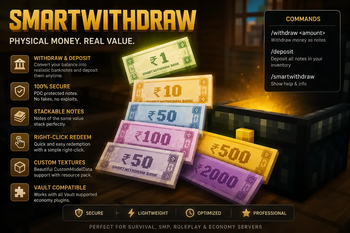
SmartWithdraw is a lightweight Vault-integrated Minecraft economy plugin that allows players to convert virtual money into physical banknotes and redeem them back into their account.

11
Downloads
1
Followers
1 months ago
Updated
📦
1
Versions
economymanagementutilitypaperspigot
Download Latestv1.0.0View on Modrinth

📖About SmartWithdraw

💰 SmartWithdraw

A secure, lightweight, and modern physical currency system for Minecraft servers.

SmartWithdraw allows players to convert their Vault economy balance into physical banknotes that can be traded, stored, gifted, and redeemed at any time. Notes are protected using Persistent Data Containers (PDC), support custom resource-pack textures, and integrate seamlessly with any Vault-compatible economy plugin.


✨ Features

✔ Withdraw money into physical currency notes

✔ Deposit notes back into your balance

✔ Right-click note redemption

✔ Stackable banknotes

✔ Secure PDC-based note validation

✔ Vault economy support

✔ CustomModelData texture support

✔ Resource pack integration

✔ Lightweight and optimized

✔ No database required

✔ Works on Paper, Spigot, and Purpur

✔ Supports Minecraft 1.21.x


📦 Supported Denominations

SmartWithdraw automatically converts withdrawn money into the following note values:

  • ₹1 Note
  • ₹10 Note
  • ₹50 Note
  • ₹100 Note
  • ₹500 Note
  • ₹2000 Note

🎮 Commands

Withdraw Currency

Convert money from your balance into physical banknotes.

/withdraw <amount>

Example:

/withdraw 500

Deposit Notes

Deposit all SmartWithdraw notes from your inventory back into your account.

/deposit

Help Menu

Display plugin information and supported note values.

/smartwithdraw
/sw help
/smartwithdraw help

🔒 Security

SmartWithdraw uses Minecraft Persistent Data Containers (PDC) to verify every authentic banknote.

Each note contains secure metadata that cannot be replicated simply by renaming paper or editing item lore.

Protected Against

✔ Fake lore notes

✔ Renamed paper exploits

✔ Item spoofing

✔ Manual lore editing

Only genuine SmartWithdraw notes can be redeemed or deposited.


🎨 Resource Pack Support

SmartWithdraw supports fully custom banknote textures using Minecraft's CustomModelData system.

Supported textures:

  • note_1.png
  • note_10.png
  • note_50.png
  • note_100.png
  • note_500.png
  • note_2000.png

Server owners may use the included default resource pack or replace it with their own custom pack at any time.

Future updates may also include redesigned and more aesthetically detailed banknote textures.


📦 Default Resource Pack

The default SmartWithdraw resource pack is available below.

Download

https://download.mc-packs.net/pack/563df5e7d4583062832f7d1d3e716580f04d5511.zip

Automatic Installation

To automatically send the resource pack to players when they join your server, add the following lines to your server.properties file.

resource-pack=https://download.mc-packs.net/pack/563df5e7d4583062832f7d1d3e716580f04d5511.zip
resource-pack-sha1=563df5e7d4583062832f7d1d3e716580f04d5511

Players will automatically download and apply the SmartWithdraw banknote textures when joining your server.


⚙ Dependencies

Required

Vault

Download Vault:

https://www.curseforge.com/minecraft/bukkit-plugins/vault


Compatible Economy Plugins

SmartWithdraw works with any Vault-compatible economy plugin, including:

  • EssentialsX Economy
  • CMI Economy
  • XConomy
  • EzEconomy
  • JustAnEconomy

or any other economy plugin that supports Vault.


🖥 Supported Server Software

  • Paper
  • Purpur
  • Spigot

Minecraft Versions

  • 1.21.x
  • 1.26.x

📥 Installation

  1. Install Vault.
  2. Install a Vault-compatible economy plugin.
  3. Place SmartWithdraw.jar inside your plugins folder.
  4. Start or restart your server.
  5. (Optional) Configure the included resource pack.
  6. Enjoy realistic physical currency on your server.

📖 Example

Player Balance

₹10,000

Withdraw

/withdraw 2500

SmartWithdraw automatically creates

₹2000 Note ×1
₹500 Note ×1

Players can then:

  • Trade notes with other players
  • Store notes inside chests
  • Gift money physically
  • Redeem notes instantly using right-click
  • Deposit all notes using /deposit

🚀 Perfect For

  • Survival Servers
  • Economy Servers
  • SMPs
  • Towny Servers
  • Nations Servers
  • Roleplay Servers
  • Marketplace Servers
  • Community Servers

❤️ Support

If you enjoy SmartWithdraw, consider leaving a ⭐ on the project page and sharing it with your community. Feedback, bug reports, and feature suggestions are always welcome and help improve future updates.


💰 SmartWithdraw

Turn virtual money into secure, tradeable physical banknotes for your Minecraft server.

👥 Team & Contributors

_arcaneofficial
_arcaneofficialOwner

⚙️ Compatibility

Environment
🖥️ Server-side
Loaders
paperspigot
Minecraft Versions
1.211.21.11.21.21.21.31.21.41.21.51.21.61.21.7+7 more

🔗 Links

Modrinth Page