

SmartChat
A performance-focused chat suite for Paper featuring proximity-based channels, interactive item linking, and localized 3D chat bubbles.
📖About SmartChat
SmartChat
SmartChat is a modern communication framework for Minecraft servers that prioritizes immersion and performance. It replaces the traditional global chat model with a localized proximity system, supplemented by specialized channels and deep NBT-based interactivity.
Core Features
Immersive Proximity & Bubbles
By default, player communication is limited to a configurable radius, reducing global noise and encouraging organic interaction.
- 3D Chat Bubbles: Messages are rendered as
TextDisplayentities above the speaker's head. - Intelligent Tracking: Bubbles follow player movement in real-time and automatically clean up upon logout.
- Spatial Logic: Includes a "no listeners" notification if you speak and no one is within range to hear you.
Deep Interactivity
SmartChat utilizes the Adventure API to provide a rich, hover-sensitive interface without the use of clunky legacy formatting.
- NBT Item Linking: Use the
[item]tag to share your gear. Hovering reveals full enchantments, lore, and NBT data. - Player Stat Cards: Hovering over a username or
@mentiondisplays real-time health, ping, and total playtime. - Secure URL Links: Links are identified and formatted with custom aqua styling and security-conscious hover warnings.
Advanced Social Framework
- Invite-Only Parties: A formal invite/accept/deny workflow prevents unsolicited group additions.
- Persistence: SQLite-backed ignore lists and mail ensure that social preferences and messages survive server restarts.
- Offline Mail: Direct messages sent to offline players trigger a notification the moment they return to the server.
Moderation & Administrative Tools
- Heuristic Spam Blocking: Uses Levenshtein distance calculations to prevent repetitive messaging and "simulated" spam.
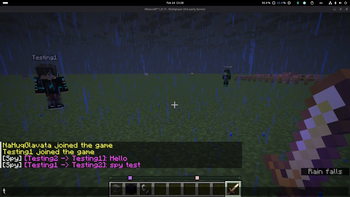
- Staff Spy: Admins can monitor private whispers and party chats with a formatted
[Sender -> Receiver]header. - Smart Filtering: Includes auto-caps correction and regex-supported profanity filtering.
Command Reference
General Communication
| Command | Usage | Description |
|---|---|---|
/s |
/s |
Switch your active channel to Proximity Chat. |
/g |
/g [message] |
Toggle Global Chat or send a single global message. |
/t |
/t [message] |
Toggle Trade Chat or send a single trade message. |
/w |
/w <player> <msg> |
Send a private whisper or Offline Mail. |
/r |
/r <message> |
Quick-reply to the last person who whispered you. |
/mail |
/mail |
Read and clear your stored offline messages. |
/mention |
/mention toggle |
Enable or disable mention sound notifications. |
Social & Management
| Command | Usage | Description |
|---|---|---|
/pinv |
/pinv <player> |
Send a party invite to a specific player. |
/p |
/p accept |
Join a party you have been invited to. |
/p |
/p deny |
Decline a pending party invitation. |
/p |
/p <message> |
Send a message to your current party. |
/pleave |
/pleave |
Leave your current party or disband it if leader. |
/ignore |
/ignore <player> |
Block all chat, mentions, and whispers from a user. |
/unignore |
/unignore <p> |
Restore communication with a previously blocked user. |
Staff & Admin
| Command | Usage | Permission |
|---|---|---|
/chat spy |
/chat spy |
Toggle visibility of private whispers and party chats. |
/chat help |
/chat help |
View the in-game command directory. |
Configuration & Permissions
SmartChat is designed to be "plug-and-play." Upon first run, a config.yml will be generated allowing you to customize chat radiuses, prefix colors, and cooldown timers.
Key Permissions:
smartchat.spy— Required for Admin Spy mode.smartchat.global— Access to the Global channel.smartchat.trade— Access to the Trade channel.smartchat.bypass— Bypasses all chat filters, cooldowns, and spam blocks.
🛠 Support & Bug Reports
Found a bug or need help setting up the plugin?
Report issues directly on Discord.
