

PluginLicenseRef-All-Rights-Reserved
SMail
Turn any barrel into a real, in-world mailbox with its own address. Send packages to anyone on the server, manage visitor access, and let mail arrive with sound and particles.
23
Downloads
1
Followers
2 months ago
Updated
📦
1
Versions
📖About SMail
SMail — Physical Mailbox System for Paper
SMail turns a humble barrel into a real, in-world mailbox. Place one down, claim your own postal address, and start receiving packages from anywhere on the server. No commands required, no GUIs to memorize — just walk up to a mailbox and send.
Built for Paper 1.21.1.
✨ Features
- Physical mailboxes. Craft a custom mailbox item, place it as a barrel, and it becomes a registered post point with its own address.
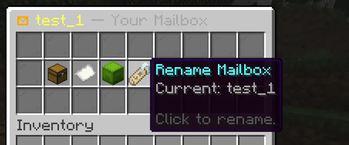
- Custom addresses. Every mailbox has a unique, player-chosen address (Latin / Cyrillic / digits supported). Rename it any time.
- Send items to any address. Open someone's mailbox to deliver a package — or send from your own mailbox by address.
- Public / Private toggle. Decide whether anyone can deliver to you, or only you can use your mailbox.
- Member access. Invite trusted players to read your inbox without giving them full ownership.
- Delivery cost. Optional configurable cost item (default: one Deepslate Diamond Ore per delivery) to give mail real weight on your economy.
- Animated arrivals. Sounds and particles fire on every mailbox the moment new mail lands.
- SQLite persistence. All mailboxes, addresses, members, and contents are saved server-side. Nothing lives in chunks — break the barrel, the mailbox is gone; place it back, it's still yours.
- Custom recipe. A configurable crafting recipe for the mailbox item, toggleable in config.
- Fully translatable. All player-facing text lives in
messages.ymlwith full MiniMessage formatting.
📦 How it works
- Get a mailbox — craft one with the configured recipe, or run
/smail give <player>as admin. - Place it down — right-click any barrel placement; you'll be assigned a fresh address (or you can rename it).
- Send mail — right-click anyone's mailbox to open the visitor menu and put items into the Send GUI. Hit confirm; the recipient gets a notification.
- Receive mail — right-click your own mailbox to open your inbox.
- Manage — toggle public/private, rename, add members, or delete the mailbox from the owner menu.
🛠 Commands
| Command | Permission | Description |
|---|---|---|
/smail reload |
smail.admin |
Reload config and messages |
/smail give <player> |
smail.admin |
Give the mailbox item to a player |
/smail inspect <address> |
smail.admin |
Inspect a mailbox by address |
🔑 Permissions
| Node | Default | Description |
|---|---|---|
smail.use |
true | Open and interact with mailboxes |
smail.create |
true | Craft and place mailboxes |
smail.send |
true | Send mail to other mailboxes |
smail.rename |
true | Rename your own mailboxes |
smail.admin |
op | Full admin access |
⚙️ Configuration
Everything is configurable in config.yml:
- Default mailbox inventory size (9 – 54)
- Maximum mailboxes per player
- Maximum members per mailbox
- Delivery delay (in ticks)
- Delivery cost item & amount
- Sounds & particles toggles
- Recipe toggle
All messages can be edited in messages.yml using MiniMessage formatting — full colors, gradients, hover and click events supported.
📥 Installation
- Download the latest
SMail.jarfrom the Files tab. - Drop it into your server's
plugins/folder. - Restart the server (Paper 1.21.1 required).
- Open the generated
plugins/SMail/config.ymland tune to taste. /smail reloadafter any edits.