

SkripyTpa
A high-performance teleportation suite designed with aesthetic configs.
📖About SkripyTpa
SkripeTpa is a high-performance, feature-rich teleportation suite designed for modern Minecraft servers. Unlike basic TPA plugins, SkripeTpa features:
• Full Hex/Gradient Support: Every message, title, and action bar can be customized with professional colors.
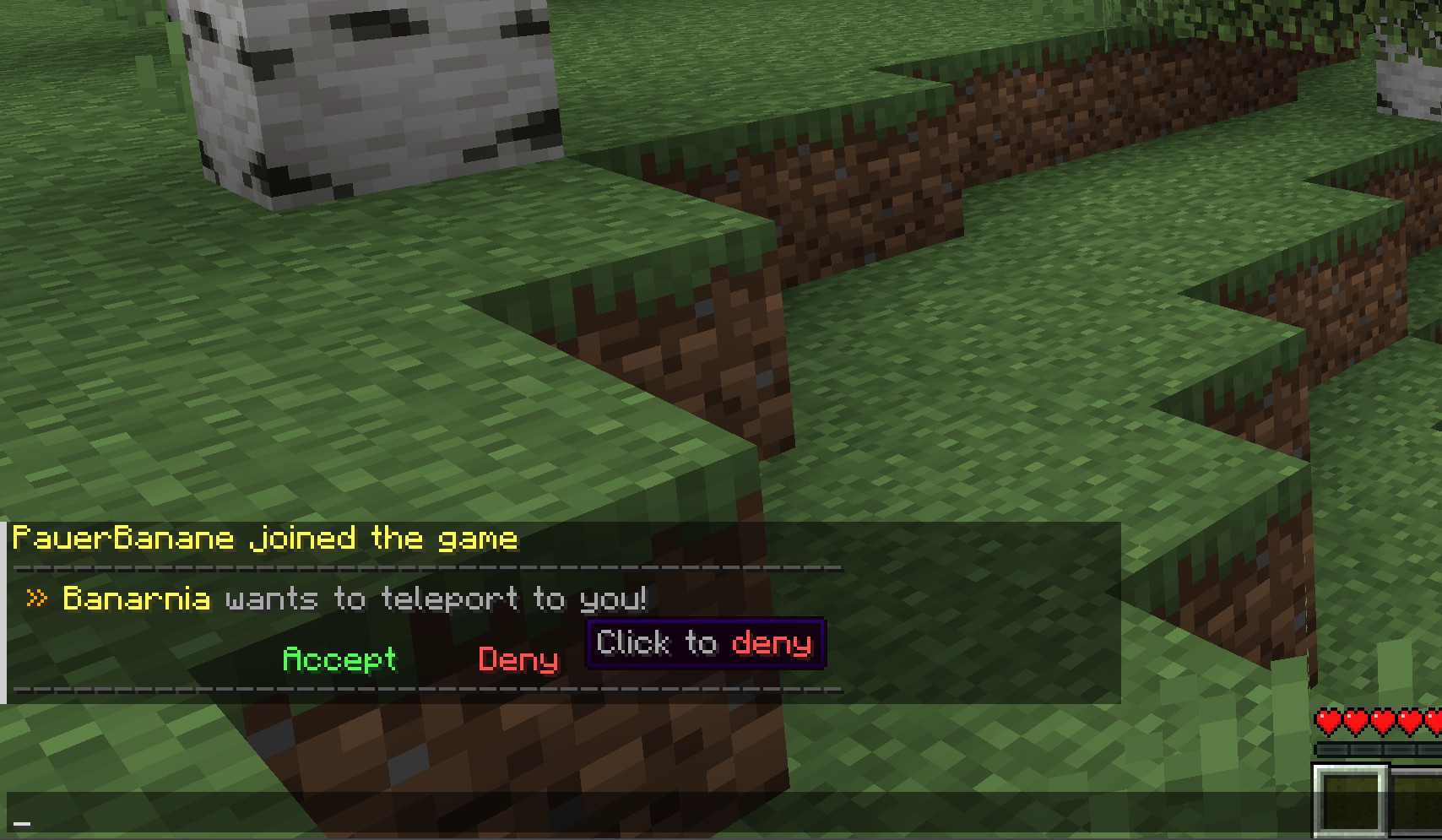
• Interactive Chat: Players receive clickable [ACCEPT] and [DENY] buttons in chat for lightning-fast responses.
• GUI System: A custom "Player Head" menu allows users to manage multiple pending requests visually.
• Advanced Movement Logic: Intelligent teleportation countdowns that detect movement to prevent "combat-logging" or unfair escapes.
• Admin Tools: Includes silent force-teleports (/tpo), pulling players (/tpohere), and global teleports (/tpaall).
• Configuration Power: 100% of sounds, messages, titles, and delays are controlled via a single config.yml.
PLAYER COMMANDS
/tpa
Description: Request to teleport to another player.
Usage: /tpa [Username]
Note: Sends a premium notification to the target player with clickable buttons.
/tpahere
Description: Request another player to teleport to your location.
Usage: /tpahere [Username]
Note: Great for bringing friends to your base or coordinates.
/tpaccept
Description: Accept a pending teleport request.
Usage: /tpaccept
Note: Starts a 3-second stabilization period. Do not move during this time!
/tpdeny
Description: Decline a pending teleport request.
Usage: /tpdeny
Note: Instantly clears the request and notifies the sender.
/tpcancel
Description: Cancel a request you have sent to someone else.
Usage: /tpcancel
Note: Useful if you sent a request by mistake or the player is AFK.
/tpatoggle
Description: Turn your incoming teleport requests on or off.
Usage: /tpatoggle
Note: Perfect for preventing interruptions during boss fights or building.
/rtp
Description: Teleport to a random safe location in the wilderness.
Usage: /rtp
Note: Scans the map for a safe spot to ensure you don't land in lava or walls.
/back
Description: Return to your last location or death point.
Usage: /back
Note: A life-saving command for retrieving items or returning to work.
/tpaui
Description: Open the visual "Dimensional Queue" menu.
Usage: /tpaui
Note: A custom GUI where you can manage all pending requests with a single click.
- Left-Click a head to Accept.
- Right-Click a head to Delete.